Monitoring results and metrics
After running the Kale pipeline, you can monitor its progress and review the results in the OpenShift AI Pipelines UI.
-
You compiled and submitted the pipeline as described in Compiling and running the pipeline.
-
In the OpenShift AI dashboard, navigate to your project and click the Pipelines tab.
-
Click on the
fraud-detection-kalepipeline and then click View runs. -
Click on your run to view the pipeline execution progress. Each step shows its status (pending, running, succeeded, or failed).
-
Click on individual steps to view their logs. For example:
-
get_data — shows the dataset download progress and row counts.
-
train — shows the Keras training output with loss and accuracy per epoch.
-
evaluate — shows the accuracy, precision, and recall metrics.
-
-
Review the pipeline metrics. The
pipeline-metricscell prints accuracy, precision, and recall values. These metrics appear in the KFP run details:-
Accuracy — overall prediction accuracy on the test set
-
Precision — proportion of predicted frauds that are actual frauds
-
Recall — proportion of actual frauds that are detected
-
-
Verify the model upload. Use an S3 client to list the bucket contents and confirm that
models/fraud/1/model.onnxexists. If you changed thes3_model_keyparameter, check that path instead. -
Optionally, download the trained model from the pipeline artifacts:
-
In the run graph, locate the
model_output_artifactproduced by the train step and passed to the evaluate step. Select the artifact to view its details and artifact URI.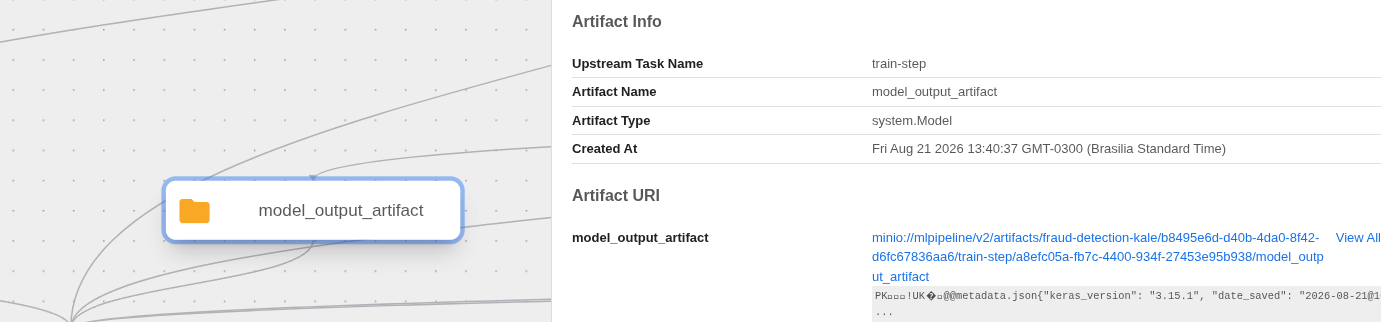
-
Use an S3 client with access to the pipeline artifact storage to download the object identified by the artifact URI. The pipeline artifact storage can differ from your
My Storageconnection. Save the downloaded model asmodel.keras. -
In a Python environment with the same Keras version and backend as the pipeline, load the model:
from keras.models import load_model

model = load_model("model.keras", compile=False)
Only load model artifacts from a trusted source. Kale serializes this notebook’s trained Keras model in Keras format, so use load_model, not pickle or joblib. This artifact is not the ONNX file created by evaluate and uploaded by upload. Downloading it does not require the explicit upload step to succeed, but the pipeline still uses artifact storage. For inference, apply the same feature selection and fittedStandardScalerused by the notebook; the model artifact does not include the scaler.
-
-
All 5 pipeline steps show a succeeded status.
-
The pipeline metrics (accuracy, precision, recall) are visible in the run details.
-
The
models/fraud/1/model.onnxfile is in your S3 bucket.
-
Distribute model training, as described in Distributing training jobs.