Phase 8: External Models (Optional)
This phase is NOT compatible with disconnected/air-gapped environments. External models require internet access to reach third-party APIs (OpenAI, Bedrock, Gemini, Anthropic, Azure OpenAI). If you are running in disconnected mode, skip this phase entirely.
The ExternalModel CRD lets you expose third-party LLM APIs (OpenAI, AWS Bedrock, Google Gemini, Anthropic, Azure OpenAI, etc.) through the MaaS gateway. External models get the same API key management, authentication, rate limiting, and usage tracking as locally-served models - your consumers use a single gateway endpoint regardless of where the model runs.
All file paths and oc apply commands in this guide are relative to the CAI-Field-Manual-MaaS repository root. Make sure you have cloned it and are working from its root directory (see Getting Started).
How It Works
An external model deployment requires six resources:
Secret - stores the provider API key. Must have the label
inference.llm-d.ai/ipp-managed=trueso the payload-processing ext-proc can inject the credential into upstream requests.ExternalProvider - defines the provider endpoint and authentication configuration (API type, secret reference).
ExternalModel - references the provider and maps the model with routing config (
apiFormat,path,targetModel). The BBR (Backend Binding Resolver) handles path rewriting and authentication header injection.MaaSModelRef - registers the external model in the MaaS catalog so it appears in the API and can be governed.
MaaSAuthPolicy - grants access to specific users or groups.
MaaSSubscription - sets rate limits (tokens per hour) and priority.
An external model deployment requires five resources:
Secret - stores the provider API key. Must have the label
inference.networking.k8s.io/bbr-managed=trueso the BBR ext-proc can inject the credential into upstream requests.ExternalModel - defines the provider, target model, endpoint, and credential reference. The BBR (Backend Binding Resolver) handles path rewriting and authentication header injection.
MaaSModelRef - registers the external model in the MaaS catalog so it appears in the API and can be governed.
MaaSAuthPolicy - grants access to specific users or groups.
MaaSSubscription - sets rate limits (tokens per hour) and priority.
Step 1: Create the Namespace and Secret
The external models live in their own namespace, separate from the MaaS platform and local models:
The namespace manifest includes the maas.opendatahub.io/gateway-access=true label, which is required for the Gateway to accept HTTPRoutes from this namespace. If you create the namespace manually instead of using the manifest, remember to apply this label: oc label namespace external-models maas.opendatahub.io/gateway-access=true --overwrite
Create the provider credential Secret. This is done imperatively (never stored in manifests):
The inference.llm-d.ai/ipp-managed=true label is required. Without it, the payload-processing ext-proc will not inject the API key and inference will fail with a 500 “credentials not found” error.
The inference.networking.k8s.io/bbr-managed=true label is required. Without it, the BBR ext-proc will not inject the API key and the provider will reject calls with 401.
Step 2: Apply the External Model Resources
Apply the model definition resources. The CRD structure changed between RHOAI versions:
This creates two resources - the ExternalProvider and ExternalModel:
This creates the ExternalModel resource:
Step 3: Apply MaaS Governance
This creates three resources:
MaaSModelRef- registersgpt-4o-miniin the MaaS catalogMaaSAuthPolicy- grants all authenticated users accessMaaSSubscription- sets a free tier with 10,000 tokens/hour rate limit
Verification
Check the MaaSModelRef reaches Ready:
Check the model appears in the MaaS API:
Create an API key and test inference:
A successful response contains a choices array with the model’s reply.
External models use the plain model name (e.g., gpt-4o-mini) as the model field, unlike local models which require the canonical publishers/{namespace}/models/{model-name} format. You can always check the correct model ID with the /v1/models endpoint.
Automated Setup
The setup script handles all of the above in a single command:
The --external-model-provider flag selects which provider manifests to deploy (openai, gemini, bedrock, anthropic, or azure-openai; default: openai).
Dashboard UI (Technology Preview)
The External models tab in the RHOAI Dashboard is a Technology Preview feature in RHOAI 3.5. Technology Preview features are not supported with Red Hat production service level agreements (SLAs) and might not be functionally complete. The CLI workflow documented above (Steps 1-3) is the fully supported (GA) method for managing external models.
The Dashboard provides an admin-only view of external models deployed through the CLI. This tab is enabled by the externalModels: true flag in the OdhDashboardConfig (see Phase 4: Check OdhDashboardConfig flags).
Navigate to AI hub > Models > Deployments and select the External models tab:
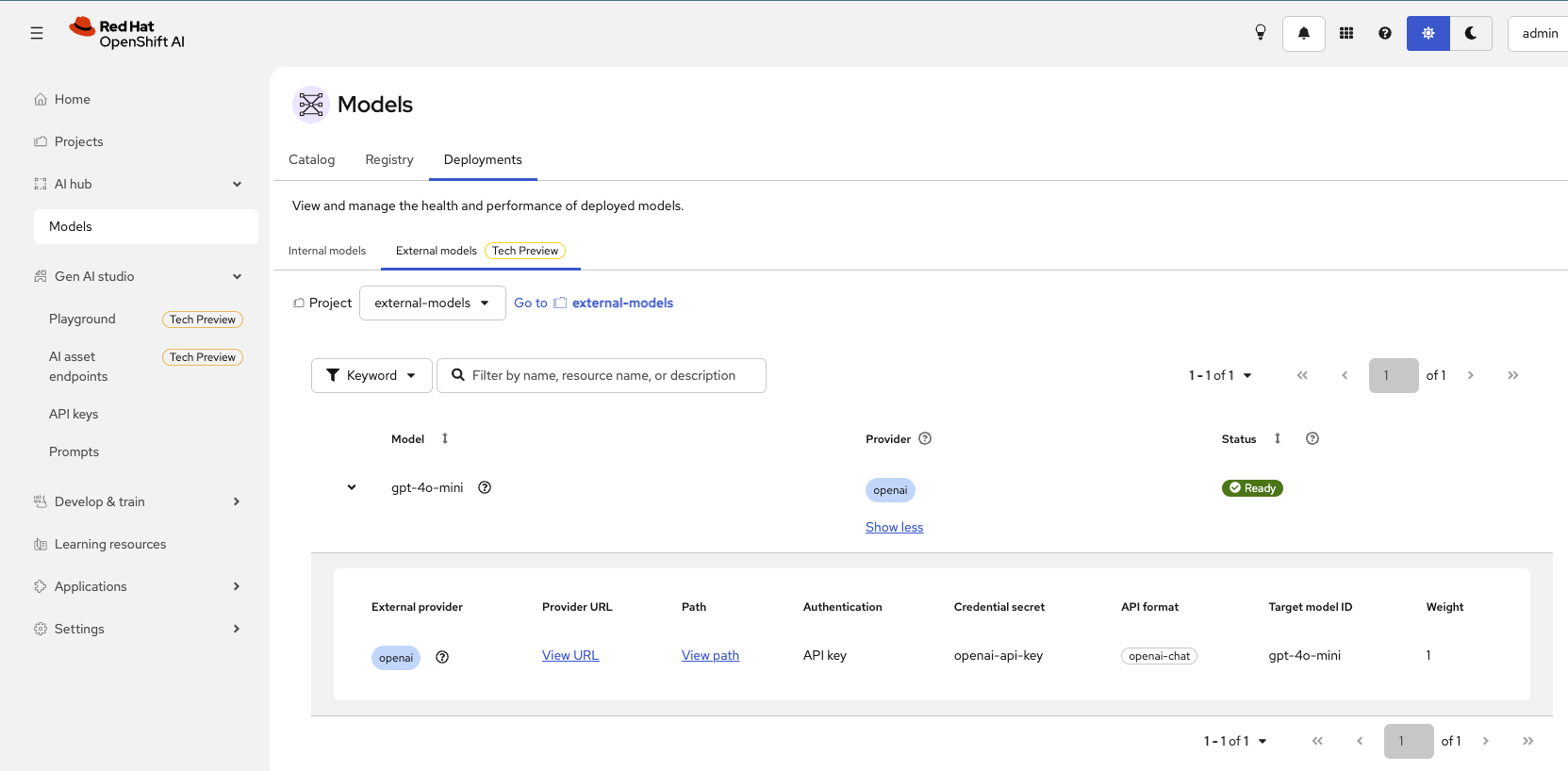
The tab lists each external model with its provider badge and status. Expanding a model row shows the full provider configuration: external provider name, provider URL, path, authentication type, credential secret, API format, target model ID, and weight.
The Dashboard provides a read-only view of the same Kubernetes CRDs created by the CLI workflow (ExternalProvider, ExternalModel). To create or modify external models, use the CLI steps documented above. Models created via oc apply appear in the Dashboard automatically.
Other Providers
Google Gemini
Manifests for Google Gemini (gemini-2.5-flash) are included under manifests/08-external-models/gemini/. To deploy Gemini instead of OpenAI, use --external-model-provider gemini.
On RHOAI 3.4, there is a known incompatibility: the BBR openai provider hardcodes the upstream path to /v1/chat/completions, but Gemini requires /v1beta/openai/chat/completions, causing inference to return HTTP 404. This was tracked in RHOAIENG-68592. On RHOAI 3.5+, the ExternalModel CRD includes a path field in externalProviderRefs that overrides the upstream path, so Gemini works end-to-end.
To deploy with Gemini:
Anthropic
Manifests for Anthropic (claude-haiku-4-5) are included under manifests/08-external-models/anthropic/. The BBR anthropic provider translates OpenAI-format requests to the Anthropic Messages API and injects the API key via the x-api-key header - consumers still send standard OpenAI-format requests to the gateway.
On RHOAI 3.4, the anthropic BBR provider must handle path rewriting internally (there is no path field on the ExternalModel CRD). This has not been validated on 3.4 - if inference returns errors, upgrade to RHOAI 3.5+ where the path field explicitly sets /v1/messages.
Clients must use the OpenAI-compatible endpoint (/v1/chat/completions) when sending requests through the MaaS gateway. The Anthropic-native Messages API endpoint (/v1/messages) is not supported for token counting or rate limiting (RHOAIENG-93984). Tools like Claude Code that default to Anthropic’s native API format need to be configured for OpenAI-compatible mode. The ExternalModel flow documented below routes through /v1/chat/completions and handles this correctly - the BBR translates to Anthropic format upstream.
Prerequisites
Get an API key from the Anthropic Console (Account Settings > API keys).
Verify the key works before deploying: curl -s "https://api.anthropic.com/v1/messages" -H "x-api-key: $ANTHROPIC_API_KEY" -H "anthropic-version: 2023-06-01" -H "Content-Type: application/json" -d '{"model":"claude-haiku-4-5-20251001","max_tokens":5,"messages":[{"role":"user","content":"Hi"}]}' | python3 -m json.tool
Manual Deployment
Create the namespace if it does not already exist (shared with other external model providers):
Create the credential Secret (never stored in manifests):
Apply the external model and MaaS governance resources:
The ExternalProvider and ExternalModel CRs:
The ExternalModel CR:
Verify the model reaches Ready:
Test inference:
Automated Deployment
AWS Bedrock
Manifests for AWS Bedrock (openai.gpt-oss-20b via the Mantle endpoint) are included under manifests/08-external-models/bedrock/. Bedrock uses the bedrock-openai provider, which routes through the OpenAI-compatible Mantle API - no request body translation is needed.
Use bedrock-mantle.<region>.api.aws, not bedrock-runtime.<region>.amazonaws.com. The BBR translator uses /v1/chat/completions, which is only available on the Mantle endpoint. Using bedrock-runtime will result in 404 errors.
Prerequisites
Bedrock requires a Bedrock API Key (ABSK key), not standard AWS access keys. Create one via IAM service-specific credentials:
The output contains a ServiceSpecificCredential.ServicePassword field starting with ABSK - this is the API key to use.
Verify the ABSK key works before deploying: curl -s "https://bedrock-mantle.us-east-2.api.aws/v1/models" -H "Authorization: Bearer $BEDROCK_API_KEY" | python3 -m json.tool
Manual Deployment
Create the namespace if it does not already exist (shared with other external model providers):
Create the credential Secret (never stored in manifests):
Apply the external model and MaaS governance resources:
The ExternalProvider and ExternalModel CRs:
The ExternalModel CR:
The endpoint must match your AWS region. Replace us-east-2 with your region if different.
Verify the model reaches Ready:
Test inference:
Automated Deployment
Azure OpenAI
Manifests for Azure OpenAI (gpt-4.1-mini deployment) are included under manifests/08-external-models/azure-openai/. The BBR azure-openai provider routes requests through Azure’s OpenAI Service - consumers send standard OpenAI-format requests to the gateway and the BBR handles Azure-specific path construction and API key injection via the api-key header.
On RHOAI 3.4, the azure-openai BBR provider must handle Azure path rewriting internally (there is no path field on the ExternalModel CRD). This has not been validated on 3.4 - if inference returns errors, upgrade to RHOAI 3.5+ where the path field explicitly sets the Azure deployment path.
The endpoint in the ExternalProvider manifest must match your Azure OpenAI resource. Replace <your-resource>.openai.azure.com with your actual resource hostname (e.g., myresource.openai.azure.com). Similarly, the path in the ExternalModel must match your deployment name and API version.
Prerequisites
You need an Azure OpenAI resource with a deployed model. Create one via the Azure Portal or the Azure CLI:
Get the API key from the Azure Portal (Resource > Keys and Endpoint) or via CLI:
Verify the key works before deploying: curl -s "https://<your-resource>.openai.azure.com/openai/deployments/gpt-4-1-mini/chat/completions?api-version=2025-04-01-preview" -H "api-key: $AZURE_OPENAI_API_KEY" -H "Content-Type: application/json" -d '{"messages":[{"role":"user","content":"Hi"}],"max_tokens":5}' | python3 -m json.tool
Manual Deployment
Create the namespace if it does not already exist (shared with other external model providers):
Create the credential Secret (never stored in manifests):
Apply the external model and MaaS governance resources:
The ExternalProvider and ExternalModel CRs:
The ExternalModel CR:
Verify the model reaches Ready:
Test inference:
Automated Deployment
HTTP Proxy
Some clusters cannot reach the internet directly and are only allowed to leave through a corporate HTTP/HTTPS proxy. This is common in regulated environments: the OpenShift nodes have no route to *.openai.azure.com, but a proxy that accepts CONNECT does.
External models still work in this setup, but not through any proxy setting on MaaS. This section explains why, and shows the pattern that does work, using Azure OpenAI as the example.
Validated on RHOAI 3.5.2, OCP 4.21, Envoy 1.35.10 (OSSM 3.x gateway). The same pattern applies to any external provider, only the hostname changes.
Why there is no proxy setting
The gateway Envoy is the process that opens the connection to the provider. Nothing in that path reads proxy configuration:
HTTP_PROXY/HTTPS_PROXYdo nothing. Envoy does not read these environment variables, and the cluster-wideProxyCR (oc get proxy/cluster) only injects them into pods that honour them. The gateway is not one of them.DestinationRuletrafficPolicy.tunnelcannot be used. Istio does have nativeCONNECTsupport, but the API states it applies to TCP or TLS routes and cannot be applied to HTTP routes. The external provider reconciler always generates theServiceEntrywithprotocol: HTTPS(orHTTP), which is an HTTP route, sotunnelnever takes effect.- An
EnvoyFilterusinghttp_11_proxydoes not work on this Envoy. On Envoy 1.35 the proxy address must come from per-endpointtyped_filter_metadata, andEnvoyFilterMERGEappends repeated fields instead of annotating the generated endpoint, so you cannot attach it to theSTRICT_DNScluster Istio builds. The other code path, which takes the address from filter state, is only reachable from compiled-in C++ filters:Http11ProxyInfoFilterStatehas no object factory, soset_filter_statecannot populate it. Envoy also documents that extension as having an “unknown security posture”. - The
maas.opendatahub.io/tlsandmaas.opendatahub.io/portannotations are RHOAI 3.4 only. On 3.5 the resources are created byipp-external-provider-reconciler, which ignores them. Annotating theExternalProviderleaves theServiceEntryonHTTPS/443 with theDestinationRulestill in place.
Do not spend time on http_11_proxy EnvoyFilters. It is the suggestion most AI assistants give for this problem and it cannot be made to work against a reconciler-generated cluster on RHOAI 3.5.
How it works
Instead of teaching the gateway about the proxy, put a small TCP tunnel in front of the proxy and point the mesh at it:
The tunnel accepts the raw TCP that the gateway was going to send to Azure, issues CONNECT <provider>:443 to the proxy, and splices the bytes through. The important consequence is that TLS is terminated by Azure, not by the tunnel: SNI, certificate validation and the api-key header injected by IPP all stay end-to-end, and the proxy only sees an opaque tunnel.
It also sends CONNECT with a hostname, so the proxy does the DNS resolution. That matters because the generated ServiceEntry is resolution: DNS: if your cluster cannot resolve *.openai.azure.com, the Envoy cluster gets zero endpoints and returns 503 before the proxy is ever contacted.
The tunnel is Envoy’s tcp_proxy with tunneling_config, a stable documented feature, and it reuses the istio-proxyv2 image your gateway already runs, so there is no extra image to mirror and no anyuid grant needed.
Prerequisites
Azure OpenAI already working through MaaS as described in Azure OpenAI. Get that green first with direct egress if you can, so that a later failure is clearly the proxy and not the provider.
You also need a proxy that accepts CONNECT to the provider hostname on port 443. If you do not have one, or you only want to try this out, the manifests include a lab proxy and Step 1 deploys it for you.
Step 1: Deploy the proxy
Pick one of the two paths.
You already have a corporate proxy. Write down its host and port, you need them in Step 2, and remove the lab proxy from the kustomization so you do not end up with a second proxy in the cluster:
Removing the file from the kustomization does not remove anything that is already running. oc apply -k does not prune. If you tried the lab path before switching to your real proxy, delete the lab proxy explicitly, otherwise it stays in the cluster as an open proxy:
Ask the proxy owners to allow CONNECT to your provider hostname on 443. Then go to Step 2.
You do not have a proxy and want to test. Keep forward-proxy.yaml and deploy it. It is an Envoy that terminates CONNECT and logs every tunnel, which is what makes the rest of this section verifiable:
This same command also deploys the tunnel, because both live in one kustomization. That is fine, the tunnel is configured in Step 2 and restarted there.
Before wiring anything to it, check the proxy on its own. This is the step that tells you whether a later failure is the proxy or the MaaS side, so do not skip it:
You want http=401. That looks like a failure but it is the result you need: 401 comes from Azure itself, so the CONNECT tunnel opened and TLS completed, and the only thing missing is the API key, which the gateway adds later. A timeout or http=000 instead means the proxy is not reachable.
oc run prints PodSecurity warnings about the throwaway pod. They are harmless, the pod still runs.
The proxy log should show the tunnel for that request:
That authority is exactly what a real corporate proxy has to allow-list.
Step 2: Configure and deploy the tunnel
The tunnel ships with the values from the test environment, so it is pointing at the wrong provider until you edit it. Open manifests/08-external-models/http-proxy/egress-tunnel.yaml and set three things:
tunneling_config.hostname- your own Azure OpenAI resource, for examplemy-resource.openai.azure.com:443.- the
corporate_proxycluster address - the proxy host and port from Step 1. Leave it as the in-cluster Service (egress-proxy.egress-proxy.svc.cluster.local:3128) if you deployed the lab proxy. image- the image your gateway already runs, so there is nothing extra to pull or mirror:
Apply your edits and restart the tunnel:
The restart is not optional. Envoy reads this static configuration once at start-up, so oc apply alone updates the ConfigMap while the running pod keeps the old settings. If Step 1 already started the tunnel with the shipped values, only the restart picks up yours. The same applies any time you change the hostname or the proxy address later.
Both pods should be running:
Step 3: Point the ServiceEntry at the tunnel
The reconciler creates the ServiceEntry with resolution: DNS, which sends the gateway straight to the internet. Switch it to STATIC so it resolves to the tunnel instead:
Nothing else changes. The ExternalProvider keeps the real Azure FQDN, so the Host header, SNI and certificate check stay correct.
This ServiceEntry is owned by ipp-external-provider-reconciler. The edit survives a restart of ai-gateway-operator and maas-controller (verified), because the reconciler creates the resource but does not correct drift. It is still an unmanaged change: re-check it after an RHOAI upgrade, and expect to re-apply it if you delete and recreate the ExternalProvider.
Step 4: Verify
Then confirm the traffic really went through the proxy:
You should see the gateway pod IP arriving at the tunnel, and a CONNECT for your provider hostname in the proxy log:
Prove there is no direct-egress fallback by breaking the path on purpose. If you deployed the lab proxy, scale it to zero:
Inference must then fail with HTTP 503 and TLS_error ... Connection reset by peer. With a real corporate proxy you cannot scale it, so stop the tunnel instead, which fails with HTTP 500:
Scale whichever you stopped back to 1 and inference recovers.
The exact status does not matter, the failure does. If inference still returns 200 while the proxy or the tunnel is down, the gateway is still reaching the provider directly, which means the ServiceEntry patch in Step 3 did not take effect and nothing you tested so far went through the proxy.
Using a real corporate proxy
Proxy requires authentication. Envoy’s tunneling_config can add headers to the CONNECT request, so Basic auth works by adding to the tcp_proxy config:
Keep that value in a Secret and mount it rather than committing it in the ConfigMap.
Proxy inspects TLS (MITM). This pattern deliberately does not terminate TLS, so an inspecting proxy breaks certificate validation at the gateway. Either allow-list the provider hostname for pass-through on the proxy, which is the usual answer, or add the proxy’s CA to the gateway trust bundle. Pass-through is strongly preferred: the api-key is in those requests.
Proxy only allows certain destinations. Ask for CONNECT to the provider hostname on 443. The lab proxy logs show exactly what to allow-list.
More than one provider. tunneling_config.hostname is a single fixed destination, so deploy one tunnel Deployment and Service per external provider and patch each ServiceEntry to its own tunnel IP.
Caveats
- One tunnel per provider, as above.
- The tunnel is a single replica in these manifests. Raise
replicasfor anything beyond a demo, it holds no state. - The
ServiceEntryedit is unmanaged, see the warning in Step 3. - Nothing changes for consumers. API keys,
AuthPolicy, and token rate limiting keep working exactly as before, because only the egress leg moved.
Known Issues
Gemini path incompatibility - RHOAI 3.4 only (RHOAIENG-68592)
On RHOAI 3.4, the BBR openai provider hardcodes the upstream path to /v1/chat/completions, but Gemini requires /v1beta/openai/chat/completions. Inference requests return HTTP 404 from Google’s API. Tracked in RHOAIENG-68592.
Resolved in RHOAI 3.5+: the ExternalModel CRD includes a path field in externalProviderRefs that overrides the upstream path. The Gemini manifest sets path: /v1beta/openai/chat/completions, and inference works end-to-end.
WASM auth timeout under load - HTTP 500 (RHOAIENG-71638)
External model calls through the gateway can return HTTP 500 under concurrent load even though the model backend is healthy. The signature: a 23-byte error body, an empty upstream host in the gateway access log, and a response time close to 200ms. This means the Kuadrant WASM plugin timed out waiting for Authorino to authorize the request (default: 200ms, failureMode: deny).
The fix is to increase AUTH_SERVICE_TIMEOUT on the RHCL operator Subscription. See Issue 7: WASM Auth Timeout Under Load in the troubleshooting guide for diagnosis steps and the workaround.
Anthropic Messages API - no token counting or rate limiting (RHOAIENG-93984)
The MaaS TokenRateLimitPolicy only supports the OpenAI-compatible /v1/chat/completions endpoint. Requests sent directly to /v1/messages (the Anthropic Messages API) bypass token counting and rate limiting entirely - usage is not tracked and rate limits are not enforced. Tracked in RHOAIENG-93984.
This affects clients that use Anthropic’s native API format (e.g., Claude Code with default settings). To ensure token counting works, clients must send requests to /v1/chat/completions through the MaaS gateway. The BBR anthropic provider handles the translation to the Anthropic Messages API upstream.
The upstream fix is tracked in Kuadrant/kuadrant-operator#1654.
Appendix
Directory Structure
Supported Providers
The provider field in the ExternalModel spec maps to a BBR payload translator. Currently supported values:
openai- OpenAI API (api.openai.com)anthropic- Anthropic API (api.anthropic.com)azure-openai- Azure OpenAI Servicebedrock-openai- AWS Bedrock (OpenAI-compatible)
References
- RHOAI 3.5 ExternalProvider documentation
- RHOAI 3.4 ExternalModel documentation
- BBR (ai-gateway-payload-processing) repository
- RHOAIENG-68592 - Gemini BBR path incompatibility
Next step
Proceed to Architecture & Request Flow.