Flow
The intended topology at a glance — Shell supplying chrome to content-only manuals, with the Library aggregating them:
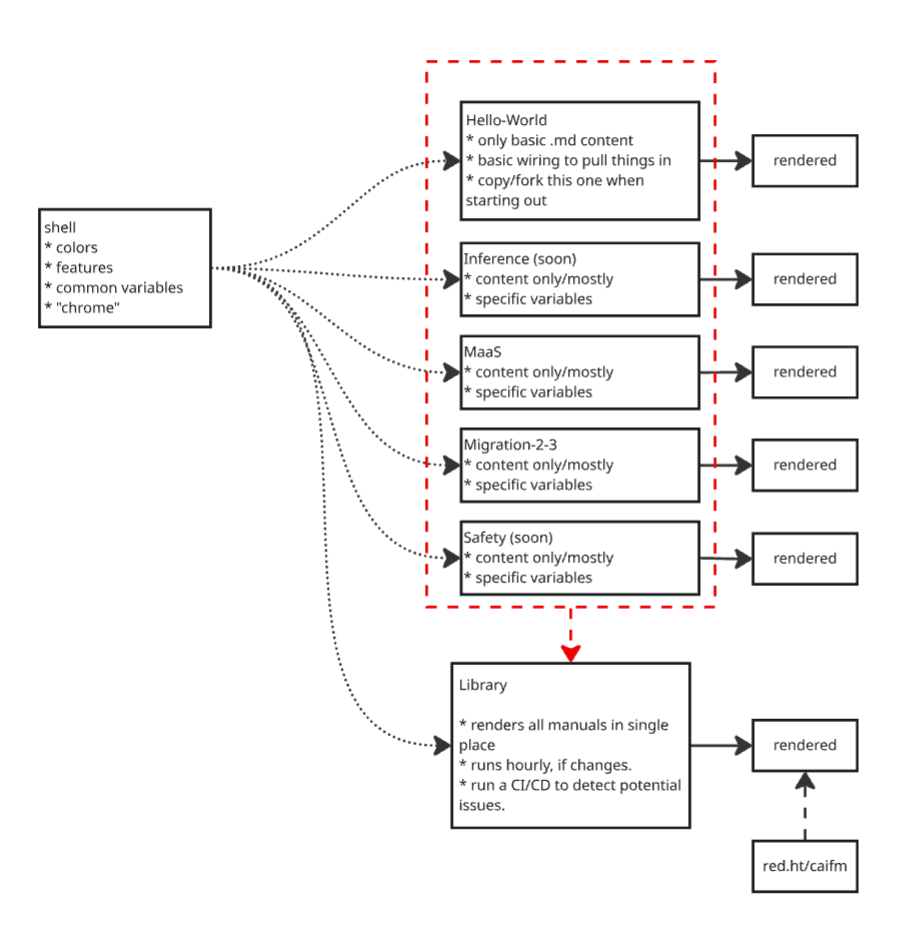
Whiteboard sketch overview. The red dashed outline groups the content-only manuals sharing Shell. Details the sketch adds beyond the text below — per-manual rendered sites, the Library’s schedule and CI checks, the red.ht/caifm short URL, and the planned Inference/Safety manuals — are as sketched; treat them as proposed until confirmed.
The interactive diagram below shows the same system with clickable detail:
Where Shell, manuals, and the Library sit. Click a node or an arrow for detail.
Two things the diagram compresses:
Mount means Hugo module mount. The Library does not copy or re-host anything. Its hugo.yaml imports each manual repo as a Hugo module, so one Library build renders every manual’s content under its own tree. The arrows above are those module imports.
Adding a manual is two steps, both content-only. Clone Hello-World, write your manual, deploy it as its own Pages site. Then open a PR in the Library that adds one module import. No new infrastructure, no Library code changes; the manual appears on the next Library deploy.