This is the multi-page printable view of this section. .
Reference
1 - Architecture & Request Flow
This page explains how Red Hat OpenShift AI Models as a Service works under the hood — what each component does and how a request travels from a user’s laptop to a model and back.
All file paths and oc apply commands in this guide are relative to the CAI-Field-Manual-MaaS repository root. Make sure you have cloned it and are working from its root directory (see Getting Started).
Component Overview
Models as a Service is built from four layers, each with a distinct responsibility:
| Layer | Components | Role |
|---|---|---|
| Gateway | Gateway API, Istio | Entry point for all traffic. HTTPRoutes direct requests to the right model endpoint. |
| Policy | Kuadrant, Authorino, Limitador | Enforce authentication, authorization, and rate limiting at the edge — before requests reach any model. |
| API & Token | maas-api, PostgreSQL | API key lifecycle: mint, validate, and revoke sk-oai-* keys. Stores hashed keys and subscription bindings. |
| Model Serving | KServe (LLMInferenceService), vLLM, ExternalModel | Run inference. Internal models run as vLLM pods on-cluster; external models proxy to third-party APIs (Anthropic, OpenAI, etc.). |
Request Flow: Step by Step
Here is what happens when a user makes an inference request, from their laptop to the model and back.
graph TB
    subgraph UserLayer["User"]
        U[User]
    end

    subgraph GatewayLayer["Gateway & Policy"]
        G[Gateway]
        MAP[MaaSAuthPolicy<br/>Authorino]
        MS[MaaSSubscription<br/>Limitador]
    end

    subgraph MaaSLayer["Token Management"]
        API[MaaS API]
    end

    subgraph ModelLayer["Model Serving"]
        INV[Inference Service]
        LLM[LLM]
    end

    U -->|"1. Inference + API key"| G
    G -->|"2. Validate identity"| MAP
    MAP -.->|"3. Validate key"| API
    MAP -->|"4. Check limits"| MS
    MS -.->|"5. Within limits"| INV
    INV -->|"6. Forward"| LLM
    LLM -->|"7. Completion"| U

    MAP -.->|"401/403"| U
    MS -.->|"429"| U
Diagram source: Upstream MaaS Architecture
1. Create an API Key
The user authenticates with their OpenShift token (or an external IdP token) and requests an API key:
Authorino validates the identity token. If valid, maas-api generates a random sk-oai-* key, hashes it with SHA-256, stores the hash and subscription binding in PostgreSQL, and returns the plaintext key once.
The subscription field is optional. If you omit it, maas-api binds the highest-priority subscription your groups have access to. The field name is subscription (not subscriptionName).
2. Send an Inference Request
The user sends a chat completion request using the API key:
3. Gateway Receives the Request
The request hits the maas-default-gateway in the openshift-ingress namespace. The Gateway API controller (backed by Istio) matches the request against HTTPRoutes to determine which backend to forward to.
4. Authorino Validates the API Key
Before the request reaches any model, Authorino intercepts it (via MaaSAuthPolicy) and calls the maas-api /internal/v1/api-keys/validate endpoint:
- Looks up the salted hash in PostgreSQL
- Returns the user identity (username, groups, key ID) and the subscription name bound to that key
- Rejects unknown, revoked, expired, or malformed keys with
401 Unauthorized
5. Subscription Access Check
Using the subscription name from the key record (not from client headers), Authorino checks:
- Is the user/group allowed to use this subscription?
- Is the requested model included in the subscription?
If either check fails, the request is rejected with 403 Forbidden.
6. Rate Limiting
Limitador checks the request against the rate limits defined in the MaaSSubscription CR:
- Requests per minute/hour
- Token budgets per time window
If the user has exceeded their limits, the request is rejected with 429 Too Many Requests.
7. Forward to Model
If all checks pass, the request is forwarded to the model backend:
- Internal model (InferenceService): routed to a vLLM pod running on-cluster via KServe
- External model (ExternalModel): proxied to a third-party API (e.g., Anthropic Claude, OpenAI GPT)
The model processes the request and returns a completion response.
8. Response Returns to User
The response flows back through the Gateway to the user. Limitador updates usage counters (tokens consumed, requests made) for the subscription.
Sequence Diagram
The full inference flow as a sequence diagram, showing every component interaction:
sequenceDiagram
    participant Client
    participant GatewayAPI
    participant Authorino
    participant MaaS as MaaS API
    participant Limitador
    participant LLMInferenceService

    Client->>GatewayAPI: Inference + API Key
    GatewayAPI->>Authorino: Validate credentials

    alt API key (sk-oai-*)
        Authorino->>MaaS: POST /internal/v1/api-keys/validate
        MaaS->>MaaS: Lookup hash in PostgreSQL
        MaaS-->>Authorino: { valid, userId, groups, subscription }
    end

    Authorino->>MaaS: POST /internal/v1/subscriptions/select (subscription check)
    MaaS-->>Authorino: Selected subscription

    Authorino->>GatewayAPI: Auth success (cached)
    GatewayAPI->>Limitador: Check TokenRateLimitPolicy
    Limitador-->>GatewayAPI: Within limits
    GatewayAPI->>LLMInferenceService: Forward request
    LLMInferenceService-->>Client: Response
Interactive Flow Visualizer
To see all of the above in action, explore the interactive animated visualizer — it walks through 5 complete flows (including auth failures and rate limiting) step by step with clickable components and a request/response inspector.
For pod-by-pod debugging with oc commands, see Request Deep Dive.
References
- Upstream MaaS Architecture
- RHOAI 3.5 Flow Visualizer (two-stage IPP)
- Install & Configuration Visualizer - animated walkthrough of the phase sequence, the most common ordering mistake, governance pairing, and tiers/priority
- RHOAI 3.5 MaaS Official Docs
2 - Request Deep Dive: Pod-by-Pod Tracing
This page traces an inference request through every pod in the Red Hat OpenShift AI 3.5 Models as a Service stack. Use it to understand where to look when debugging, what each component does to the request, and which oc commands to run.
For an animated walkthrough of these flows, see the RHOAI 3.5 Flow Visualizer .
Envoy Filter Chain (Inside the Gateway)
The maas-default-gateway Envoy proxy in openshift-ingress processes every request through this filter chain:

| Order | Filter | Pod / Mechanism | What It Does |
|---|---|---|---|
| ① | ext_proc (IPP Pre) | payload-pre-processing | Runs two plugins: model-extractor (body-field-to-header) copies the model field from the body into the X-Gateway-Model-Name header, and model-provider-resolver resolves it. Runs BEFORE auth so Kuadrant can use the header for per-model policy matching. |
| ② | wasm (Kuadrant) | WasmPlugin CR (in-process) | Auth via Authorino (gRPC), rate limiting via Limitador (gRPC). Uses X-Gateway-Model-Name for route-level policy enforcement. |
| ③ | ext_proc (IPP Post) | payload-processing | Header guarding, usage enforcement, provider resolution, API format translation, credential injection. Runs AFTER auth completes. |
| ④ | router | (built-in) | Routes the mutated request to the upstream - external provider API or on-cluster InferencePool/InferenceService. |
Namespace Map
Every component lives in a specific namespace. Here is the full layout for RHOAI 3.5:

| Namespace | Components | Purpose |
|---|---|---|
openshift-ingress | maas-default-gateway (Envoy), payload-pre-processing, payload-processing, istiod, kube-auth-proxy, router-default | Gateway, IPP ext_proc pods, Istio control plane |
redhat-ai-gateway-infra | maas-api, maas-api-key-cleanup (CronJob) | API key management (moved from redhat-ods-applications in 3.5) |
redhat-ods-applications | maas-controller, maas-ui, postgres | MaaS controller, UI, PostgreSQL database |
kuadrant-system | authorino, limitador-limitador | Auth server, rate limit server |
models-as-a-service | MaaSAuthPolicy, MaaSSubscription CRs | User-facing access control and quota definitions |
ai-tenants | AITenant CRs | Multi-tenancy configuration |
model namespace (e.g., llm) | vLLM pods, MaaSModelRef, TokenRateLimitPolicy, LLMInferenceService | Model serving workloads |
| external-models namespace | ExternalProvider, ExternalModel CRs | Third-party API proxy configuration |
Pod-by-Pod Request Trace
External Model Request (e.g., Anthropic)

| Step | Pod | Namespace | What Happens | Debug Command |
|---|---|---|---|---|
| 1 | client | - | Sends POST /v1/chat/completions with Authorization: Bearer sk-oai-... | curl -v https://maas.${CLUSTER_DOMAIN}/v1/chat/completions ... |
| 2-4 | payload-pre-processing | openshift-ingress | Parses JSON body, extracts model field, sets X-Gateway-Model-Name header. Resolves model type. | oc logs -n openshift-ingress deploy/payload-pre-processing -f |
| 5-6 | maas-default-gateway (Wasm) | openshift-ingress | Kuadrant WasmPlugin triggers auth-service action | oc logs -n openshift-ingress deploy/maas-default-gateway-istio -c istio-proxy -f |
| 7 | authorino | kuadrant-system | Receives gRPC call from Wasm shim. Calls MaaS API to validate the sk-oai-* key. On success, injects the identity headers (X-MaaS-Username, X-MaaS-Group, X-MaaS-Subscription) from the validation result via the MaaSAuthPolicy response stage. | oc logs -n kuadrant-system deploy/authorino -f |
| 8-9 | maas-api | redhat-ai-gateway-infra | Looks up key hash in PostgreSQL. Returns the validation result {valid, userId, groups, subscription} to Authorino (a JSON body, not headers). The subscription comes from the key record bound at mint time. | oc logs -n redhat-ai-gateway-infra deploy/maas-api -f |
| 10 | limitador-limitador | kuadrant-system | Receives gRPC call from Wasm shim. Checks token quota for the subscription. | oc logs -n kuadrant-system deploy/limitador-limitador -f |
| 11-17 | payload-processing | openshift-ingress | Runs post-processing plugins in order: maas-headers-guard, stream-usage-enforcer, model-provider-resolver (resolves ExternalModel CRD), api-translation (OpenAI to Anthropic format), apikey-injection (injects provider key from Secret). | oc logs -n openshift-ingress deploy/payload-processing -f |
| 18-19 | maas-default-gateway (router) | openshift-ingress | Routes mutated request to https://api.anthropic.com/v1/messages | oc logs -n openshift-ingress deploy/maas-default-gateway-istio -c istio-proxy -f |
| 20 | Anthropic API | - | Processes request, returns Anthropic Messages format response | - |
| 21-22 | payload-processing | openshift-ingress | Response plugins: api-translation converts Anthropic response back to OpenAI format (only when response translation is enabled - see note below) | oc logs -n openshift-ingress deploy/payload-processing -f |
| 23-25 | maas-default-gateway (Wasm) | openshift-ingress | Kuadrant Wasm reads usage.total_tokens from response body. Reports consumed tokens to Limitador via gRPC. | oc logs -n openshift-ingress deploy/maas-default-gateway-istio -c istio-proxy -f |
| 26 | client | - | Receives OpenAI-format response regardless of which provider was used | - |
Response api-translation is off by default. The payload-processing-plugins ConfigMap ships with an empty response profile (response: []) so streaming (SSE) is not held by a response processor. Providers that rewrite responses (for example Anthropic Messages to OpenAI) need it enabled manually on the ConfigMap. Steps 21-22 above only run once you opt in. See the upstream MaaS docs (External Model Setup - IPP response translation).
Internal Model Request (P/D Disaggregated)

After step 16 (IPP Post returns to Gateway), the internal model flow diverges:
| Step | Pod | Namespace | What Happens | Debug Command |
|---|---|---|---|---|
| 17-19 | EPP (ext_proc) | model namespace | Endpoint Picker selects optimal Prefill and Decode pods based on KV cache utilization and queue depth | oc logs -n <model-ns> deploy/<epp-deploy> -f |
| 20-21 | Sidecar | model namespace | Coordinates the Prefill/Decode transaction | oc logs -n <model-ns> <sidecar-pod> -f |
| 22-23 | Prefill Pod (vLLM) | model namespace | Processes input prompt, generates KV cache, returns KVXfer metadata | oc logs -n <model-ns> <prefill-pod> -c kserve-container -f |
| 24-25 | NIXL | model namespace | High-speed KV cache transfer from Prefill to Decode pod (GPU-direct RDMA or DCN) | - |
| 26-27 | Decode Pod (vLLM) | model namespace | Pulls KV cache via NIXL, generates tokens auto-regressively, streams response back to Gateway | oc logs -n <model-ns> <decode-pod> -c kserve-container -f |
Key Configuration Resources

These are the ConfigMaps, Secrets, and CRDs that control the request flow:
| Resource | Namespace | Purpose |
|---|---|---|
ConfigMap/payload-processing-plugins | openshift-ingress | Defines which plugins run in IPP pre and post stages |
Secret with label inference.llm-d.ai/ipp-managed=true | external-models namespace | Provider API keys for apikey-injection plugin (3.5 label; was bbr-managed in 3.4) |
Config/default | (cluster-scoped) | Platform anchor CR that triggers MaaS controller reconciliation |
AITenant | ai-tenants | Multi-tenancy configuration for the AI Gateway |
MaaSModelRef | model namespace | Maps user-facing model name to provider endpoint and target model ID |
MaaSAuthPolicy | models-as-a-service | Configures API key authentication via K8s Secret |
MaaSSubscription | models-as-a-service | Defines quota - associates user/team with allowed models and rate limits |
ExternalProvider | external-models namespace | Provider connection config (URL, auth type) |
ExternalModel | external-models namespace | Maps model name to provider and target model |
AuthPolicy | openshift-ingress | Generated by maas-controller from MaaSAuthPolicy |
TokenRateLimitPolicy | model namespace | Generated by maas-controller from MaaSSubscription |
Common Debugging Scenarios

500 Error on External Model
The request reaches the provider but credential injection failed:
401 Unauthorized
The API key is invalid, expired, or revoked:
429 Too Many Requests
Token quota exceeded:
Model Not Found
The model name doesn’t match any MaaSModelRef:
RHOAI 3.4 vs 3.5 Differences

If you are debugging a 3.4 cluster, these are the key differences:
| What | 3.4 | 3.5 |
|---|---|---|
| DSC component | kserve.modelsAsService | aigateway.modelsAsAService |
| MaaS API namespace | redhat-ods-applications | redhat-ai-gateway-infra |
| Secret label | inference.networking.k8s.io/bbr-managed=true | inference.llm-d.ai/ipp-managed=true |
| Kuadrant integration | EnvoyFilter-based Wasm | WasmPlugin CRs |
| External model CRD | Single ExternalModel | ExternalProvider + ExternalModel |
| IPP architecture | Single ext_proc stage (after auth) | Two stages: pre (before auth) + post (after auth) |
| IPP plugins (post) | model-provider-resolver, body-field-to-header, api-translation, apikey-injection | maas-headers-guard, stream-usage-enforcer, model-provider-resolver, api-translation, apikey-injection |
3 - API Key Security
This page is a security reference for Red Hat OpenShift AI Models as a Service API keys. It covers the full lifecycle of an sk-oai-* key – from cryptographic generation through inference-time validation to expiry and revocation. For the high-level request flow, see Architecture & Request Flow. For pod-by-pod debugging, see Request Deep Dive.
This page describes the security internals of the maas-api component. You do not need to understand these details to use Models as a Service, but they are useful for security reviews, incident response, and compliance documentation.
Key Anatomy
A Models as a Service API key has four components:
| Component | Value | Purpose |
|---|---|---|
sk-oai- | Fixed string | Industry convention prefix. Allows grep/scan tooling to detect leaked keys in logs and repos. |
key_id | 96-bit Base62 (~16 chars) | Per-key salt (FIPS 180-4 compliant). First input to the SHA-256 hash derivation. |
_ | Underscore separator | Unambiguous boundary between key_id and secret. |
secret | 256-bit Base62 (~43 chars) | Cryptographic secret generated by crypto/rand. 256 bits of entropy makes brute-force infeasible (2^256 keyspace). |
Hash Derivation
The maas-api never stores the plaintext key. Instead, it derives a hash at creation time:
The null byte (\x00) delimiter prevents ambiguous component boundaries. Without it, key_id "ab" + secret "cdef" would hash identically to key_id "abc" + secret "def".
The plaintext key is returned exactly once in the HTTP response at creation time. There is no “retrieve my key” operation. If you lose the key, create a new one.
Key Creation
The key generation process uses OS-level cryptographic randomness:
crypto/randgenerates 12 random bytes (key_id) + 32 random bytes (secret)- Both components are Base62-encoded
- The plaintext key is assembled as
sk-oai-{key_id}_{secret} SHA-256(key_id + "\x00" + secret)is computed and stored in PostgreSQL- The plaintext key is returned in the HTTP response body
- The server discards the plaintext from memory
The response contains the key field with the full plaintext. Subsequent GET requests return only metadata:
Store the key immediately upon creation. If you lose it, you must create a new one.
For the complete key creation procedure, see upstream: Create an API Key.
Persistence
The database stores identity and policy metadata, not the bearer secret:
| Stored | Not Stored |
|---|---|
SHA-256 key_hash (hex-encoded) | Plaintext API key |
Database UUID (id) | Secret component |
| Username, key name, description | Display prefix (sk-oai-XXXX...) |
Immutable group snapshot (user_groups[]) | |
| Subscription, tenant | |
Status (active / revoked / expired) | |
Timestamps (created_at, expires_at, last_used_at) | |
| Ephemeral flag |
Database access alone does not reveal usable keys. An attacker with full database read access must brute-force 256 bits of entropy to reconstruct a valid secret.
Validation Flow
Every inference request triggers API key validation on the hot path. The high-level flow is covered in Architecture: Authorino Validates the API Key. This section details the internal steps of ValidateAPIKey() inside maas-api.
sequenceDiagram
    participant App as Application
    participant GW as API Gateway
    participant Auth as Authorino
    participant API as MaaS API
    participant DB as PostgreSQL

    App->>GW: POST /v1/chat/completions<br/>Authorization: Bearer sk-oai-...
    GW->>Auth: gRPC auth check (Wasm shim)
    Auth->>API: POST /internal/v1/api-keys/validate

    rect rgb(240, 248, 255)
    Note over API: ValidateAPIKey()
    Note over API: 1. Format check (reject malformed)
    Note over API: 2. SHA-256(key_id + 0x00 + secret)
    API->>DB: SELECT WHERE key_hash=$1 AND tenant=$2
    DB-->>API: key record
    Note over API: 3. Expiry and status check
    Note over API: 4. Subscription check (fail closed)
    Note over API: 5. UUID validation
    end

    API-->>Auth: {valid, userId, groups, subscription}
    Note over API,DB: Async: update last_used_at (background, 2s timeout)
    Auth-->>GW: Auth success + identity headers
    GW->>App: Forward to model
ValidateAPIKey() Steps
- Format check – reject malformed keys before any database access. If the key does not match
sk-oai-{key_id}_{secret}, return invalid immediately. - SHA-256 hash – compute
SHA-256(key_id + "\x00" + secret)to producekey_hash. - Hash lookup – query PostgreSQL using the
(key_hash, tenant)unique index. Single B-tree indexed lookup. - Expiry and status check – reject if
status != 'active'orexpires_at < now(). - Subscription check (fail closed) – verify the key’s subscription exists and is valid. Missing subscription causes rejection.
- UUID validation (fail closed) – confirm the key’s UUID is well-formed. Invalid UUID causes rejection.
| Rejection Reason | Behavior |
|---|---|
| Missing subscription | Reject (fail closed) |
| Invalid UUID | Reject (fail closed) |
| Parse failure | Reject (fail closed) |
| Expired or revoked | Reject |
Performance Characteristics
The validation design protects both the credential and the performance of the inference path:
| Technique | Implementation | Purpose |
|---|---|---|
| Indexed lookup | UNIQUE (key_hash, tenant) B-tree | O(log n) validation on every inference request |
| Constant-time comparison | crypto/subtle.ConstantTimeCompare | Prevents timing side-channel attacks that could leak hash information |
| Async usage tracking | Background goroutine + 2-second timeout | last_used_at update never blocks the validation response path |
| Debounced updates | sync.Map + CAS, TTL 60 seconds | Prevents row-lock storms under high concurrency (CWE-362 safe) |
Access Control
Authentication identifies the caller. Tenant and ownership rules determine which records that caller may operate on.
Tenant Isolation
Every database query includes WHERE tenant = $1. There is no code path that allows cross-tenant data access at the query level.
Owner-or-Admin
Users can see and revoke only their own keys. Admin privileges are detected via Kubernetes SubjectAccessReview – the maas-api checks whether the caller has admin permissions on the cluster, not through a separate admin flag in the database.
Unauthorized requests to key endpoints return 404 (not 403). This IDOR protection prevents attackers from enumerating valid key IDs by probing for different HTTP status codes.
Group Validation
Groups must match regex ^[a-zA-Z0-9:._-]+$. Groups are snapshotted at key creation time and never updated after that. This immutability prevents privilege escalation by modifying group membership after key creation.
Admin Key Management
Two questions come up regularly from administrators. Both answers follow directly from the ownership model above.
Can an Admin Create a Key Owned by Another User?
Not directly. POST /v1/api-keys has no owner or username field – the key always belongs to the identity of the Bearer token that created it, and it snapshots that identity’s group memberships (see Group Validation). This is by design: the groups baked into the key are what resolve the subscription, so the key must be minted from a token that actually carries the user’s groups.
A commonly suggested shortcut does not work:
--as only adds impersonation headers to Kubernetes API requests. oc whoami -t prints the token from your kubeconfig without contacting the server, so the output is identical with and without --as (easy to verify: run both and compare). A key created with that token is owned by the admin – the maas-api resolves identity from a TokenReview of the presented token, and impersonation headers never reach it.
What works instead:
| Approach | When to use it |
|---|---|
| Self-service (intended flow) | The user creates their own key with their own token. This is the design center: keys are self-service, and admins govern through subscriptions and auth policies rather than by minting keys. |
| Token from the identity provider | With external OIDC (Phase 9), an admin who controls the IdP can obtain a token as the user (password grant or token exchange in Keycloak) and create the key with it. The key is then owned by the user with the user’s groups. This is exactly how the Phase 9 test script and the OIDC demos mint user-owned keys. |
| ServiceAccount token | For workloads rather than humans: oc create token <sa> -n <ns> mints a token whose identity is system:serviceaccount:<ns>:<sa>, and the key created with it is owned by the ServiceAccount. See the Service Account Access demo. |
What admins can do to other users’ keys, per Owner-or-Admin: view, search, revoke individual keys, and bulk-revoke by username – just not create them.
Can the Number of Keys per User Be Capped?
There is no per-user key count limit in the current maas-api. Two things make this less of a problem than it sounds:
- Extra keys do not multiply quota. Rate limits are counted per subscription, not per key. A user who mints five keys against the same subscription shares one token budget across all five – creating a second key does not reset or extend the limit. (The corporate scenario demo verifies exactly this: a second key is rate-limited immediately after the first key exhausts the subscription quota.)
- Lifetime is capped centrally. The
API_KEY_MAX_EXPIRATION_DAYSsetting on the maas-api bounds how long any key can live, and ephemeral keys default to 1 hour, so unused key sprawl ages out.
For cleanup, admins can audit and bulk-revoke a user’s keys (dry run first):
Lifecycle
There are no permanent Models as a Service API keys. State transitions are one-way – there is no mechanism to reactivate a revoked or expired key.
graph TD
    A([ACTIVE]) -->|"Owner/admin revokes"| R([REVOKED])
    A -->|"expires_at reached"| E([EXPIRED])
    style A fill:#d5f5e3,stroke:#27ae60,color:#333
    style R fill:#f5b7b1,stroke:#e74c3c,color:#333
    style E fill:#fdebd0,stroke:#f39c12,color:#333
Standard Keys
- Mandatory expiry controlled by
API_KEY_MAX_EXPIRATION_DAYSenvironment variable on maas-api - Can be revoked by the key owner or a cluster admin at any time
- Bulk revocation available for offboarding via
POST /v1/api-keys/bulk-revoke - Key metadata is retained after expiry or revocation for audit purposes
Ephemeral Keys
- Maximum 1 hour lifetime
- Auto-cleaned by the
maas-api-key-cleanupCronJob inredhat-ai-gateway-infra - Hard deleted 30 minutes after expiry via
POST /internal/v1/api-keys/cleanup - Use case: temporary access for demos, CI/CD pipelines, testing
Database Constraints
The database enforces the lifecycle at the schema level:
No reactivation is possible even via direct database manipulation.
State transitions are one-way. There is no mechanism to reactivate a revoked or expired key. Create a new key instead.
Service Accounts
Service accounts are first-class Models as a Service API key identities. They use the same API, the same ValidateAPIKey() code path, and the same lifecycle rules as human users.
| Aspect | Detail |
|---|---|
| Identity | Kubernetes service account format: system:serviceaccount:<namespace>:<name> |
| Binding | MaaSSubscription subjects.users (not groups) – direct user binding |
| Validation | Same API, same hash, same tenant scope |
| Lifecycle | Same expiry, revocation, and cleanup rules |
API Surface
Public management and internal validation are separate API surfaces with different trust boundaries.
Authenticated Endpoints (/v1/api-keys)
Auth via X-MaaS-Username and X-MaaS-Group headers injected by the ExtractUserInfo() middleware after Authorino validates the identity token. These headers are set by the gateway, not by the client.
| Method | Path | Purpose |
|---|---|---|
GET | /v1/api-keys/config | Get API key configuration limits (max expiry, etc.) |
POST | /v1/api-keys | Create a new API key (returns plaintext once) |
POST | /v1/api-keys/search | Search keys with filters, sort, pagination |
POST | /v1/api-keys/bulk-revoke | Revoke all keys for a user (offboarding) |
GET | /v1/api-keys/:id | Retrieve key metadata |
DELETE | /v1/api-keys/:id | Revoke a specific key |
Internal Endpoints (/internal/v1)
| Method | Path | Caller |
|---|---|---|
POST | /internal/v1/api-keys/validate | Authorino (on every inference request) |
POST | /internal/v1/api-keys/cleanup | CronJob (ephemeral key cleanup) |
POST | /internal/v1/subscriptions/select | Authorino (subscription resolution) |
Internal APIs have no application-level authentication. Access is restricted by Kubernetes NetworkPolicy. This is a different trust boundary, not a defect – only pods in kuadrant-system and redhat-ai-gateway-infra can reach them.
Threat Model
No single control carries the security model. Each threat is addressed by a specific primary control:
| Threat | Attack Vector | Primary Control |
|---|---|---|
| Credential guessing | Brute-force the API key | 256-bit secret (2^256 keyspace) |
| Database breach | Read DB to reconstruct keys | Hash-only storage (SHA-256, no plaintext) |
| Timing analysis | Measure response time to infer hash match | crypto/subtle.ConstantTimeCompare |
| Cross-tenant access | User A accesses User B’s keys | Tenant-scoped queries (WHERE tenant=$1) |
| ID enumeration | Probe key IDs to discover valid ones | 404 for unauthorized (IDOR protection) |
| Forgotten credentials | Old keys remain active indefinitely | Mandatory expiration (API_KEY_MAX_EXPIRATION_DAYS) |
| Update storms | High-concurrency last_used_at writes | Async debounce (sync.Map + CAS, 60s TTL) |
| Offboarding | Departed user’s keys remain active | Bulk revocation (POST /v1/api-keys/bulk-revoke) |
For incident response, use POST /v1/api-keys/bulk-revoke to immediately disable all keys for a departing user. This is faster than revoking keys one by one.
Database Schema
api_keys Table
| Column | Type | Notes |
|---|---|---|
id | TEXT (PK) | UUID |
username | TEXT NOT NULL | Key owner identity |
name | TEXT NOT NULL | User-assigned key name |
description | TEXT | Optional description |
key_hash | TEXT NOT NULL | SHA-256 hex digest |
status | TEXT NOT NULL | DEFAULT 'active'; CHECK IN ('active', 'revoked', 'expired') |
user_groups | TEXT[] NOT NULL | Immutable snapshot at creation |
subscription | TEXT NOT NULL | Bound subscription name |
tenant | TEXT NOT NULL | Tenant identifier |
ephemeral | BOOLEAN NOT NULL | DEFAULT FALSE |
created_at | TIMESTAMPTZ NOT NULL | Creation time |
expires_at | TIMESTAMPTZ | Expiry time |
last_used_at | TIMESTAMPTZ | Last validation time (async updated) |
Indexes
| Index | Columns | Purpose |
|---|---|---|
| Unique validation | (key_hash, tenant) | Fast lookup during ValidateAPIKey(); ensures no hash collisions within a tenant |
| Key listing | (tenant, username, created_at) | User-facing key list queries |
| Audit / cleanup | (last_used_at) WHERE NOT NULL | Find unused keys; cleanup CronJob |
| Group queries | (user_groups) GIN | Group-based access control queries |
| User key listing | (username, created_at DESC) | User-scoped key listing (without tenant filter) |
| Ephemeral cleanup | Partial on status + expires_at WHERE ephemeral=true | CronJob: find expired ephemeral keys for deletion |
References
- Architecture & Request Flow – high-level Models as a Service component overview and request flow
- Request Deep Dive – pod-by-pod debugging with
occommands - Upstream: API Key Management
- Upstream: MaaS Architecture
4 - Multi-Tenancy
This page is a reference for Red Hat OpenShift AI Models as a Service multi-tenancy (RHOAI 3.5+). It answers the question that comes up in every architecture discussion: “Can we have a MaaS per team or per namespace in the same cluster?” The short answer: you get multiple MaaS tenants on one shared platform, not multiple independent MaaS instances. This page explains what that difference means, what is isolated, what is shared, and how to provision an additional tenant.
MaaS multi-tenancy is a Technology Preview feature in RHOAI 3.5. Technology Preview features are not supported with Red Hat production service level agreements (SLAs) and might not be functionally complete. See the official RHOAI 3.5 multi-tenancy documentation for the supported scope.
Tenants, Not Instances
A tenant is a slice of one shared MaaS platform, bootstrapped by an AITenant custom resource. From the user’s point of view each tenant behaves like an independent MaaS environment: its own gateway hostname, its own identity configuration, its own API keys, subscriptions, and model catalog. From the platform’s point of view there is still one maas-controller, one PostgreSQL database, and one model serving infrastructure underneath.
What each tenant gets (dedicated):
| Resource | Detail |
|---|---|
| Gateway | A dedicated Gateway API Gateway with a unique hostname (e.g. finance-maas.apps.<cluster-domain>). The controller claims each Gateway for exactly one tenant - two AITenant resources cannot share a Gateway. |
| Tenant namespace | Created as ai-tenant-<name> for additional tenants. Holds the tenant-scoped MaaS resources: MaaSSubscription, MaaSAuthPolicy, MaaSModelRef, and the tenant’s MaasTenantConfig. |
| API infrastructure | A per-tenant maas-api instance (maas-api-<name> in redhat-ai-gateway-infra), plus gateway-scoped authentication and rate-limit policies for that tenant’s Gateway. |
| Identity realm | Each tenant can point at its own OIDC issuer (spec.oidc on the AITenant), or fall back to OpenShift TokenReview. Tokens minted for one tenant are rejected by other tenants’ gateways. |
| RBAC Roles | The controller creates aitenant-<name>-tenant-admin (manage subscriptions, auth policies, tenant config in the tenant namespace) and aitenant-<name>-object-admin (read the AITenant object). You grant access by creating standard RoleBindings. |
What stays shared across all tenants:
| Resource | Detail |
|---|---|
| PostgreSQL database | All tenants store API keys in the same database instance. Keys are stored as salted SHA-256 hashes together with the username, group memberships, subscription, and tenant name, and every lookup is scoped by the (key_hash, tenant) index - a key created in tenant A returns 404 API key not found on tenant B’s gateway. See API Key Security for the full storage and validation internals. |
| maas-controller | One controller reconciles all tenants. |
| Model serving infrastructure | GPU nodes, model weights, and the serving stack (KServe / llm-d / vLLM) are cluster resources. Tenants govern access to models; they do not get dedicated copies of them. |
| Authorino and Limitador | Platform-level authentication and rate limiting components are shared; the policies they enforce are per tenant. |
| Observability stack | Prometheus, OTEL collectors, and dashboards are shared. Metrics, traces, and structured logs carry the tenant name, so usage can be filtered and attributed per tenant. |
So “a MaaS per namespace” is not quite the model. The model is: one platform, and per team a tenant slice consisting of a gateway, a tenant namespace, and labeled model namespaces. Traffic separation comes from the dedicated gateways; governance separation comes from the tenant scoping in maas-api and the per-tenant policies.
Isolation Boundaries
The official docs list four cross-tenant protections, all enforced at the application layer:
- API key rejection - a key created in one tenant returns HTTP 404 (
API key not found) against another tenant’s gateway. Each tenant’s maas-api instance queries only its own tenant’s keys. - OIDC token rejection - tokens are validated against the tenant-specific identity provider configuration; tokens from another tenant’s IdP are rejected by the gateway AuthPolicy.
- Subscription scoping -
GET /v1/subscriptionsreturns only the requesting tenant’s data. - Model discovery scoping -
GET /v1/modelsreturns only models associated with the tenant throughMaaSModelRefresources in the tenant namespace or with a matchingtenantRef.
Network-layer isolation is not part of MaaS tenancy. The boundaries above are gateway, identity, and RBAC boundaries. Pods in different tenant namespaces still share the cluster network. If your isolation requirements go further (e.g. tenants must not reach each other’s model pods directly, bypassing the gateway), add NetworkPolicies or, on OVN-Kubernetes, User Defined Networks (UDN) on top - that is standard OpenShift multi-tenancy hardening, independent of MaaS. This guide has not validated a UDN setup with MaaS.
The Default Tenant
Deploying MaaS (Phase 4) automatically creates the default tenant, which is exactly what this guide has been using all along:
The default tenant uses the models-as-a-service namespace and claims maas-default-gateway. On upgrade from 3.4, the controller migrates the old Tenant resource to a MaasTenantConfig, preserving API keys, subscriptions, and models.
ExternalModel resources (Phase 8) are supported only in the default tenant. The controller disables the ExternalModel controller for non-default tenants (DISABLE_EXTERNAL_MODEL_CONTROLLER=true) to prevent HTTPRoute conflicts between tenant gateways. Access external models through the default tenant gateway.
Provisioning an Additional Tenant
Condensed from the official procedure. Prerequisites: the default tenant is Ready, cert-manager is installed, and RHCL is at Kuadrant v1.4.2 or later (the gateway-scoped AuthPolicy needs spec.defaults.rules).
Step 1: Pick a tenant name (DNS-1123 label, max 41 characters), detect the TLS certificate name (same derivation as Phase 2 - the official docs hardcode router-certs-default, which is wrong on clusters with a custom ingress certificate), and label the namespaces that must attach routes to the tenant Gateway:
Step 2: Create the dedicated Gateway. The two annotations are required - opendatahub.io/managed: "false" keeps the ODH model controller from overriding MaaS policies, and the TLS bootstrap annotation enables Gateway-to-Authorino TLS (same pattern as Phase 2). The heredoc expands the variables from Step 1:
On non-cloud platforms (baremetal, SNO, OpenStack) the same LoadBalancer considerations as in Phase 2 apply: each additional Gateway needs its own external IP from MetalLB (extend the IPAddressPool), or a passthrough/reencrypt Route through the OpenShift router. Check whether the Gateway controller auto-provisioned a Route (oc get route -n openshift-ingress -l gateway.networking.k8s.io/gateway-name=<tenant-name>) and create one manually if not.
Step 3: Create the AITenant. It must live in the ai-tenants management namespace - the admission webhook rejects any other namespace:
Step 4: Wait for the tenant to become Ready and verify the bootstrap:
Step 5: Grant tenant admins access by binding the controller-created Roles (the spec.rbac field on AITenant is deprecated and ignored):
From there, the tenant admin creates MaaSSubscription and MaaSAuthPolicy resources in the tenant namespace exactly as in Phase 5, and users mint API keys against the tenant’s own gateway hostname.
Deleting a Tenant
Delete the AITenant CR. The controller revokes the tenant’s API keys, removes the per-tenant maas-api, releases the Gateway claim, and deletes the controller-owned Roles and RoleBindings. User-created RoleBindings are preserved - review and remove stale ones before re-creating a tenant with the same name, or former admins regain access.
Quick Answers
| Question | Answer |
|---|---|
| Can we run a MaaS per namespace in the same cluster? | You run one MaaS platform with multiple isolated tenants. Each tenant maps to a dedicated gateway + tenant namespace + labeled model namespaces, not to an arbitrary namespace. |
| Multiple MaaS instances then? | No - multiple tenants. One controller, one database, one serving infrastructure. The per-tenant pieces are the gateway, identity realm, namespace, maas-api instance, and policies. |
| Are the API keys separated? | Logically yes, physically no. All keys live in the shared PostgreSQL database (as salted hashes with tenant metadata, see API Key Security), and every validation is tenant-scoped: a tenant A key gets 404 on tenant B’s gateway. |
| Can each tenant bring its own IdP? | Yes - spec.oidc on the AITenant points that tenant at its own issuer. Without it, the tenant uses OpenShift TokenReview. |
| Are external models per tenant? | No - ExternalModel works only in the default tenant in 3.5 (Technology Preview limitation). |
| Is there network isolation between tenants? | Not from MaaS itself - isolation is at the gateway/identity/RBAC layer. Add NetworkPolicies or UDN separately if you need network-level separation. |
References
- RHOAI 3.5 - Manage MaaS multi-tenancy (official docs)
- MaaS upstream repo (AITenant controller)
- API Key Security - what is actually stored in the shared database
- Phase 9: External OIDC Authentication - Keycloak setup reusable per tenant
5 - Browser Access (CORS)
Calling the Models as a Service gateway directly from a browser – pointing a browser-based chat UI at https://<gateway-host> with a MaaS API key – fails out of the box: CORS preflights are rejected (404 or 401, depending on whether the gateway’s route matching or auth chain rejects OPTIONS first), and success responses carry no CORS headers. This page shows the one EnvoyFilter that fixes both.
Prerequisites: cluster-admin access on the MaaS cluster, at least one model deployed (local or external), and a MaaS API key. A key comes from POST /maas-api/v1/api-keys with your OpenShift token.
Status: undocumented and unsupported in RHOAI/Kuadrant docs – but verified end-to-end on a live cluster (2026-09-22, RHOAI 3.5.1 + MaaS from this repo’s setup-maas.sh): all three CORS checks pass and the browser flow was confirmed working. Model-agnostic: the same gateway reconfiguration works for local models, external models, and the /maas-api/* control plane. No AuthPolicy changes – authentication is untouched.
What Has to Happen for CORS to Work
Three things, all on the gateway:
Preflights must be answered before the auth filters run. Browsers never send
Authorizationon a CORS preflight (fetch spec: preflights are credentialless). Without the Lua filter,OPTIONSfails – typically 404 because no HTTPRoute matches the method, or 401 if the auth chain intercepts first:<1> May be 401 with
x-ext-auth-reason: Authentication requiredon some Kuadrant/gateway configurations. Either way, CORS fails.Actual responses must carry CORS headers. A preflight alone is not enough – the browser also validates every real response (
200,401,429, …). Noaccess-control-allow-originon a response means the browser blocks it from JavaScript.Never add a second set of CORS headers. OpenAI-compatible upstreams (LiteLLM-style) often run permissive CORSMiddleware and already emit
access-control-allow-origin(plusaccess-control-allow-credentials: true). Adding another one merges intoaccess-control-allow-origin: *,*, which browsers treat as invalid. Verified on-cluster 2026-09-22 – an unguardedheaders():add()produced exactly that.
How to Reconfigure the Gateway
One EnvoyFilter. A Lua filter inserted FIRST in the gateway’s HTTP filter chain – before the Kuadrant WASM/ext-authz filters – does both jobs: it answers preflights itself (auth never sees them) and adds CORS headers to responses that the upstream did not already decorate. No AuthPolicy changes, no auth touched.
The applied, verified manifest is manifests/99-cors/envoyfilter-cors.yaml in the repo. The block below mirrors it – if the filter changes, update both together.
Apply from the repository root:
Three properties make this work:
operation: INSERT_FIRST– the Lua filter sits ahead of the Kuadrant ext-authz/WASM filters, so preflights are answered before auth can 401 them, and every response that comes back passes through the Luaon_response(including auth-generated 401s, which the upstream never sees).- The
workloadSelectormatches the gateway pods – verify the label withoc get pod -n openshift-ingress --show-labels. The genericistio: ingressgatewaylabel would hit every gateway on the node. - The guard in
on_response– only add CORS headers the upstream did not already send.
On anything shared, pin access-control-allow-origin to the real origin instead of * (both in the preflight respond() and in on_response).
Why Not the Alternatives
- Native
envoy.filters.http.corsfilter (VIRTUAL_HOST/ROUTEtyped_per_filter_configCorsPolicy): works – Istio ships it – but its position in the filter chain is not controllable. If the Kuadrant ext-authz filter is inserted before it, preflights 401 before the cors filter ever sees them. LuaINSERT_FIRSTguarantees ordering. (header_mutationwas also considered: it mutates headers but cannot answer preflights with local replies.) - AuthPolicy with an anonymous rule gated to OPTIONS (
when: predicate: "request.method == 'OPTIONS'"– documented Kuadrant syntax,predicateper the Authorino 1.5.x features doc): only worth it if EnvoyFilters are blocked on your gateway. It is risky: the MaaS AuthPolicy on this setup is Gateway-targeting (maas-gateway-authinopenshift-ingress), and a route-level policy may REPLACE the gateway defaults for that route rather than OR-combine – the CRD says gatewaydefaultsare enforced on “routes that lack a more specific policy attached to”. If it replaces, non-OPTIONS requests have no active authentication rules -> anonymous access -> the route silently opens. If you must, target the specific model HTTPRoute, then MANDATORY: verify an unauthenticated request still returns 401 and roll back (oc delete authpolicy allow-cors-preflight -n <HTTPROUTE_NS>) if it does not. - Authorino response headers (
rules.response.unauthenticated.headers– documented CRD fields): makes the 401 carry CORS headers (error bodies readable in-browser) but NOT success responses – the CRD’sresponse.success.headersare “wrapped as HTTP headers to be injected in the request” (the upstream request, not the client response). Success-response CORS needs the EnvoyFilter or a permissive upstream.
Verify
Then the browser: point the chat UI at https://<HOST> with a MaaS key, click Test connection. Expect “Connected – N model(s)”.
Undo
One resource, one delete. The procedure on this page changed nothing else – auth, routes, and policies are untouched – and nothing re-creates the filter afterwards: setup-maas.sh never applies manifests/99-cors/, and cleanup-maas.sh never deletes it, so the whole lifecycle is manual.
Check whether the filter is currently active. Resource existence is not proof – a silent NACK leaves the EnvoyFilter in place but ineffective. The preflight is answered before auth, so an unauthenticated
OPTIONSis the cleanest probe: 204 means the filter is live, 404 means stock gateway behavior (OPTIONS does not match any HTTPRoute, so the gateway returns 404 before auth runs):Delete it:
Verify the rollback. Re-run the probe: expect 404 – without the Lua filter,
OPTIONSdoes not match any HTTPRoute and the gateway returns 404 before auth runs. Re-run the three checks in the Verify section: expect noaccess-control-allow-originon any response. The xDS config push is immediate; no pod restarts needed.
- Access ends immediately. Browsers cache preflight decisions for up to 24h (
access-control-max-age), but a cached preflight grants nothing after the delete: real responses stop carrying CORS headers, so the browser blocks them regardless. Cross-origin access ends as soon as the gateway stops emitting the headers. - Outlives teardown. A full
cleanup-maas.shrun leavesmaas-cors-headers(with*CORS) sitting inopenshift-ingresson an otherwise torn-down gateway – delete it manually if you want the cluster clean. Platform upgrades do not re-create it: the MaaS controller re-applies only its own filters (such asauthorino-tls-bootstrap), never this one.
Caveats
- Silent NACK: if the listener update is rejected, Envoy keeps its last-known-good config – the EnvoyFilter resource still exists but CORS never appears. Check
oc logs -n openshift-ingress deploy/maas-default-gateway-openshift-default -c istio-proxyfor config rejections before concluding the filter applied. - Controller reconcile: the MaaS controller manages EnvoyFilters on this gateway (it creates the
authorino-tls-bootstrapone itself) and may re-apply its own set on upgrade – re-check after platform upgrades. - If chat requests break: remove the filter first (
oc delete envoyfilter maas-cors-headers -n openshift-ingress) – the MaaS disconnected setup shows the gateway falls back to deny-all when its WASM filter fails, so filter-chain interference is the prime suspect.
6 - Model Swap
This page explains how to replace a model backend in Red Hat OpenShift AI Models as a Service without changing anything from the customer’s perspective - same API key, same model ID. The key is the MaaSModelRef abstraction layer that decouples the customer-facing API from the actual inference backend. Customers must use the body-based routing (BBR) endpoint (/v1/chat/completions) for seamless swaps.
All file paths and oc apply commands in this guide are relative to the CAI-Field-Manual-MaaS repository root. Make sure you have cloned it and are working from its root directory (see Getting Started).
Overview
A model swap is the process of replacing the inference backend behind a model without affecting customers. Typical scenarios include:
- Upgrading to a newer model version (e.g. Qwen 3.6 to Qwen 3.8)
- Replacing a GPU model with a more efficient one
- Moving from a simulator to a real model (or vice versa)
- Switching hardware (e.g. different GPU type or node pool)
The swap works because MaaSModelRef acts as an indirection layer. Auth policies, subscriptions, and API keys all reference the MaaSModelRef by name - they have no knowledge of which LLMInferenceService sits behind it. Swapping the backend is a one-field patch.
Resource Hierarchy
Understanding how resources relate to each other is critical for a safe swap. Some resources are created by the admin, others are auto-created by maas-controller.
| Resource | Namespace | Created By | Role |
|---|---|---|---|
| LLMInferenceService | llm (model ns) | Admin | Defines the inference workload: container, model weights, resources, gateway routing. This is the actual serving pod. |
| MaaSModelRef | llm (model ns) | Admin | Registers the model with the MaaS control plane. Points to an LLMInferenceService (or ExternalModel) via spec.modelRef. This is the stable identity that customers interact with. |
| MaaSAuthPolicy | models-as-a-service | Admin | Controls who can access the model. References MaaSModelRef by name + namespace. |
| MaaSSubscription | models-as-a-service | Admin | Defines rate-limiting tiers. References MaaSModelRef by name + namespace. API keys are permanently bound to a subscription at creation time. |
| HTTPRoute | llm (model ns) | Controller (KServe) | Routes traffic from the Gateway to the model pod. Created automatically when the LLMInferenceService is deployed. |
| TokenRateLimitPolicy | llm (model ns) | Controller (maas-controller) | Enforces token rate limits from MaaSSubscription. Owned by the HTTPRoute - garbage collected when the HTTPRoute is deleted. |
| AuthPolicy (singleton) | Gateway ns | Controller (maas-controller) | Shared gateway-level auth policy. One per gateway, not per model. |
The Abstraction Layer
The diagram below shows how the resources connect. The MaaSModelRef is the pivot point - everything above it (auth, subscriptions, API keys) stays the same during a swap. Only the pointer below it (to the LLMInferenceService) changes.
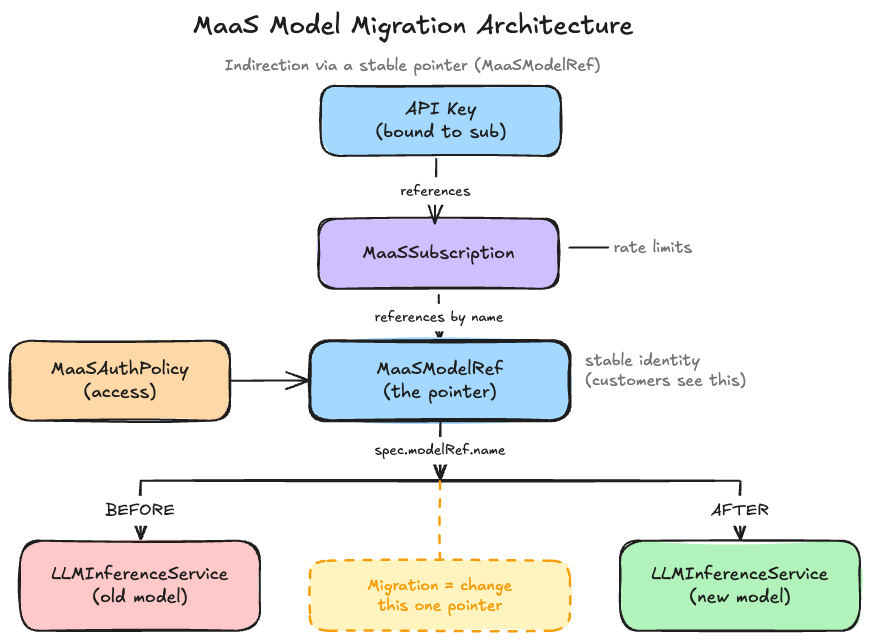
MaaSModelRef Phase Transitions
The MaaSModelRef goes through these phases:
| Phase | Meaning |
|---|---|
| Pending | Backend is initializing or no governance pairing found yet. |
| Ready | Backend is healthy AND at least one MaaSSubscription + MaaSAuthPolicy pair is active. Inference is possible. |
| Unhealthy | Governance is attached but the backend has a runtime or health failure. |
| Failed | Non-recoverable reconciliation error. |
| Invalid | The resource spec is missing or structurally invalid. |
Governance means at least one MaaSSubscription AND one MaaSAuthPolicy both reference the same MaaSModelRef. Both are required for the model to reach Ready phase. These two CRDs are independent - updating one does NOT auto-update the other. For details on keeping them in sync, see Governance Pairing in Phase 5.
What Changes vs What Stays the Same
| Component | Changes? | Why |
|---|---|---|
| LLMInferenceService | Yes | New backend deployed (qwen-38), old one deleted (qwen-36). |
MaaSModelRef spec.modelRef.name | Yes | Pointer swapped from qwen-36 to qwen-38. |
| MaaSModelRef name | No | qwen-coder is the stable identity that customers see. Keeping it the same is what makes the swap seamless. |
| MaaSAuthPolicy | No | References MaaSModelRef qwen-coder by name (unchanged). |
| MaaSSubscription | No | References MaaSModelRef qwen-coder by name (unchanged). |
| API keys | No | Bound to a subscription at creation time. Subscription is unchanged, so keys keep working. |
| Model ID in requests | No | Both qwen-36 and qwen-38 serve the same spec.model.name (Qwen/Qwen3-Coder), so the canonical model ID (publishers/llm/models/Qwen/Qwen3-Coder) stays the same. |
BBR endpoint (/v1/chat/completions) | No | Body-based routing uses the canonical model ID in the request body (publishers/llm/models/Qwen/Qwen3-Coder), derived from the namespace and spec.model.name (both unchanged). Customers using this endpoint need no changes. |
Per-model URL path (/llm/<name>/...) | Yes | The per-model URL path changes from /llm/qwen-36/... to /llm/qwen-38/... because it is derived from the LLMInferenceService name. Customers using per-model URLs must switch to the BBR endpoint. |
The per-model URL path changes after a swap: /llm/qwen-36/v1/chat/completions becomes /llm/qwen-38/v1/chat/completions because it is derived from the LLMInferenceService name, not the MaaSModelRef name. Always use the BBR endpoint (/v1/chat/completions) with the full publisher model ID in the request body (e.g. publishers/llm/models/Qwen/Qwen3-Coder) for swap-safe client integration.
Prerequisites
- Phases 1-5 completed (Red Hat OpenShift AI installed, Models as a Service platform running,
llmnamespace created) - Admin access to the model namespace and
models-as-a-servicenamespace
Swap Procedure
This procedure walks through the full swap lifecycle using the provided Qwen 3.6 -> 3.8 simulator templates. Both templates use the CPU simulator image (llm-d-inference-sim), so no GPU is required.
The scenario: you have a model called qwen-36 registered with MaaS through a MaaSModelRef called qwen-coder. You want to replace it with qwen-38 without affecting customers.
If you already have a model deployed from Phase 5, you can skip the original model deployment and adapt the steps to your existing model names.
Step 1: Deploy the Original Model
Deploy the original model (qwen-36) with its full MaaS stack (MaaSModelRef, AuthPolicy, Subscriptions):
Wait for the model to become Ready:
Expected output:
Step 2: Deploy the Replacement Model
Deploy the replacement (qwen-38) alongside the existing one:
The new LLMInferenceService must use the same spec.model.name as the existing one. Both qwen-36 and qwen-38 use Qwen/Qwen3-Coder. This is the model ID that customers send in their API requests (/v1/chat/completions). If the names differ, customers would need to update their client code.
Step 3: Verify the Replacement is Ready
Wait for both LLMInferenceServices to be running:
Expected output - both old and new show a Ready condition:
For GPU models, this can take 5-15 minutes while the image is pulled and model weights are loaded.
Step 4: Swap the MaaSModelRef Pointer
This is the swap itself. Patch the MaaSModelRef to point to the new LLMInferenceService:
This one-field change is what makes the swap seamless. The MaaSModelRef name (qwen-coder) stays the same, so all auth policies, subscriptions, and API keys continue to work.
Verify the MaaSModelRef now points to qwen-38:
Step 5: Delete the Old LLMInferenceService
While both LLMInferenceServices exist, the gateway routes 100% of BBR traffic to qwen-36 (the first-created backend) and 0% to qwen-38. You must delete qwen-36 so the gateway starts routing to qwen-38.
This means the swap is not zero-downtime. There is a brief window (typically a few seconds) between deleting the old model and the gateway routing to the new one where requests may fail.
This deletes the old inference pods, its HTTPRoute, and frees any GPU resources it was using.
Step 6: Clean Up Stale TokenRateLimitPolicy
After swapping the MaaSModelRef and deleting the old LLMInferenceService, the TokenRateLimitPolicy (TRLP) may retain an owner reference to the old HTTPRoute. This causes the MaaSSubscription to go Failed because the TRLP references a non-existent route.
Delete the stale TRLP so the controller can recreate it with the correct owner reference:
The maas-controller will automatically recreate the TRLP, now correctly owned by the new HTTPRoute.
Step 7: Verify
Confirm that everything is healthy:
Test inference to confirm the swap worked. If you already have an API key from before the swap, use it - the whole point is that existing keys keep working. If you need a new one:
Send an inference request using the BBR endpoint:
A successful response confirms the swap is complete - the request was routed to qwen-38 using the same model ID and API key that worked with qwen-36.
The model ID in the request body must be the full publisher path as returned by /v1/models (e.g. publishers/llm/models/Qwen/Qwen3-Coder). Using the short name (Qwen/Qwen3-Coder) returns a 404.
Operational Notes
BBR Routing Conflict
When two LLMInferenceServices in the same namespace share the same spec.model.name, their HTTPRoutes create identical BBR match rules. The gateway accepts both routes but routes 100% of traffic to the first-created backend - the new model receives zero requests. This was validated on OpenShift 4.21: 10/10 requests hit the old pod, 0/10 hit the new one. Deleting the old LLMInferenceService removes its HTTPRoute and lets the gateway discover the new one. There is no way to “test the new model first” while the old one exists.
TokenRateLimitPolicy Stale Owner Reference
The TokenRateLimitPolicy is auto-created by maas-controller and owned by the HTTPRoute. When the MaaSModelRef pointer changes, the TRLP still references the old HTTPRoute. Deleting the TRLP (Step 6) lets the controller recreate it with the correct owner. If you skip this, the MaaSSubscription may go Failed with an error like: Object <namespace>/maas-trlp-<name> is already owned by another HTTPRoute.
endpointOverride
If you created the MaaSModelRef manually (not through the Kustomize manifests in Phase 5), the controller may not be able to auto-discover the endpoint URL. In that case, set spec.endpointOverride on the MaaSModelRef:
You can check if this is needed by looking at the MaaSModelRef status. If it is stuck in Unhealthy with an empty endpoint, endpointOverride is the fix.
Model ID Format
The model ID used in inference requests (/v1/chat/completions) is the full publisher path, not the short model name. For example:
- Short name:
Qwen/Qwen3-Coder - Full publisher path:
publishers/llm/models/Qwen/Qwen3-Coder
Always use the model ID as returned by the /v1/models endpoint to avoid 404 errors.
Template Manifests
The manifests/99-model-swap/ directory contains two concrete simulator-based templates that walk through the full swap lifecycle (Qwen 3.6 -> 3.8):
Both templates use the CPU simulator image (llm-d-inference-sim), so no GPU is required. Both share spec.model.name: Qwen/Qwen3-Coder - this is the invariant that makes the swap seamless.
The qwen-36/ directory includes the full MaaS stack (MaaSModelRef + AuthPolicy + Subscriptions) because it is the original deployment. The qwen-38/ directory only includes the LLMInferenceService because the MaaS governance resources persist unchanged across the swap - only the MaaSModelRef pointer changes.
For a real swap with GPU models, replace the container image, model URI, and resource requests in both model.yaml files to match your actual models.
References
- Architecture & Request Flow - full Models as a Service component overview and request lifecycle
- Phase 5: Model Deployment - how to deploy a model from scratch
- Upstream MaaS Documentation