This is the multi-page printable view of this section. .
CAI Field Manual for MaaS
- 1: Automated Setup
- 2: Phase 0: Disconnected Setup
- 3: Installation Guide
- 4: Model Deployment & Verification
- 5: Phase 7: Observability (Optional)
- 6: Phase 8: External Models (Optional)
- 7: Phase 9: External OIDC Authentication (Optional)
- 8: Upgrade (3.4 → 3.5)
- 9: Running MaaS on OpenShift 5
- 10: Running MaaS with RHCL 1.5
- 11: Reference
- 11.1: Architecture & Request Flow
- 11.2: Request Deep Dive: Pod-by-Pod Tracing
- 11.3: API Key Security
- 11.4: Multi-Tenancy
- 11.5: Browser Access (CORS)
- 11.6: Model Swap
- 12: Demos
- 13: Cleanup & Teardown
- 14: Guide Changelog
- 15: AI-Assisted Installation and Verification
- 16: MaaS:PAL — Verification for your MaaS
Guide to deploy Red Hat OpenShift AI 3.4 / 3.5 Models as a Service on OpenShift.
- Kustomize manifests with status gates between every phase
- Single automation script for end-to-end deployment
- CPU-only simulator model for validation without GPUs
Requires OpenShift 4.19+ with cluster-admin access.
OpenShift 5: MaaS runs on OpenShift 5.0, but two operators need a different catalog and channel than the manifests assume. See Running MaaS on OpenShift 5.
RHCL 1.5: MaaS on RHOAI 3.5.2 was validated with RHCL 1.5.0 and the GA MCP Gateway on the same cluster. See Running MaaS with RHCL 1.5 for the fixes it needs.
Open the Install & Configuration Visualizer (opens in new tab) 4 Flows | 9 Phases | Governance Pairing | Tiers & Priority | 30+ Components An animated, click-to-inspect walkthrough of the full install sequence, the most common ordering mistake, and how MaaSModelRef/MaaSAuthPolicy/MaaSSubscription pair up. Handy for explaining the moving parts to a customer before you touch a cluster.
Getting Started
Clone the repository and work from its root directory. All commands and file paths in this guide are relative to the cloned repo.
You also need:
- OpenShift 4.19+ cluster with
ocCLI authenticated as cluster-admin envsubst,curl,jqavailable on PATH
Phases
Each phase has step-by-step instructions, status gates, and troubleshooting.
Disconnected Setup
| Phase | Description | Time |
|---|---|---|
| 0. Disconnected Setup (air-gapped only) | Mirror MaaS operators and images, ITMS for modelcars, WASM shim patch, GPU driver setup | 30-60 min |
Installation Guide
| Phase | Description | Time |
|---|---|---|
| 1. Prerequisites | Operator subscriptions (RHOAI, RHCL, cert-manager, LWS) | 5-10 min |
| 2. Platform Configuration | Kuadrant/Authorino, User Workload Monitoring, GatewayClass, Gateway | 5-10 min |
| 3. MaaS Platform | PostgreSQL database and secrets | 5 min |
| 4. RHOAI Configuration | DataScienceCluster, DSCInitialization, Dashboard settings | 5-10 min |
Model Deployment & Verification
| Phase | Description | Time |
|---|---|---|
| 5. Model Deployment | Deploy and register LLM models with MaaS | 1-15 min |
| 6. Verification | End-to-end checks (API keys, inference, rate limiting) | 5 min |
Observability
| Phase | Description | Time |
|---|---|---|
| 7. Observability (optional) | COO subscription + Gateway telemetry dashboards | 5 min |
External Models
| Phase | Description | Time |
|---|---|---|
| 8. External Models (optional) | Expose third-party LLM APIs (OpenAI, Bedrock, Gemini) through the MaaS gateway | 5-10 min |
External OIDC Authentication
| Phase | Description | Time |
|---|---|---|
| 9. External OIDC Authentication (optional) | Integrate MaaS with Keycloak or other OIDC providers for corporate authentication | 10-15 min |
Automated Setup
For end-to-end deployment using a single script, see the Automated Setup page.
Available Models
| Model | GPU Required | VRAM | Use Case |
|---|---|---|---|
simulator | No | None | Testing/demo (CPU-only) |
granite-tiny-gpu | Yes | ~8 GiB | Small GPU (L4, L40) |
gemma | Yes | ~12 GiB | Mid GPU (L4, L40, L40S) |
gpt-oss-20b | Yes | ~16 GiB | Large model, runs quantized (L4 24 GB, L40S, A100) |
qwen3-06b | No | None (~16 GiB RAM) | Real CPU inference (no GPU needed) |
Documentation
1 - Automated Setup
setup-maas.sh is a single script that handles the entire MaaS lifecycle, from operator installation through model deployment and verification. Each phase is idempotent; re-running skips what’s already done.
Clone and Run
RHAIE Version: 3.5, 3.6
RHAIE Version: 3.4
This runs Phases 0-6 automatically. The script detects what’s already installed and skips completed phases.
Arguments
| Option | Description | Default |
|---|---|---|
--model <name> | Model to deploy: simulator (CPU), granite-tiny-gpu (small GPU), gemma (mid GPU), gpt-oss-20b (large GPU), qwen3-06b (real CPU, no GPU), auto (auto-detect by GPU VRAM) | auto |
--rhoai-version <v> | RHOAI version: 3.4 or 3.5. Auto-detects if already installed. | 3.5 |
--from-phase <N> | Start from phase N (0-8), skipping earlier phases | 0 |
--skip-models | Skip Phase 5 (model deployment) | |
--skip-verify | Skip Phase 6 (verification) | |
--with-observability | Also run Phase 7 (COO + Gateway telemetry) | |
--with-external-models | Also run Phase 8 (ExternalModel deployment via OpenAI, Gemini, or Bedrock) | |
--dry-run | Preview what would be applied without making changes |
Phases
| Phase | What it does | Time |
|---|---|---|
| 0 | Preflight - detect cluster state, decide which phases to run | instant |
| 1 | Operators - oc apply -k manifests/01-prerequisites/operators/, wait for CSVs | 2-5 min |
| 2 | Platform - Kuadrant, UWM, GatewayClass, envsubst Gateway | 2-5 min |
| 3 | MaaS Platform - PostgreSQL secrets/deployment | 2-3 min |
| 4 | RHOAI - DSC with modelsAsService: Managed, Dashboard flags, wait for maas-api | 3-5 min |
| 5 | Model - auto-detect GPU, apply Kustomize, wait for Ready | 0.5-15 min |
| 6 | Verify - 6-phase E2E (API, auth, rate limits, cleanup) | 3-5 min |
| 7 | Observability - COO subscription + Gateway TelemetryPolicy | 2-3 min |
| 8 | External Models - ExternalModel CRs + MaaS governance (only with --with-external-models) | 5-10 min |
Common Usage Patterns
Full installation (recommended)
For a fresh cluster with no MaaS components:
With observability
Resume from a specific phase
If a previous run failed at Phase 4:
Models only
If the platform is already installed and you just want to deploy a model:
Or use the standalone model script for more control:
With external OIDC authentication
After the base installation, add Keycloak-based OIDC authentication so users can access MaaS with their corporate credentials instead of OpenShift tokens:
See Phase 9: External OIDC Authentication for the full manual walkthrough and Bring Your Own IdP instructions.
Verify only
Or directly:
Convenience Scripts
These wrap individual phases for standalone use:
| Script | What it does |
|---|---|
scripts/deploy-model.sh | Phase 5 only - deploy a model with GPU auto-detection |
scripts/test-inference.sh | Send inference requests to a deployed model endpoint |
scripts/verify-maas.sh | Phase 6 only - wrapper for manifests/06-verification/verify.sh |
manifests/09-external-oidc/setup-keycloak.sh | Phase 9 - deploy Keycloak + configure OIDC on the MaaS tenant (--cleanup to revert) |
manifests/09-external-oidc/test-external-oidc.sh | Phase 9 verification - 6-test OIDC flow (tokens, API keys, inference, group access) |
State Detection
Phase 0 inspects the cluster and reports what’s already installed. The script uses this to skip completed phases:
- Operators installed? Skip Phase 1.
- Kuadrant + UWM + Gateway ready? Skip Phase 2.
- PostgreSQL running? Skip Phase 3.
- DSC with modelsAsService: Managed + maas-api running? Skip Phase 4.
- Models deployed in llm namespace? Skip Phase 5.
Override with --from-phase N to force re-running from a specific phase.
AI-Assisted Installation
If you use an AI coding tool (Claude Code, Open Code, Cursor, Roo Code), the /install-maas skill wraps the same script with an interactive, AI-assisted workflow. Clone the repo, open it in your tool, and run:
Or with arguments:
See AI-Assisted Installation for details.
Final Report
The script ends with a summary: RHOAI version, MaaS API URL, Gateway status, health check, deployed models, and suggested next steps.
2 - Phase 0: Disconnected Setup
Additional steps to deploy Red Hat OpenShift AI Models as a Service on an air-gapped (disconnected) OpenShift cluster.
This phase is only needed for disconnected environments where the cluster has no internet access. For connected clusters, skip directly to Phase 1.
Overview
A disconnected OpenShift cluster pulls all container images from a private mirror registry instead of the public registries. Before deploying MaaS, the operator catalogs and container images must be mirrored to that registry.
This guide assumes:
- OpenShift 4.20+ is already installed in disconnected mode
- Red Hat OpenShift AI 3.4 / 3.5 operators are installed (rhods-operator, cert-manager, NFD, GPU operator)
- A mirror registry is running and the cluster trusts its CA
- ImageDigestMirrorSet (IDMS) and CatalogSources from the RHOAI mirror are already applied
The MaaS guide adds 10 operators and several container images that are NOT part of the base RHOAI mirror set. This phase mirrors those extra components.
Currently, oc-mirror mirrors all images referenced in the RHOAI operator bundle regardless of which DSC components you enable. There is an initiative (RHOAIENG-75890 / OCPSTRAT-3350) to support selective mirroring - so you can mirror only the images for the components you need (e.g. Dashboard + MaaS). Until that lands, this guide mirrors the full set.
MaaS operators to mirror
| Operator | Package Name | Purpose |
|---|---|---|
| Red Hat Connectivity Link | rhcl-operator | API gateway, auth (Authorino), rate limiting (Limitador) |
| Authorino Operator | authorino-operator | Auth engine (RHCL dependency, required >= 1.4.2) |
| DNS Operator | dns-operator | DNS policy (RHCL dependency, required >= 1.4.1) |
| Limitador Operator | limitador-operator | Rate limiting engine (RHCL dependency, required >= 1.4.1) |
| Leader Worker Set | leader-worker-set | Distributed inference coordination |
| MetalLB | metallb-operator | LoadBalancer service for the MaaS gateway |
| Cluster Observability Operator | cluster-observability-operator | Monitoring stack |
| OpenTelemetry | opentelemetry-product | Distributed tracing |
| Tempo | tempo-product | Trace storage backend |
| Loki Operator | loki-operator | Log storage for the Phase 7 usage dashboards |
Additional images to mirror
The vLLM CUDA runtime is published under registry.redhat.io/rhaii/ (double ‘i’, no trailing ’s’). Some upstream references incorrectly use rhaiis/ - this will fail on disconnected clusters because the IDMS only covers rhaii/. The model manifests in this guide already use the correct rhaii/ path with a pinned digest. See RHOAIENG-82814.
Images not discoverable through operator bundles:
| Image | Purpose |
|---|---|
registry.redhat.io/rhel9/postgresql-16@sha256:3943... (pinned digest) | MaaS PostgreSQL database |
registry.redhat.io/rhaii/vllm-cuda-rhel9@sha256:5800... (pinned digest) | vLLM CUDA runtime for GPU models |
registry.access.redhat.com/rhcl-1/wasm-shim-rhel9@sha256:... (pinned digest) | Kuadrant WASM shim for gateway auth and rate limiting (see wasm-shim) |
ghcr.io/llm-d/llm-d-inference-sim:v0.7.1 | Simulator runtime (CPU-only model) |
quay.io/rh-aiservices-bu/minio:RELEASE.2025-09-07T16-13-09Z | MinIO S3 backend for the LokiStack (usage dashboards) |
quay.io/rh-aiservices-bu/mc:latest | MinIO client, creates the loki bucket (floating tag, pin it for a reproducible mirror) |
registry.redhat.io/rhai/modelcar-granite-4-0-h-tiny-fp8-dynamic:3.0 | Granite 4.0-h-tiny model weights |
registry.redhat.io/rhelai1/modelcar-gpt-oss-20b:1.5 | GPT-oss-20b model weights |
registry.redhat.io/rhelai1/modelcar-gemma-2-9b-it-fp8:1.5 | Gemma 2 9B IT FP8 model weights |
registry.redhat.io/openshift-service-mesh/istio-pilot-rhel9@sha256:... (pinned digest) | Istiod control plane (OpenShift >= 4.20.32 only, see istiod-images) |
registry.redhat.io/openshift-service-mesh/proxyv2-rhel9@sha256:... (pinned digest) | Envoy proxy / gateway data plane (OpenShift >= 4.20.32 only, see istiod-images) |
The WASM shim image lives on registry.access.redhat.com (not registry.redhat.io). This is a different registry. The WASM shim digest changes with each RHCL operator version - see wasm-shim for how to discover it.
Mirroring workflow
Step 1: Mirror the MaaS content
An ImageSetConfiguration is provided at manifests/00-disconnected/imageset-config-maas.yaml. It includes all the operators (Red Hat OpenShift AI base + MaaS) and the additional images listed above.
Before running oc-mirror, discover the WASM shim digest for your RHCL version and update the ImageSetConfiguration:
On OpenShift 4.20.32 and later, the openshift-ingress operator embeds the Istio sail library instead of installing a standalone OSSM operator. The istiod and proxyv2 images it pulls are NOT in the OCP release payload and NOT in any operator catalog. They must be mirrored explicitly.
On OpenShift < 4.20.32, the servicemeshoperator3 catalog entry covers these images and you can skip this block.
To discover the digests, you need a connected reference cluster running the same OpenShift version with a Gateway already created (creating a Gateway triggers istiod provisioning):
Replace <ISTIOD_DIGEST> and <PROXYV2_DIGEST> in imageset-config-maas.yaml with the digests from the commands above.
If you do not have a connected reference cluster with a Gateway, check the OpenShift release notes for your z-stream. The istiod and proxyv2 images are listed under the Service Mesh / Gateway API components.
On a connected system (jump box) with oc-mirror v2 and a valid pull secret:
If the RHOAI operators are already mirrored, oc-mirror only downloads the 6 new MaaS operators and the additional images. The run is incremental.
Step 2: Transfer to the disconnected side
Transfer the archive to the disconnected host. Use rsync for resumable transfers:
Step 3: Push to the mirror registry
On the disconnected host, push the content into the mirror registry:
This produces IDMS/ITMS and CatalogSource files in working-dir/cluster-resources/.
Step 4: Apply cluster resources
Apply the generated resources to the cluster:
If the cluster already has a CatalogSource alias named redhat-operators, update it to point to the new catalog index image (which now includes the MaaS operators):
Step 5: Create ITMS for modelcar images
oc-mirror creates ImageDigestMirrorSet (IDMS) entries for images referenced by digest, but OCI modelcar images use tags (e.g. :3.0, :1.5). CRI-O needs an ImageTagMirrorSet (ITMS) to redirect tag-based pulls to the mirror registry.
A ready-to-use ITMS manifest is provided at manifests/00-disconnected/itms-maas-modelcars.yaml. It covers rhai/, rhelai1/, registry.access.redhat.com/rhcl-1/, and ghcr.io/llm-d namespaces.
Check if ITMS entries already exist:
If no ITMS entries exist, apply the manifest (replace the placeholder with your mirror address):
Replace <your-registry>:<port>/<ns> with your mirror registry address (the same one used in Step 3).
Applying ITMS triggers a MachineConfig update. Worker nodes will reboot in a rolling fashion. Wait for oc get mcp worker to show UPDATED=True before continuing.
Batch all ITMS/IDMS changes into a single oc apply. Do not add them incrementally - each apply triggers a separate MachineConfig rollout with node reboots.
Step 6: Patch RHCL for WASM shim
The Kuadrant/RHCL WASM shim is loaded at runtime by the Envoy gateway pod using the OCI protocol. This fetch does not go through CRI-O and does not respect IDMS/ITMS/ICSP. On a disconnected cluster, the gateway tries to reach registry.access.redhat.com directly. When it fails, Kuadrant applies a deny-all RBAC filter and every request returns “RBAC: access denied”.
The fix is to set the RELATED_IMAGE_WASMSHIM environment variable on the RHCL operator subscription, which tells the operator to serve the shim from the mirrored image via its internal cluster service instead of having the gateway fetch it from the public registry.
First, find the WASM shim digest from the installed RHCL CSV:
Build the mirrored image reference (replace the source registry with your mirror):
Patch the RHCL subscription:
Wait for the RHCL operator pod to restart with the new env var:
After the operator restarts, delete the gateway pod so it picks up the new WASM shim location:
If the mirror registry uses a self-signed CA, the gateway pod may fail with a TLS certificate error when fetching the WASM shim. Ensure the mirror registry CA is in the cluster’s proxy/trust bundle (oc get proxy/cluster -o jsonpath='{.spec.trustedCA.name}').
Verification
Confirm all MaaS operators are available:
All 10 should resolve to a CatalogSource. If any show NOT FOUND, the mirror set is incomplete - check the oc-mirror output for errors.
Verify the gateway pod has no WASM errors:
If you see cannot fetch Wasm module or applying deny RBAC filter, the WASM shim patch from wasm-shim was not applied or the image is not in the mirror registry.
CPU MachineSet (optional)
If the cluster has no dedicated CPU worker nodes and you plan to deploy the CPU-only models (simulator, qwen3-06b), create a CPU MachineSet.
A template is provided at manifests/00-disconnected/cpu-machineset.yaml. It is the same shape as the GPU template but sets no taint - the GPU model manifests tolerate nvidia.com/gpu, while the CPU model manifests carry no tolerations, so a taint here would leave their pods Pending.
On IPI-installed AWS clusters the worker MachineSet references its subnet by tag filter, not by ID, which is why SUBNET_NAME reads the filter value. If oc get machineset ... subnet.filters[0].values[0] returns nothing, your cluster pins an explicit subnet ID instead - edit the template’s subnet block to use id: <subnet-id>.
The node comes up labelled node-role.kubernetes.io/cpu-inference. m6i.2xlarge (8 vCPU / 32 GiB) is the minimum for qwen3-06b; m6i.4xlarge (16 vCPU / 64 GiB) leaves room for platform pods as well.
GPU setup (optional)
GPU MachineSet
If the cluster has no GPU nodes and you plan to deploy GPU models (Gemma, Granite, GPT-oss), create a GPU MachineSet.
A template is provided at manifests/00-disconnected/gpu-machineset.yaml. Before applying, discover the cluster-specific values:
On IPI-installed AWS clusters the worker MachineSet references its subnet by tag filter, not by ID, which is why SUBNET_NAME reads the filter value. If oc get machineset ... subnet.filters[0].values[0] returns nothing, your cluster pins an explicit subnet ID instead - edit the template’s subnet block to use id: <subnet-id>.
Wait for the GPU node to be Ready:
The default instance type is g6.2xlarge (1x L4, 24 GB VRAM) - enough for Gemma 2 9B FP8, Granite tiny, and gpt-oss-20b (quantized). Edit the template to use g6e.2xlarge (1x L40S, 48 GB VRAM) for more VRAM headroom (longer context, larger models).
Do not use g5 instances (A10G GPUs) - vLLM FP8 requires compute capability >= 80 (Ampere or newer). A10G GPUs are not supported. Use g6 (L4) or g6e (L40S) instances instead.
GPU driver compilation on disconnected
The NVIDIA GPU operator compiles the NVIDIA kernel module at runtime, against the exact kernel running on the GPU node. On OpenShift it does this one of two ways, and which one you get decides whether a disconnected cluster needs anything extra:
- With the Driver Toolkit (DTK) - the driver pod gets a second container built from the Driver Toolkit image, which ships in the OpenShift release payload and is therefore already mirrored. That image contains the matching kernel sources at
/usr/src/kernels/<kernel-version>, so the build downloads nothing. The operator symlinksdnfto/usr/bin/trueinside the pod, which makes thednf install kernel-*calls in the build script inert. - Without DTK - the driver container builds alone and its
dnfis real. It is UBI-based, and the standard UBI repos do not ship kernel packages, so the build script enablesrhocp-<ocp-version>-for-rhel-9-x86_64-rpmsandrhel-9-for-x86_64-baseos-eus-rpmsand installskernel-headers,kernel-develandkernel(with vmlinuz) from them. Both are entitled Red Hat CDN repos and are unreachable from a disconnected cluster. This is the only case that needs a local repo.
Both paths run the same build script and ask for the same packages. The only thing that decides between them is whether the operator can pair the driver with a DTK image whose kernel matches the node. Check that first - on a healthy disconnected cluster it matches and there is nothing to do.
Step 1: Confirm the node and DTK kernels match
The two kernel versions must be identical. If no GPU node exists yet, read the kernel from any worker instead - a GPU MachineSet cloned from the worker set boots the same RHCOS.
Nodes lag the release payload while a MachineConfig rollout is in progress, which breaks the match. Confirm oc get mcp shows every pool UPDATED=True, not paused and not degraded, before trusting the comparison - and check after any IDMS/ITMS reboot cycle, not before.
Create the GPU MachineSet by cloning the worker MachineSet and changing only the name, the machineset labels, replicas and instanceType. Leaving providerSpec.value.ami.id untouched makes the kernel match structural instead of coincidental.
Also confirm the DTK image is actually in the mirror. oc image info does not apply the cluster’s IDMS, so check the mirror path directly - IDMS maps quay.io/openshift-release-dev/ocp-v4.0-art-dev to <mirror-registry>/openshift/release:
If the kernels match and the DTK image is present, go to Step 2 - no local repo is required. If they do not match, fix the drift (converge the MachineConfigPool, or rebuild the GPU MachineSet from the current worker AMI). Do not jump to the fallback: it extracts from the DTK image, so a mismatched DTK yields the wrong kernel-devel and the module still will not load.
Step 2: Confirm the driver built
A healthy DTK build shows nvidia-driver-ctr and openshift-driver-toolkit-ctr, and the DaemonSet is named for the RHCOS version (for example nvidia-driver-daemonset-9.6.20260715-0). At this point driver.repoConfig.configMapName in the ClusterPolicy should still be empty - that is expected and correct.
If the driver pod never appears at all, the GPU operator has no labels to match on. Check that NFD is healthy (oc get pods -n openshift-nfd) and that the node carries feature.node.kubernetes.io/pci-10de.present=true. A broken NFD looks exactly like a driver problem but is not one.
Fallback: serve kernel and CUDA RPMs over HTTP
Only needed when Step 2 shows a single-container driver pod - the operator did not pair with DTK despite a matching image being available. This happens on older GPU operator versions where use_ocp_driver_toolkit was unset or false (the field no longer exists in v26.x, where DTK handling is internal), or when the operator cannot resolve a DTK image for that RHCOS version.
The approach is to take the kernel content out of the DTK image, repackage it as RPMs, add the CUDA development packages, and serve them to the driver container over HTTP.
Extract kernel packages from DTK
The obvious shortcut - run dnf download kernel-devel-${KERNEL_VERSION} inside the DTK container and get genuine RPMs - does not work. The DTK image has only the UBI repos configured (ubi-9-baseos, ubi-9-appstream, ubi-9-codeready-builder) and carries no entitlement certificates, and UBI does not ship kernel packages. Downloading on the bastion instead needs a host entitled for the rhocp-* and *-eus-rpms repos, which a disconnected lab bastion generally is not. That leaves the files already installed inside the DTK image as the only source of kernel content at the node’s exact version - hence extraction.
If you do have an entitled RHEL host that can reach the CDN, download the real kernel-devel, kernel-headers and kernel RPMs at the node’s exact NVR and skip the rpmbuild step. Genuine RPMs are more reliable than hand-rolled ones because the NVRs and file layout are correct by construction.
On a host that can pull from the mirror registry:
Build RPMs and create a local repo
Download CUDA development packages
The NVIDIA driver container also needs CUDA development packages (cuda-devel, cuda-nvcc, cuda-cudart-devel) to compile. On a connected cluster the driver pod downloads these from developer.download.nvidia.com. On a fully air-gapped cluster that is unreachable, so the CUDA RPMs must be included in the same local repo.
This applies to the fallback path only. A DTK build resolves everything locally and runs nvidia-installer with --no-kernel-modules, so it never reaches developer.download.nvidia.com - one more reason to confirm Step 1 before doing any of this.
On a connected host with access to the NVIDIA CUDA repo:
The CUDA version must match what the GPU operator expects. Check the driver container image tag or the CUDA_VERSION env var in the ClusterPolicy to find the right version.
Generate the repo metadata:
Serve the repo and configure the GPU operator
Replace <bastion-ip> with the IP of the host serving the repo. The GPU driver pod must be able to reach this host on port 8088.
The HTTP repo must stay running for the lifetime of the GPU nodes. The NVIDIA driver pod runs dnf install every time it starts - on node reboots, MachineSet scale-ups, operator upgrades, or ClusterPolicy changes. If the repo is gone, driver compilation fails and the GPU stays unusable. For production use, serve the repo from a persistent service (httpd container, nginx pod, or a proper artifact server) instead of a background python3 process. We opened RHOAIENG-82815 to track finding a better long-term solution for this.
Verify the driver
Troubleshooting
WASM shim: “RBAC: access denied”
Symptom: All MaaS API requests return “RBAC: access denied”. The gateway pod logs show:
Cause: The Kuadrant WASM shim is fetched at runtime by the Envoy gateway pod via the OCI protocol. This fetch bypasses CRI-O and does not respect IDMS/ITMS/ICSP. On a disconnected cluster, the public registry is unreachable, the fetch fails, and Kuadrant falls back to a deny-all RBAC filter.
Fix: Apply Step 6 of the Mirroring Workflow to patch the RHCL subscription with RELATED_IMAGE_WASMSHIM pointing to the mirror registry. Then restart the gateway pod.
TLS variant: If you see tls: failed to verify certificate: x509: certificate signed by unknown authority instead of no such host, the WASM shim is reachable but the mirror registry’s CA is not trusted by the gateway pod. Ensure the mirror CA is included in:
- The cluster proxy trusted CA bundle:
oc get proxy/cluster -o jsonpath='{.spec.trustedCA.name}' - The
additionalTrustedCAinimage.config.openshift.io/cluster
Istiod / gateway pod ImagePullBackOff (OpenShift >= 4.20.32)
Symptom: After creating the MaaS gateway, the istiod deployment or gateway proxy pod in openshift-ingress shows ImagePullBackOff or ErrImagePull with errors referencing registry.redhat.io/openshift-service-mesh/istio-pilot-rhel9 or proxyv2-rhel9.
Cause: On OpenShift >= 4.20.32, the openshift-ingress operator embeds the Istio sail library and pulls istiod/proxyv2 images directly from registry.redhat.io. These images are not in the OCP release payload and not in any operator catalog. Without explicit mirroring, the disconnected cluster cannot pull them.
Fix: Mirror the istiod and proxyv2 images as described in istiod-images. Discover the correct digests from a connected reference cluster, add them to imageset-config-maas.yaml, re-run oc-mirror, and apply the updated IDMS.
After the IDMS is applied and nodes reboot, delete the failed pods so they retry with the new mirror configuration:
Certificates
In a disconnected environment, the mirror registry uses a self-signed CA. The cluster needs to trust this CA for image pulls AND for workloads running inside RHOAI (workbenches, model servers, pipelines).
If RHOAI was deployed using the standard disconnected procedure:
- The mirror CA is already in the cluster’s image.config (
additionalTrustedCA) - The DSCInitialization
trustedCABundleis set toManagedwith the CA incustomCABundle - The
odh-trusted-ca-bundleConfigMap is propagated to all RHOAI-managed namespaces
Verify:
If any of these are missing, refer to the RHOAI disconnected installation guide, Chapter 8 (Working with certificates).
MaaS Gateway connectivity (AWS)
On AWS, the MaaS gateway creates a LoadBalancer service that defaults to an external NLB with public IPs. In a disconnected VPC, these public IPs are unreachable - both from the high-side host and from pods inside the cluster (the RHOAI dashboard’s maas-ui sidecar fails with EOF errors).
When you run setup-maas.sh with DISCONNECTED=true on AWS, the script automatically patches the Gateway to use an internal NLB:
After the internal NLB is provisioned (1-2 minutes), maas.<cluster-domain> resolves to private IPs reachable from inside the VPC.
If you already deployed MaaS without DISCONNECTED=true, you can apply the patch manually and delete the service. The gateway controller recreates it automatically.
The setup-maas.sh and verify.sh scripts also have a NodePort fallback - if the MaaS gateway URL is unreachable, they discover the NodePort and test via --resolve. You can test manually:
Next steps
Once the MaaS operators are available and (optionally) a GPU node is ready, proceed to Phase 1: Prerequisites and run the guide normally. Use the DISCONNECTED=true flag with setup-maas.sh to automatically skip Phase 8 (External Models) and use the disconnected simulator variant:
3 - Installation Guide
3.1 - Phase 1: Prerequisites
Install the operator subscriptions required by Red Hat OpenShift AI 3.4 / 3.5 Models as a Service.
All file paths and oc apply commands in this guide are relative to the CAI-Field-Manual-MaaS repository root. Make sure you have cloned it and are working from its root directory (see Getting Started).
Version Notes
The versions this guide is written against, for orientation only. This is not a support statement - the RHOAI 3.x supported configurations matrix is the authoritative source, and you should check it (and your own entitlements) before installing.
| Component | Used here | Notes |
|---|---|---|
| OpenShift | 4.19+ | 4.22 has been reported to work with Red Hat OpenShift AI 3.4 and 3.5. Disconnected installs are documented against 4.20+ (Phase 0). For OpenShift 5, which needs a different catalog and channel for two of the operators below, see Running MaaS on OpenShift 5. |
| RHOAI | 3.4, 3.5 | Both are covered. Version-specific steps are marked with tabs. |
| Red Hat Connectivity Link (RHCL) | 1.4.2+ | Any 1.4.x release is generally reported to work with Red Hat OpenShift AI 3.4 and 3.5. The manifests here assume >= 1.4.2, which is what the gateway-scoped AuthPolicy used by Multi-Tenancy needs. RHCL 1.5.0 (channel stable-1.5, with the GA MCP Gateway) was validated with Red Hat OpenShift AI 3.5.2, with two fixes, see Running MaaS with RHCL 1.5. |
On RHCL specifically: 1.3.x does not appear in the matrix for these RHOAI versions, so downgrading to it is probably not a good way out of a problem. For issues seen in earlier RHCL releases, see KCS 7144055.
On entitlement, the Red Hat AI subscription guide describes RHCL as being included in Red Hat AI SKUs for Models as a Service use cases only from Red Hat OpenShift AI 3.4 onward, and not included for other RHOAI components. When Models as a Service is enabled, RHCL is deployed through the Kuadrant Operator, which provides authentication, authorization, and rate limiting. Confirm the details for your subscription with Red Hat rather than relying on this paragraph.
Operator Overview
| Operator | Namespace | Purpose |
|---|---|---|
Red Hat OpenShift AI (rhods-operator) | redhat-ods-operator | Core RHOAI platform, model serving, dashboards, pipelines |
Red Hat Connectivity Link (rhcl-operator) | openshift-operators | API gateway policies, authentication (Authorino) and rate limiting (Limitador) for MaaS endpoints |
cert-manager (openshift-cert-manager-operator) | cert-manager-operator | TLS certificate lifecycle management for serving endpoints |
Leader Worker Set (leader-worker-set) | openshift-lws-operator | Coordinates multi-replica workloads for distributed inference and training |
Optional GPU Operators
| Operator | Namespace | Purpose |
|---|---|---|
Node Feature Discovery (nfd) | openshift-nfd | Detects hardware features (GPUs, CPU flags) and labels nodes accordingly |
NVIDIA GPU Operator (gpu-operator-certified) | nvidia-gpu-operator | Installs NVIDIA drivers, device plugin, and monitoring for GPU workloads |
Optional MetalLB Operator (Non-Cloud Clusters)
| Operator | Namespace | Purpose |
|---|---|---|
MetalLB Operator (metallb-operator) | metallb-system | Provides LoadBalancer IP addresses for the MaaS Gateway on baremetal, OpenStack, or SNO clusters |
On non-cloud clusters (baremetal, OpenStack, RHPDS, SNO), there is no cloud load-balancer controller to provision external IPs for LoadBalancer Services. MetalLB fills this role, assigning IPs from a configured pool so the MaaS Gateway can reach Programmed=True.
The setup-maas.sh script auto-detects non-cloud platforms and installs MetalLB automatically if needed.
Installation
Step 0: Clone the Repository
All commands in this guide are run from the repository root.
Step 1: Install Required Operators
This installs all four required operator subscriptions. OLM will resolve and install each operator automatically.
If any of these operators are already installed on your cluster (e.g. via OperatorHub), this command may fail with an OperatorGroup conflict - OLM only allows one OperatorGroup per namespace. In that case, delete the duplicate OperatorGroup that was just created:
Step 2 (Optional): Install GPU Operators
If your cluster has GPU nodes (or you plan to add them), install the GPU operators:
Step 2b (Optional): Create GPU Operand Instances
After the GPU operator CSVs have succeeded (see Verification below), create the operand instances that configure NFD and the GPU driver stack.
The operators must be fully installed before applying these resources - the CRDs they define do not exist until the operators are ready. Wait for both CSVs to succeed first.
Create the NFD NodeFeatureDiscovery instance (scans nodes for GPU hardware) and the NVIDIA ClusterPolicy (installs drivers, device plugin, monitoring):
Wait for the ClusterPolicy to reach ready state (this takes 5-10 minutes as the GPU operator installs NVIDIA drivers on GPU nodes):
Verify GPU resources are available:
Step 3: Install MetalLB (Non-Cloud Platforms Only)
Read this section carefully!
If your cluster has no cloud load-balancer controller (baremetal, OpenStack, RHPDS/SNO), you need MetalLB to make the Gateway accessible externally.
First, determine your platform type:
| Platform output | What to do |
|---|---|
AWS, Azure, GCP (cloud) | Skip to Verification below — no extra configuration needed. |
None, BareMetal, OpenStack | Continue with the steps below — MetalLB and a passthrough Route are required. |
Install the MetalLB operator:
If MetalLB is already installed on your cluster, this may fail with an OperatorGroup conflict. Delete the duplicate OperatorGroup from metallb-system namespace (see the note in Step 1 above).
Wait for the MetalLB CSV to succeed, then create the MetalLB CR and configure an IP pool:
Create MetalLB instance
Create IPAddressPool + L2Advertisement.
Do not use the node’s own IP for the MetalLB pool. When a LoadBalancer service shares the node IP on port 443, kube-proxy iptables rules intercept internal cluster traffic meant for the OpenShift router (which serves *.apps routes on the same IP:port via hostNetwork). This breaks OAuth callbacks, console access, and any in-cluster traffic to routes.
The command below derives an IP one address above the first node’s InternalIP. For multi-node clusters or complex networks, adjust METALLB_IP_RANGE to an unused IP on the same L2 subnet.
Verification
Wait for Operator CSVs to Succeed
After applying the subscriptions, wait for each operator’s ClusterServiceVersion to reach the Succeeded phase.
Operator CSVs take 30-60 seconds to appear after applying subscriptions. If oc wait returns “no matching resources found”, wait a minute and retry.
Required operators:
GPU operators (if installed):
Verify CRDs Are Available
Check that the key CRDs have been registered:
Quick Status Check
List all operator subscriptions and their current CSVs:
Expected Results:
Exact CSV versions will vary depending on when you install. The versions below were current as of June 2026.
Appendix
Directory Structure
References
- RHOAI 3.5 MaaS Official Docs
- RHOAI 3.4 MaaS Official Docs
- Upstream MaaS Documentation
- RHOAI 3.5 Installation Guide
- RHOAI 3.4 Installation Guide
Next step
Proceed to Phase 2: Platform Configuration.
3.2 - Phase 2: Platform Configuration
This phase configures the platform prerequisites for MaaS: Kuadrant/Authorino (auth and rate limiting), the GatewayClass, and the MaaS Gateway.
Apply each step in order and wait for the status gates before proceeding to the next step. The ordering matters because later resources depend on earlier ones (e.g. the Authorino CR references the TLS cert created by the Service annotation, and the Gateway requires the GatewayClass to exist).
All file paths and oc apply commands in this guide are relative to the CAI-Field-Manual-MaaS repository root. Make sure you have cloned it and are working from its root directory (see Getting Started).
Prerequisites
- OpenShift 4.19+ cluster with
ocCLI authenticated as cluster-admin - Red Hat Connectivity Link (RHCL) operator already installed (see RHCL docs)
- Phase 1 (operators) completed
Step 1: Kuadrant and Authorino
Kuadrant provides authentication (Authorino) and rate limiting (Limitador) for MaaS API endpoints. These three configurations:
- Create the
kuadrant-systemnamespace - Pre-configure the Authorino Service with a service-ca annotation to auto-generate a TLS certificate (
authorino-server-cert) for secure Gateway-to-Authorino communication - Deploy the Kuadrant CR with observability enabled, which triggers the Kuadrant operator to install Authorino and Limitador components. The
observability.enable: truesetting exposes rate-limiting and auth metrics for the RHOAI monitoring stack (COO) and the optional observability dashboards in Phase 7.
The Kuadrant operator auto-creates an Authorino instance when reconciling the Kuadrant resource. You’ll enable TLS on that Authorino instance in the next step.
Apply the namespace, service annotation, and Kuadrant CR. Do not apply the full kustomization in one shot. The Kuadrant operator auto-creates an Authorino CR when it reconciles the Kuadrant resource, so the Authorino CR must be configured separately via oc patch after Kuadrant is ready.
Wait for Kuadrant to become ready:
Expected on fresh clusters: If the cluster has no GatewayClass yet, this wait times out with Ready=False, reason MissingDependency (“Gateway API provider (istio / envoy gateway) is not installed”). This is normal - Istio is only provisioned when the GatewayClass is created in Step 4. Continue with Steps 2-4, then restart the Kuadrant operator pod and re-run the wait:
The same fix applies if Kuadrant reports MissingDependency on a cluster where Istio was installed after the Kuadrant CR (race condition).
Step 2: Configure TLS for Models-as-a-Service
Now that Kuadrant is deployed, we need to update the Authorino CR to enable TLS. (Detailed documentation for this step is available in the RHOAI docs: 3.5 | 3.4.) Follow the three steps below to enable TLS between the Gateway and Authorino. (The fourth step from the official docs - annotating the Gateway for the Authorino TLS bootstrap - is applied in Step 5c, after the Gateway is created.)
Step 2a: The service annotation (already applied above) triggered the service-ca operator to generate the authorino-server-cert TLS Secret:
Step 2b: Patch the Authorino CR to enable the TLS listener:
Step 2c: Configure Authorino deployment with TLS certificate env vars:
Wait for the Authorino deployment to become available:
Step 3: User Workload Monitoring (Optional)
In Red Hat OpenShift AI 3.5, User Workload Monitoring is no longer required for MaaS. The RHOAI operator creates its own ServiceMonitors with monitoring.opendatahub.io/scrape labels, and the COO MonitoringStack (configured in Phase 7) handles metrics collection. Enable UWM if you want the cluster to collect and forward MaaS metrics to external observability tools (Grafana, Datadog, etc.) via the standard OpenShift remote-write configuration. Skip it if you only need the RHOAI-native observability dashboards.
Enable User Workload Monitoring so that Prometheus scrapes MaaS and Kuadrant metrics from user namespaces.
Wait for the user-workload monitoring stack to start:
The prometheus-operator deployment may take 10-20 seconds to appear after applying the ConfigMap. If the wait command returns “not found”, retry after a few seconds.
Verify the Prometheus pods are running:
You should see prometheus-user-workload-0 and thanos-ruler-user-workload-0 pods in Running state.
Expected output:
Step 4: GatewayClass
Apply the GatewayClass that initializes OpenShift’s built-in Gateway API controller:
Wait for the GatewayClass to be accepted:
Verify:
Expected output:
Step 5: MaaS Gateway
The Gateway uses cluster-specific values (domain and TLS cert name), so it is provided as an envsubst template. Here we will extract the values, render the template, and apply them.
Step 5a: Check Your Platform Type
Before creating the Gateway, determine if your cluster requires additional configuration for non-cloud platforms:
| Platform output | What to do |
|---|---|
AWS, Azure, GCP (cloud) | Skip to Step 5b — create the Gateway directly. |
None, BareMetal, OpenStack | Continue to Step 5a.1 — verify MetalLB is installed first. |
Step 5a.1: Verify MetalLB is Installed (Non-Cloud Platforms Only)
Check if MetalLB is installed:
If you see “NotFound” or “Error”:
MetalLB is not installed. Without it, the Gateway will never reach Programmed=True because there is no cloud load balancer to assign an external IP.
You must go back and complete: Phase 1: MetalLB for Non-Cloud Clusters
After installing MetalLB and configuring an IPAddressPool, return to this step.
If MetalLB is installed: Continue to the next step.
Step 5b: Create the MaaS Gateway
First, apply the Gateway resource overrides ConfigMap. This sets the gateway proxy memory limit to 2Gi (the Istio default of 1Gi is insufficient when Kuadrant Wasm extensions are loaded):
Now create the Gateway. The Gateway template includes spec.infrastructure.parametersRef pointing to the ConfigMap above, so Istio applies the 2Gi limit to the generated Deployment and preserves it across reconciliations.
Step 5c: Annotate the Gateway for Authorino TLS bootstrap:
Wait for the Gateway to be programmed:
Gateway Pod OOMKill Prevention
The ConfigMap applied in Step 5b overrides the Istio default 1Gi memory limit to 2Gi via spec.infrastructure.parametersRef. This prevents the gateway pod from being OOMKilled when Kuadrant Wasm extensions (Authorino auth, Limitador rate limiting) are compiled at startup. Unlike oc patch deployment, this approach survives Istio reconciliation.
If you deployed the Gateway without the ConfigMap (e.g. from an older version of this guide), apply the fix retroactively:
Step 5d: Label namespaces for Gateway route binding
The Gateway restricts HTTPRoute attachment to namespaces explicitly labeled with maas.opendatahub.io/gateway-access=true. This follows the principle of least privilege - only namespaces that are designated to expose services through the Gateway can create routes.
For additional Gateway hardening beyond namespace selectors - including RBAC restrictions on HTTPRoute creation, ValidatingAdmissionPolicy enforcement, and audit procedures - see the KCS How to verify and secure configuration of OpenShift AI Gateway for Model Serving.
Any namespace that needs to serve models through the MaaS Gateway must be labeled with maas.opendatahub.io/gateway-access=true. Without this label, HTTPRoutes created in that namespace will not be accepted by the Gateway and the model will not be reachable.
If you create additional namespaces for model serving, remember to apply this label:
Label the namespace where the MaaS API route is created:
RHAIE Version: 3.5, 3.6
The redhat-ai-gateway-infra namespace does not exist yet - it is created by the RHOAI operator when MaaS is enabled in Phase 4. After completing Phase 4, come back and label it:
RHAIE Version: 3.4
Model namespaces (llm, external-models) are labeled in their respective deployment phases.
Step 5e: Create Passthrough Route (Non-Cloud Platforms Only)
If your platform type from Step 5a was None, BareMetal, or OpenStack, you must create a passthrough Route. This routes external traffic through the OpenShift ingress controller to the Gateway’s LoadBalancer service.
If your platform type from Step 5a was AWS, Azure, GCP, or another cloud provider, you can skip this step.
Why is this needed?
On non-cloud platforms, the Gateway’s LoadBalancer service receives an IP from MetalLB (e.g., 10.10.10.11), but that IP is only routable within the cluster network. External traffic cannot reach it directly.
The passthrough Route bridges external requests (via the OpenShift router at your cluster’s public DNS) to the internal LoadBalancer IP, allowing the Gateway to be accessible from outside the cluster.
MetalLB and the Route solve different problems. MetalLB assigns a LoadBalancer IP so the Gateway reaches Programmed=True - without it, the Gateway stays stuck in Pending. The passthrough Route makes that internal IP reachable from outside the cluster. Both are required on non-cloud platforms.
Environments without a Router VIP (round-robin DNS)
This setup assumes *.apps.<base_domain> resolves to the OpenShift Router VIP so that the passthrough Route can intercept traffic for maas.apps.<base_domain>.
In some on-prem environments, *.apps is configured as round-robin DNS pointing directly to worker node IPs instead of a single VIP. If the Router pods are not scheduled on all workers, requests may land on a node without a Router and fail silently.
In that case, create a dedicated DNS A record for maas.apps.<base_domain> pointing to the MetalLB-assigned IP of the Gateway’s LoadBalancer service:
Use that IP as the target for the DNS record.
Verify the Route was created:
Expected output:
Step 5f: Corporate Proxy Configuration (OCP < 4.22 Only)
On OCP versions before 4.22, the OpenShift Gateway controller does not propagate the cluster-wide proxy settings (config.openshift.io/v1 Proxy) into the gateway pod. If your cluster sits behind a corporate HTTP proxy, the istio-proxy container cannot reach external endpoints - this breaks ExternalModel provider calls and WASM plugin OCI image pulls.
This is tracked as OCPBUGS-77457 and is fixed in OCP 4.22+. On earlier versions, you must inject the proxy env vars manually through the gateway ConfigMap.
If your cluster is not behind a corporate proxy, or you are on OCP 4.22+, skip this step.
Detect if this applies to you:
If the OCP version is below 4.22 and httpProxy returns a value, apply the proxy-aware ConfigMap.
Step 5f.1: Extract the proxy values from the cluster-wide Proxy config:
Step 5f.2: Apply the proxy-aware ConfigMap (this replaces the gateway-resources.yaml applied in Step 5b - it includes the same 2Gi memory limit plus the proxy env vars):
The gateway pod will restart automatically. Wait for it to come back:
Step 5f.3: Verify the proxy env vars are set on the gateway pod:
You should see HTTP_PROXY, HTTPS_PROXY, and NO_PROXY with the correct values.
How it works: The gateway-resources-proxy.yaml.tmpl produces the same maas-gateway-options ConfigMap that the Gateway already references via spec.infrastructure.parametersRef. The gateway controller merges this ConfigMap into the generated Deployment, injecting the proxy env vars into the istio-proxy container alongside the 2Gi memory limit.
If you already applied gateway-resources.yaml in Step 5b, this step overwrites it with the proxy-aware version. The ConfigMap name (maas-gateway-options) and the Gateway’s parametersRef remain unchanged.
Verification
After completing all steps, confirm the full platform state:
On macOS, the local DNS resolver may cache negative lookups for maas.apps.<cluster-domain>. If curl reports “Could not resolve host” but dig or nslookup resolves the address correctly, either flush your DNS cache (sudo dscacheutil -flushcache; sudo killall -HUP mDNSResponder) or use the --resolve flag: curl -vsk --resolve "maas.${CLUSTER_DOMAIN}:443:$(dig +short maas.${CLUSTER_DOMAIN} | head -1)" https://maas.${CLUSTER_DOMAIN}.
Expected output:
Appendix
Directory Structure
References
- MaaS Platform Setup (upstream)
- MaaS Gateway Setup (upstream)
- Red Hat Connectivity Link documentation
- OpenShift User Workload Monitoring
- Gateway API on OpenShift
- Gateway Hardening KCS - Verify and secure Gateway for Model Serving
Next step
Proceed to Phase 3: MaaS Platform.
3.3 - Phase 3: MaaS Platform Infrastructure
Deploy the PostgreSQL database required by the MaaS API for key lifecycle management.
All file paths and oc apply commands in this guide are relative to the CAI-Field-Manual-MaaS repository root. Make sure you have cloned it and are working from its root directory (see Getting Started).
Prerequisites
- Phase 2 (platform configuration) is completed
- Kuadrant, User Workload Monitoring, GatewayClass, and Gateway are configured
redhat-ods-applicationsnamespace exists (created by the RHOAI operator in Phase 1)
Overview
The MaaS platform requires a PostgreSQL database before the RHOAI operator can fully enable Models-as-a-Service. Deploying PostgreSQL and creating the maas-db-config secret before enabling modelsAsService in the DataScienceCluster (Phase 4) ensures the maas-api deployment starts without crash-looping.
- PostgreSQL database - stores API key metadata (hashed tokens, subscription bindings, expiration, revocation state).
- PostgreSQL secrets -
postgres-creds(DB credentials) andmaas-db-config(connection URL consumed by maas-api).
If you prefer the fully automated path, see Automated Setup. To run only this phase automatically: ./scripts/setup-maas.sh --from-phase 3
Manual setup
Step 1: Create PostgreSQL secrets
These secrets cannot be stored in git. Create them imperatively:
On RHOAI 3.5+, the maas-api deployment runs in redhat-ai-gateway-infra, and the maas-db-config secret must also exist in that namespace. The namespace is only created by the RHOAI operator in Phase 4, so pre-create it now (this is safe - the operator adopts it later) and create the mirrored secret. Use the fully-qualified service hostname postgres.redhat-ods-applications.svc:5432 in the DB_CONNECTION_URL instead of the short name postgres:5432 (which won’t resolve from a different namespace):
The setup-maas.sh script handles this mirroring automatically.
Step 2: Deploy PostgreSQL
Apply the PostgreSQL manifests using Kustomize:
Or apply individually:
Verify
PostgreSQL
PostgreSQL secrets
Gateway
What this creates
| Resource | Namespace | Purpose |
|---|---|---|
PVC/postgres-data | redhat-ods-applications | 20Gi storage for PostgreSQL data |
Service/postgres | redhat-ods-applications | ClusterIP service for PostgreSQL |
Deployment/postgres | redhat-ods-applications | PostgreSQL 16 instance (RHEL 9 based) |
Secret/postgres-creds | redhat-ods-applications | DB user, password, database name (imperative) |
Secret/maas-db-config | redhat-ods-applications | Connection URL for maas-api (imperative) |
Troubleshooting
PostgreSQL pod not starting
Common causes:
postgres-credssecret does not exist (create it per Step 1)- PVC cannot be bound (check StorageClass availability)
Gateway stuck in Pending
On baremetal/OpenStack clusters without a cloud LB controller:
- See
openshift-gateway-setup/for MetalLB configuration - On cloud clusters, the LB provisions automatically
Appendix
Directory Structure
References
Next step
Proceed to Phase 4: RHOAI Configuration.
3.4 - Phase 4: RHOAI Configuration
Configure the RHOAI operator instances to enable Models-as-a-Service. Because the PostgreSQL database and maas-db-config secret already exist (Phase 3), the maas-api deployment will start healthy immediately.
All file paths and oc apply commands in this guide are relative to the CAI-Field-Manual-MaaS repository root. Make sure you have cloned it and are working from its root directory (see Getting Started).
Prerequisites
- RHOAI operator is installed and CSV is in
Succeededstate - Phase 3 (MaaS platform) is completed — PostgreSQL is running and
maas-db-configsecret exists
Verify the operator is ready before proceeding:
Expected output (version varies):
Apply
On a fresh install, apply in two stages. The OdhDashboardConfig CRD does not exist until the RHOAI operator has reconciled the DataScienceCluster, so applying the full kustomization in one shot will fail the first time.
The RHOAI operator auto-creates a default-dsci and odh-dashboard-config during installation. When you oc apply over these auto-created resources, you will see a warning: “resource is missing the kubectl.kubernetes.io/last-applied-configuration annotation”. This is harmless — the annotation is patched automatically and subsequent applies will be clean.
Wait until the DSCI is created (this step must complete before creating the DSC):
Create the Data Science Cluster:
RHAIE Version: 3.5, 3.6
Enables MaaS via aigateway.modelsAsAService: Managed, the modularized path for RHOAI 3.5+.
RHAIE Version: 3.4
The kserve.modelsAsService DSC path is deprecated in RHOAI 3.5 and replaced by aigateway.modelsAsAService. Without aigateway set to Managed, regular (non-admin) users will not see the AI asset endpoints page in the Dashboard. If upgrading from 3.4, see Platform Upgrade (3.4 -> 3.5).
Apply the GPU HardwareProfile so RHOAI properly schedules GPU workloads:
Without this HardwareProfile, GPU model deployments may hang. The node will show nvidia.com/gpu: 0 requested even when the GPU is physically present, because RHOAI needs a HardwareProfile to map GPU resources to workloads.
The DataScienceCluster reconciles multiple components. Wait for KServe and the Model Controller (MaaS) to reach Ready:
With the Data Science Cluster created we can now apply the dashboard configuration:
On subsequent runs (CRDs already exist), oc apply -k manifests/04-rhoai-config/ works in one shot. The kustomization includes the 3.5+ DSC by default - for RHOAI 3.4, apply the individual files as shown above.
Verify
Check MaaS CRDs are installed
The operator installs MaaS CRDs when Models-as-a-Service is set to Managed:
Expected CRDs (RHOAI 3.4):
- externalmodels.maas.opendatahub.io
- maasauthpolicies.maas.opendatahub.io
- maasmodelrefs.maas.opendatahub.io
- maassubscriptions.maas.opendatahub.io
- tenants.maas.opendatahub.io
RHOAI 3.5+ adds three additional CRDs:
- aitenants.maas.opendatahub.io
- configs.maas.opendatahub.io
- maastenantconfigs.maas.opendatahub.io
Check maas-api deployment
Since PostgreSQL and the maas-db-config secret were created in Phase 3, the maas-api deployment should start healthy:
RHAIE Version: 3.5, 3.6
In RHOAI 3.5+, maas-api runs in the redhat-ai-gateway-infra namespace.
RHAIE Version: 3.4
The maas-api deployment may take 30-60 seconds to appear after the DSC is applied. If it is not found, wait and retry.
Check Tenant / Config CR
RHAIE Version: 3.5, 3.6
In RHOAI 3.5+, the maas-controller auto-creates a cluster-scoped Config CR (replacing the namespaced Tenant CR from 3.4):
RHAIE Version: 3.4
The maas-controller auto-creates a default-tenant CR in the models-as-a-service namespace:
The default-tenant CR may show either Ready=True (reason Reconciled) or Ready=False (reason DeploymentsNotReady) at this stage. Both are normal - if it shows Ready=False, it will become Ready=True after a model is deployed in Phase 5.
MaaS health endpoint
Check OdhDashboardConfig flags
Verify the following flags are set:
modelAsService: true- enables the Models as a Service tabgenAiStudio: true- enables the GenAI Studio tab (requiresogxManaged on 3.5+ orllamastackoperatorManaged on 3.4)observabilityDashboard: true- enables the Observability tab (requires COO + monitoring configured)externalModels: true- enables the External models tab under AI hub > Models > Deployments in the Dashboard, where administrators can view deployed external models, their providers, and connection details
The External models tab is a Technology Preview feature in RHOAI 3.5. Technology Preview features are not supported with Red Hat production service level agreements (SLAs) and might not be functionally complete. The external models functionality itself (CRDs, CLI, gateway routing) is fully supported (GA). For CLI-based external model management, see Phase 8: External Models.
The maasAuthPolicies flag was removed from the OdhDashboardConfig CRD in RHOAI 3.5. Do not include it in the manifest - the admission webhook will reject it.
What this creates
| Resource | Purpose |
|---|---|
DSCInitialization/default-dsci | Configures applications namespace, monitoring, and trusted CA bundle |
DataScienceCluster/default-dsc | Enables all RHOAI components including KServe with modelsAsService Managed |
OdhDashboardConfig/odh-dashboard-config | Enables MaaS, GenAI Studio, and Observability UI tabs |
HardwareProfile/gpu | Registers GPU resources with RHOAI for proper GPU scheduling |
Troubleshooting
If components do not become ready:
Appendix
Directory Structure
References
- RHOAI 3.5 MaaS Official Docs
- RHOAI 3.4 MaaS Official Docs
- RHOAI 3.5 Installation Guide
- RHOAI 3.4 Installation Guide
- Upstream MaaS Documentation
Next step
Proceed to Phase 5: Model Deployment.
4 - Model Deployment & Verification
4.1 - Phase 5: MaaS Model Deployment
This phase deploys LLM models and registers them with the MaaS platform. Each model includes the inference workload (LLMInferenceService) and the MaaS control plane resources (MaaSModelRef, MaaSAuthPolicy, MaaSSubscription) that enable API key management, access control, and rate limiting.
All file paths and oc apply commands in this guide are relative to the CAI-Field-Manual-MaaS repository root. Make sure you have cloned it and are working from its root directory (see Getting Started).
Prerequisites
- Phases 1-4 completed (RHOAI installed, MaaS platform running)
- MaaS Gateway available in
openshift-ingressnamespace maas-apiandmaas-controllerpods running (inredhat-ai-gateway-infraon RHOAI 3.5+, orredhat-ods-applicationson 3.4)
GPU models use FP8 quantization, which requires NVIDIA GPUs with compute capability >= 80 (Ampere architecture or newer). T4 GPUs (compute capability 75) are not supported with the current vLLM version. Use A10G, L4, L40, L40S, A100, or H100 GPUs.
Available Models
simulator (recommended for initial testing)
A CPU-only mock LLM that requires no GPU. It uses the llm-d-inference-sim container to simulate an OpenAI-compatible inference endpoint. This is the best choice for validating the MaaS platform without GPU infrastructure.
- Runtime: llm-d-inference-sim (CPU-only)
- Resources: 100m-500m CPU, 256Mi-512Mi memory
- GPU: Not required
- Startup time: ~30 seconds
granite-tiny-gpu
Red Hat AI Granite 4.0-h-tiny FP8 Dynamic, a small Granite model (~1B parameters) running on the Red Hat AI Inference Server (vLLM CUDA). Suitable for clusters with modest GPU resources.
- Runtime: vLLM CUDA (registry.redhat.io/rhaii/vllm-cuda-rhel9:3.3.0)
- Model weights: OCI modelcar from registry.redhat.io
- Resources: 2-4 CPU, 8Gi-24Gi memory, 1x NVIDIA GPU
- GPU memory: ~8GB required
- Startup time: 5-15 minutes (image pull + model loading)
gemma
Google Gemma 2 9B IT FP8 running on the Red Hat AI Inference Server (vLLM CUDA). A 9B parameter instruction-tuned model with FP8 quantization, suitable for general-purpose text generation and code tasks. Fits on a single L4 GPU (24GB VRAM).
- Runtime: vLLM CUDA (registry.redhat.io/rhaii/vllm-cuda-rhel9:3.3.0)
- Model weights: OCI modelcar
registry.redhat.io/rhelai1/modelcar-gemma-2-9b-it-fp8:1.5 - Resources: 2-4 CPU, 8Gi-24Gi memory, 1x NVIDIA GPU
- GPU memory: ~12GB required (FP8 quantized)
- Startup time: 5-15 minutes (image pull + model loading)
- Context length: 4096 tokens (configurable via
--max-model-len)
Gemma is a US-origin model, making it suitable for deployments with export control requirements. The OCI modelcar is available from registry.redhat.io and works in both connected and disconnected (air-gapped) environments.
gpt-oss-20b
OpenAI gpt-oss-20b running on the Red Hat AI Inference Server. Uses the Red Hat AI validated quantized build, which fits on a single 24 GB GPU (L4) or better.
- Runtime: vLLM CUDA (registry.redhat.io/rhaii/vllm-cuda-rhel9:3.3.0)
- Model weights: OCI modelcar from registry.redhat.io (~8GB download)
- Resources: 2-4 CPU, 16Gi-60Gi memory, 1x NVIDIA GPU
- GPU memory: ~16GB required (quantized - verified on a 24 GB L4)
- Startup time: 5-15 minutes (image pull + model loading)
qwen3-06b
Qwen3-0.6B running on the Red Hat AI Inference Server (vLLM CPU). A small but capable 0.6B parameter model that runs entirely on CPU - no GPU required. Good for clusters without GPU infrastructure that still need a real (non-simulated) LLM endpoint.
- Runtime: vLLM CPU (registry.redhat.io/rhaiis/vllm-cpu-rhel9)
- Model weights: HuggingFace
hf://Qwen/Qwen3-0.6B - Resources: 4-8 CPU, 16Gi memory
- GPU: Not required
- Context length: 2048 tokens
- Startup time: 2-5 minutes (HuggingFace download + CPU model loading)
This model downloads weights from HuggingFace (hf://), so it is subject to the same HuggingFace Xet download hang as the simulator (see HuggingFace Xet Download Hang below). If the pod is stuck in Init:0/1, apply the HF_HUB_DISABLE_XET workaround.
simulator-disconnected
A variant of the simulator for air-gapped clusters. Uses oci:// storage URI instead of hf:// because HuggingFace is unreachable in disconnected environments. Functionally identical to the connected simulator - the inference container generates random responses regardless of the model URI.
- Runtime: llm-d-inference-sim (CPU-only)
- Resources: 100m-500m CPU, 256Mi-512Mi memory
- GPU: Not required
- Startup time: ~30 seconds (plus OCI modelcar init pull from mirror)
Custom Resource Descriptions
Each model deployment creates the following custom resources. LLMInferenceService is a KServe resource (serving.kserve.io/v1alpha1); the MaaS resources belong to maas.opendatahub.io/v1alpha1:
LLMInferenceService (namespace: llm)
Defines the inference workload: the container, model weights, resource requests, health probes, and gateway routing. This is the actual serving pod that handles inference requests.
MaaSModelRef (namespace: llm)
Registers the LLMInferenceService with the MaaS control plane. The MaaS API uses this reference to discover available models and route API requests to the correct inference endpoint.
MaaSAuthPolicy (namespace: models-as-a-service)
Defines who can access the model. The examples here grant access to all authenticated users (system:authenticated group). You can restrict access to specific users or groups by modifying the subjects field.
MaaSSubscription (namespace: models-as-a-service)
Defines rate-limiting tiers for model access. Each model ships with two tiers:
- Free tier (priority 10): 100 tokens/min for all authenticated users
- Premium tier (priority 20): 100,000 tokens/min for all authenticated users
Higher-priority subscriptions take precedence. You can adjust limits, windows, and subject groups to match your usage policies.
See the User-Level Rate Limiting demo and Subscription Priority demo for hands-on walkthroughs of tiering and priority resolution. All demos are listed on the Demos page.
Governance Pairing: Why Both Are Required
A MaaSModelRef reaches Ready phase only when both a MaaSSubscription AND a MaaSAuthPolicy reference it. This is called governance pairing. If only one of them references a model, the model stays in Pending phase with the condition No active subscription and auth policy pairing found, and inference requests will fail.
These two CRDs are intentionally separate - they serve different purposes (access control vs rate limiting) and can target different groups. For example, you can grant all users access via one MaaSAuthPolicy while having separate MaaSSubscription resources with different rate limits per department.
However, updating one does NOT auto-update the other. If you add a model to a MaaSSubscription (via CLI or UI), you must also add it to a MaaSAuthPolicy. The controller does not sync them automatically.
Open the Install & Configuration Visualizer (opens in a new tab) to see governance pairing, tiers/priority, and the full phase sequence animated end-to-end.
Deploying a Model
Gateway Pod OOMKill
Deploying a model triggers the Istio gateway to load Kuadrant Wasm extensions, which can push the pod past the default 1Gi memory limit. If you applied the gateway-resources.yaml ConfigMap in Phase 2 Step 5b, this is already handled (the limit is set to 2Gi via parametersRef).
If the gateway pod starts OOMKilling after deploying a model, see Phase 2: Gateway OOMKill Prevention for the fix.
Create the llm namespace if it doesn’t exist and label it for RHOAI:
The maas.opendatahub.io/gateway-access label is required for any namespace that serves models through the MaaS Gateway. Without it, the Gateway will not accept HTTPRoutes from this namespace and the model will not be reachable.
The opendatahub.io/dashboard label makes the llm namespace appear as a Data Science Project in the Red Hat OpenShift AI dashboard.
Deploy the simulator (no GPU required):
HuggingFace Xet Download Hang
The simulator uses hf://sshleifer/tiny-gpt2 as its model URI. HuggingFace has migrated model storage to the Xet protocol, which can cause the KServe storage-initializer init container to hang indefinitely during download. If the model pod is stuck in Init:0/1 for more than 5 minutes, apply this workaround:
This disables the Xet protocol and falls back to standard HTTP downloads. The patched pod should complete init within 30 seconds. Note that KServe may revert this patch on reconciliation, so reapply if the model is redeployed.
GPU models using OCI modelcar images (granite-tiny-gpu, gpt-oss-20b) are not affected by this issue since they do not download from HuggingFace.
For disconnected (air-gapped) clusters, use the disconnected simulator variant:
Or deploy a CPU model that provides real inference without GPU:
Or deploy a GPU model if your cluster has NVIDIA GPUs:
Verifying Model Readiness
After deploying, verify that the model is ready:
The LLMInferenceService should show a Ready condition. For GPU models, initial startup takes 5-15 minutes while the container image is pulled and model weights are loaded into GPU memory.
Testing Inference
Once the model is ready, test inference through the MaaS API:
The model field in the request body must match the id returned by /v1/models. For local models (LLMInferenceService), this is the canonical form publishers/{namespace}/models/{model-name} (e.g., publishers/llm/models/facebook/opt-125m). For external models (ExternalModel), it is just the model name (e.g., gpt-4o-mini). Using a short name like facebook/opt-125m for local models will return 404.
Removing a Model
Adding a Model to an Existing Subscription
If you already have a MaaSSubscription and MaaSAuthPolicy for one model and want to add a second model, you need to update both resources. This is a common Day 2 operation that catches people off guard.
Deploy the new model (LLMInferenceService + MaaSModelRef) as usual, then update both the subscription and the auth policy:
If you update only the MaaSSubscription without updating the MaaSAuthPolicy, the new model will stay in Pending phase. The MaaSModelRef condition will show No active subscription and auth policy pairing found. This applies to both CLI and UI edits. See Governance Pairing: Why Both Are Required for details.
ServiceAccount-Scoped Subscriptions
For programmatic workloads (CI/CD pipelines, batch jobs, automated testing), you can restrict a model so that only a specific ServiceAccount can access it. This requires scoping both the MaaSAuthPolicy and the MaaSSubscription to the SA. If you only scope the subscription but leave the auth policy open to system:authenticated, any user can still access the model through other subscriptions.
Create a ServiceAccount and generate a token:
Create a MaaSAuthPolicy that only grants this ServiceAccount access to the model:
Create a MaaSSubscription scoped to the same ServiceAccount:
The ServiceAccount identity in both resources must use the full format: system:serviceaccount:{namespace}:{sa-name}. Setting groups: [] in both ensures only this SA can access the model and create API keys.
Auth policies are additive. If the existing simulator-access policy (from the Phase 5 deployment) is still active with system:authenticated, all authenticated users can still access the model through that policy - regardless of the SA-scoped policy above. For full isolation, the model should only have SA-scoped governance resources and no broader policies.
Test it:
A regular user trying to create an API key with "subscription": "simulator-pipeline" gets invalid_subscription - the maas-api checks the caller’s identity against spec.owner.users and rejects anyone not listed.
See the Service Account Access demo for a full walkthrough deploying an in-cluster app that calls a model with its SA token. Listed on the Demos page.
Appendix
Directory Structure
Each model follows the same Kustomize layout:
References
Next step
Proceed to Phase 6: Verification.
4.2 - Phase 6: MaaS Verification
End-to-end verification of a MaaS (Models as a Service) deployment on OpenShift.
All file paths and oc apply commands in this guide are relative to the CAI-Field-Manual-MaaS repository root. Make sure you have cloned it and are working from its root directory (see Getting Started).
What it tests
The verify.sh script runs 6 phases:
- Infrastructure health - checks Gateway, PostgreSQL, maas-api, maas-controller, Authorino, DSC readiness, and the
/maas-api/healthendpoint. - Deploy simulator model - creates a temporary CPU-only simulator (LLMInferenceService, MaaSModelRef, MaaSAuthPolicy, MaaSSubscription) and waits for it to become Ready.
- API verification - creates an API key, lists available models, and sends a chat completion inference request.
- Auth enforcement - sends requests with no token and an invalid token, verifying both are rejected (HTTP 401/403).
- Rate limiting - fires 16 rapid requests to trigger the 100 tokens/min rate limit and confirms HTTP 429 responses.
- Cleanup - removes all temporary test resources (API key, MaaS CRs, simulator pods, namespaces if empty).
Prerequisites
- MaaS platform installed on the cluster
oclogged into the cluster (oc whoamisucceeds)curl,jq, anddigavailable on PATH
Usage
The verification script deploys a temporary simulator model and removes it during the cleanup phase. Resources that already existed before the run - such as a simulator you deployed in Phase 5 - are detected and kept. Use --no-cleanup to keep even the script’s own test resources, and --cleanup-only to remove all test resources including a pre-existing simulator.
Expected output
The exit code is 0 on success and 1 if any check failed.
Manual verification commands
If you prefer to verify each phase manually:
Phase 1: Infrastructure health
RHAIE Version: 3.5, 3.6
RHAIE Version: 3.4
Phase 2: Deploy simulator model
Phase 3: API verification
Phase 4: Auth enforcement
Phase 5: Rate limiting
Troubleshooting
Gateway pod OOMKilled (CrashLoopBackOff)
If the verification script fails at Phase 1 (health endpoint unreachable) or Phase 3 (API key creation returns {}), check the MaaS gateway pod:
If the pod shows CrashLoopBackOff with multiple restarts, the Kuadrant Wasm extensions may exceed the default 1Gi memory limit. Apply the ConfigMap fix from Phase 2 Step 5b:
Wait for the pod to stabilize, then re-run the script.
Wrong subscription name in API key creation
If the API key creation returns {"code":"invalid_subscription","error":"Unable to resolve a subscription for this API key"}, ensure the subscription name matches an existing MaaSSubscription resource:
The Kustomize-deployed simulator uses simulator-free and simulator-premium. The verification script creates its own simulator-subscription.
Appendix
Directory Structure
References
Next step
Proceed to Phase 7: Observability.
5 - Phase 7: Observability (Optional)
In Red Hat OpenShift AI 3.5, the monitoring stack uses the Cluster Observability Operator (COO) and its MonitoringStack CR for metrics collection. User Workload Monitoring (UWM) is no longer required. The RHOAI operator creates its own ServiceMonitors with monitoring.opendatahub.io/scrape labels that the COO-managed Prometheus scrapes.
This phase installs the optional observability operators and configuration:
Tempo Operator - provides the
TempoStackCRD that the RHOAI operator’s Monitoring controller requires for distributed tracing. Without this operator, the Monitoring CR cannot provision tracing infrastructure.Red Hat build of OpenTelemetry Operator - provides the
OpenTelemetryCollectorCRD that the RHOAI operator’s Monitoring controller requires. Without this operator, the Monitoring CR fails with: “OpenTelemetryCollector operator must be installed for OpenTelemetry configuration”. This blocks the full observability chain: MonitoringStack, ThanosQuerier, Perses, and PrometheusDatasource.Cluster Observability Operator (COO) - required for the Observability Dashboard tab in the Red Hat OpenShift AI UI. COO provides the Perses CRDs (
Perses,PersesDatasource,PersesDashboard) that the RHOAI operator uses to deploy the dashboard backend.Gateway Telemetry (auto-created) - the RHOAI operator auto-creates a TelemetryPolicy and Istio Telemetry CR when telemetry is enabled on the MaasTenantConfig (3.5) or Tenant (3.4). These add per-model, per-subscription, and per-organization labels to gateway metrics for usage attribution.
Loki Operator + Usage Dashboards (RHOAI 3.5+ only) - log-based per-request usage tracking. The gateway emits structured OTLP access logs with token counts, user identity, and subscription info. Logs are shipped to a LokiStack via an OpenTelemetry Collector. The RHOAI console shows admin and user-scoped usage dashboards under Observe & monitor.
All file paths and oc apply commands in this guide are relative to the CAI-Field-Manual-MaaS repository root. Make sure you have cloned it and are working from its root directory (see Getting Started).
Step 1: Install the Tempo Operator
Wait for the operator CSV to reach Succeeded:
Step 2: Install the Red Hat build of OpenTelemetry Operator
Wait for the operator CSV to reach Succeeded:
Step 3: Install the Cluster Observability Operator
Wait for the operator CSV to reach Succeeded:
Step 4: Enable DSCI Monitoring
Now that all three observability operators are installed, configure the DSCI monitoring section to trigger the operator’s observability cascade (MonitoringStack, ThanosQuerier, Perses, tracing):
This step is required for the Observability Dashboard tab in the RHOAI UI to show metrics. Without it, the DSCI monitoring section remains empty (metrics: {}) and the dashboard has no data source.
Wait for the DSCI to reconcile:
Step 5: Enable Gateway Telemetry
The RHOAI operator auto-creates a TelemetryPolicy and an Istio Telemetry CR when telemetry is enabled on the MaaS tenant configuration. These add per-model, per-subscription, and per-organization labels to gateway Prometheus metrics. No manual YAML application is needed.
RHAIE Version: 3.5, 3.6
MaasTenantConfig
Patch the MaasTenantConfig to enable telemetry:
The operator creates a TelemetryPolicy with model, subscription, organization_id, and cost_center labels, plus an Istio Telemetry CR for REQUEST_DURATION per subscription. Verify they exist:
Enable per-user metrics, which the MaaS UI Usage tab needs to show per-user activity (RHOAI disables captureUser by default for GDPR compliance):
RHAIE Version: 3.4
Tenant
Patch the Tenant CR to enable telemetry:
Verify the auto-created resources:
The manifests in manifests/07-observability/telemetry/ are kept as a reference. The operator-created resources may differ slightly in label expressions and dimensions. You do not need to apply them manually.
Step 6: Usage Dashboards with Loki (RHOAI 3.5+ Only)
RHOAI 3.5 introduces log-based usage dashboards that provide per-request token consumption, user attribution, and subscription tracking. Unlike the Prometheus-based metrics (which aggregate data), this approach emits structured OTLP access logs from the gateway and stores them in Loki for exact per-call granularity.
When enabled, the RHOAI operator automatically creates:
- EnvoyFilter
maas-model-access-logs- emits OTLP structured access logs from the gateway on every inference request - OpenTelemetry Collector
usage-logs- collects the access logs and exports them to the LokiStack - Tenancy Proxy
usage-logs-tenancy-proxy- filters user-scoped usage data so non-admin users only see their own consumption - Perses Dashboards - admin (
dashboard-4-maas-usage-logs-admin) and user-scoped (dashboard-5-maas-usage-logs) dashboards visible in the RHOAI console under Observe & monitor
Step 6a: Install the Loki Operator
Wait for the operator CSV:
Step 6b: Deploy S3 Storage for Loki
Loki requires S3-compatible object storage. For non-production deployments, the guide includes a MinIO setup:
This deploys MinIO in redhat-ods-monitoring, creates a loki bucket, a storage secret, and the LokiStack CR.
The LokiStack manifest uses gp3-csi as default StorageClass (common on AWS). If your cluster uses a different default (e.g. ocs-external-storagecluster-ceph-rbd on OCS), edit manifests/07-observability/usage-logging/lokistack.yaml before applying. For production, replace MinIO with an ObjectBucketClaim (NooBaa/ODF) or a cloud S3 bucket and update minio-secret with the real credentials.
Wait for the LokiStack to be ready:
Step 6c: Enable Usage Logging
Patch the MaaS Config to enable the usage logging pipeline:
The RHOAI operator will create the EnvoyFilter, OTEL Collector, Tenancy Proxy, and Perses Dashboards automatically. Verify:
The usage dashboards will appear in the RHOAI console under Observe & monitor > Dashboard, showing per-model token consumption, per-user breakdowns, and subscription usage.
Step 7: Limitador Persistence with Redis (Optional)
By default, Limitador stores rate-limit counters in memory. If the Limitador pod restarts, scales, or gets rescheduled, all counters reset to zero. For example, with a 7-day rate limit window, a pod restart on day 6 gives every user a full quota refresh for the remaining window period. For production deployments, configure Redis as a persistent backend so counters survive pod lifecycle events.
Limitador supports additional storage backends beyond Redis. See the Limitador configuration documentation for details. This guide focuses on Redis.
Step 7a: Deploy Redis (Dev/Test)
Wait for the Redis deployment:
This deploys a single-replica, non-HA Redis instance with persistence disabled (no RDB/AOF). Data is stored in memory only and will be lost if the Redis pod itself restarts. This is for development and testing. For production, use a supported Redis-based data store - see the production guidance below.
Step 7b: Configure Limitador for Redis
Patch the Limitador CR to use the Redis secret created by the kustomize manifests:
The Limitador operator will restart the pod automatically.
Step 7c: Verify Redis Connection
Verify the Limitador CR has the Redis storage configured:
Test that counters survive a pod restart. First make a few inference requests (using an existing API key) to populate Redis, then restart Limitador:
If the DBSIZE is the same before and after the restart, counters survived and Redis persistence is working.
Production Redis guidance
For production deployments, use a supported Redis-based data store instead of the dev instance above. Supported options include Redis Enterprise, Amazon ElastiCache, and Dragonfly.
The configuration is the same - create a Secret with the Redis URL and patch the Limitador CR:
For complete production setup steps, see the Red Hat Connectivity Link - Configure Redis documentation.
The Track model usage with the OpenShift AI Usage Dashboard article explains how Limitador counters feed the usage dashboard metrics (authorized_calls, rate_limited, authorized_hits). Without Redis, these metrics reset on pod restart. For accurate long-term usage tracking, RHOAI 3.5 also provides logs-based usage dashboards (Step 6 above) which are independent of Limitador counter persistence.
Verification
Check all four observability operators are installed:
Check the required CRDs are registered:
Check the TelemetryPolicy exists (auto-created by the operator):
Check the Istio Telemetry exists (auto-created by the operator):
If these resources are missing, verify that spec.telemetry.enabled: true is set on the MaasTenantConfig (3.5) or Tenant (3.4) CR.
Check Redis is running (if deployed):
Appendix
Directory Structure
References
- RHOAI 3.5 - Enabling the observability stack
- RHOAI 3.4 - Enabling the observability stack
- Cluster Observability Operator documentation
- RHOAI 3.5 Observability dashboard
- RHOAI 3.4 Observability dashboard
- Kuadrant TelemetryPolicy
- Track model usage with the OpenShift AI Usage Dashboard
- MaaS upstream - Logs-based Usage Dashboards
- RHCL - Configure Redis for Limitador
- MaaS upstream - Limitador Persistence
- Limitador server configuration (storage backends)
Next step
Proceed to Phase 8: External Models.
6 - Phase 8: External Models (Optional)
This phase is NOT compatible with disconnected/air-gapped environments. External models require internet access to reach third-party APIs (OpenAI, Bedrock, Gemini, Anthropic, Azure OpenAI). If you are running in disconnected mode, skip this phase entirely.
The ExternalModel CRD lets you expose third-party LLM APIs (OpenAI, AWS Bedrock, Google Gemini, Anthropic, Azure OpenAI, etc.) through the MaaS gateway. External models get the same API key management, authentication, rate limiting, and usage tracking as locally-served models - your consumers use a single gateway endpoint regardless of where the model runs.
All file paths and oc apply commands in this guide are relative to the CAI-Field-Manual-MaaS repository root. Make sure you have cloned it and are working from its root directory (see Getting Started).
How It Works
RHAIE Version: 3.5, 3.6
An external model deployment requires six resources:
Secret - stores the provider API key. Must have the label
inference.llm-d.ai/ipp-managed=trueso the payload-processing ext-proc can inject the credential into upstream requests.ExternalProvider - defines the provider endpoint and authentication configuration (API type, secret reference).
ExternalModel - references the provider and maps the model with routing config (
apiFormat,path,targetModel). The BBR (Backend Binding Resolver) handles path rewriting and authentication header injection.MaaSModelRef - registers the external model in the MaaS catalog so it appears in the API and can be governed.
MaaSAuthPolicy - grants access to specific users or groups.
MaaSSubscription - sets rate limits (tokens per hour) and priority.
RHAIE Version: 3.4
An external model deployment requires five resources:
Secret - stores the provider API key. Must have the label
inference.networking.k8s.io/bbr-managed=trueso the BBR ext-proc can inject the credential into upstream requests.ExternalModel - defines the provider, target model, endpoint, and credential reference. The BBR (Backend Binding Resolver) handles path rewriting and authentication header injection.
MaaSModelRef - registers the external model in the MaaS catalog so it appears in the API and can be governed.
MaaSAuthPolicy - grants access to specific users or groups.
MaaSSubscription - sets rate limits (tokens per hour) and priority.
Step 1: Create the Namespace and Secret
The external models live in their own namespace, separate from the MaaS platform and local models:
The namespace manifest includes the maas.opendatahub.io/gateway-access=true label, which is required for the Gateway to accept HTTPRoutes from this namespace. If you create the namespace manually instead of using the manifest, remember to apply this label: oc label namespace external-models maas.opendatahub.io/gateway-access=true --overwrite
Create the provider credential Secret. This is done imperatively (never stored in manifests):
RHAIE Version: 3.5, 3.6
The inference.llm-d.ai/ipp-managed=true label is required. Without it, the payload-processing ext-proc will not inject the API key and inference will fail with a 500 “credentials not found” error.
RHAIE Version: 3.4
The inference.networking.k8s.io/bbr-managed=true label is required. Without it, the BBR ext-proc will not inject the API key and the provider will reject calls with 401.
Step 2: Apply the External Model Resources
Apply the model definition resources. The CRD structure changed between RHOAI versions:
RHAIE Version: 3.5, 3.6
This creates two resources - the ExternalProvider and ExternalModel:
RHAIE Version: 3.4
This creates the ExternalModel resource:
Step 3: Apply MaaS Governance
This creates three resources:
MaaSModelRef- registersgpt-4o-miniin the MaaS catalogMaaSAuthPolicy- grants all authenticated users accessMaaSSubscription- sets a free tier with 10,000 tokens/hour rate limit
Verification
Check the MaaSModelRef reaches Ready:
Check the model appears in the MaaS API:
Create an API key and test inference:
A successful response contains a choices array with the model’s reply.
External models use the plain model name (e.g., gpt-4o-mini) as the model field, unlike local models which require the canonical publishers/{namespace}/models/{model-name} format. You can always check the correct model ID with the /v1/models endpoint.
Automated Setup
The setup script handles all of the above in a single command:
The --external-model-provider flag selects which provider manifests to deploy (openai, gemini, bedrock, anthropic, or azure-openai; default: openai).
Dashboard UI (Technology Preview)
The External models tab in the RHOAI Dashboard is a Technology Preview feature in RHOAI 3.5. Technology Preview features are not supported with Red Hat production service level agreements (SLAs) and might not be functionally complete. The CLI workflow documented above (Steps 1-3) is the fully supported (GA) method for managing external models.
The Dashboard provides an admin-only view of external models deployed through the CLI. This tab is enabled by the externalModels: true flag in the OdhDashboardConfig (see Phase 4: Check OdhDashboardConfig flags).
Navigate to AI hub > Models > Deployments and select the External models tab:
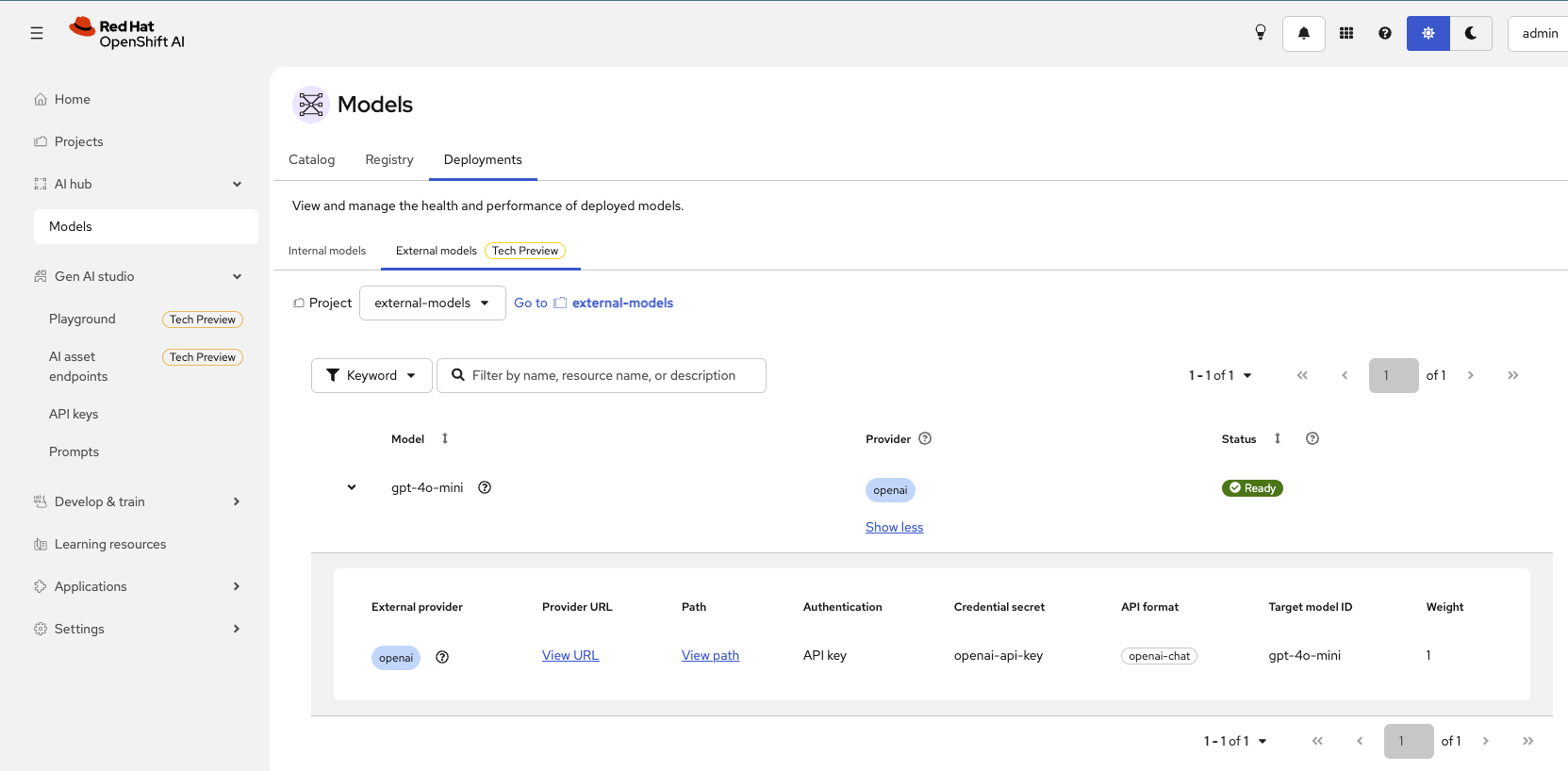
The tab lists each external model with its provider badge and status. Expanding a model row shows the full provider configuration: external provider name, provider URL, path, authentication type, credential secret, API format, target model ID, and weight.
The Dashboard provides a read-only view of the same Kubernetes CRDs created by the CLI workflow (ExternalProvider, ExternalModel). To create or modify external models, use the CLI steps documented above. Models created via oc apply appear in the Dashboard automatically.
Other Providers
Google Gemini
Manifests for Google Gemini (gemini-2.5-flash) are included under manifests/08-external-models/gemini/. To deploy Gemini instead of OpenAI, use --external-model-provider gemini.
On RHOAI 3.4, there is a known incompatibility: the BBR openai provider hardcodes the upstream path to /v1/chat/completions, but Gemini requires /v1beta/openai/chat/completions, causing inference to return HTTP 404. This was tracked in RHOAIENG-68592. On RHOAI 3.5+, the ExternalModel CRD includes a path field in externalProviderRefs that overrides the upstream path, so Gemini works end-to-end.
To deploy with Gemini:
Anthropic
Manifests for Anthropic (claude-haiku-4-5) are included under manifests/08-external-models/anthropic/. The BBR anthropic provider translates OpenAI-format requests to the Anthropic Messages API and injects the API key via the x-api-key header - consumers still send standard OpenAI-format requests to the gateway.
On RHOAI 3.4, the anthropic BBR provider must handle path rewriting internally (there is no path field on the ExternalModel CRD). This has not been validated on 3.4 - if inference returns errors, upgrade to RHOAI 3.5+ where the path field explicitly sets /v1/messages.
Clients must use the OpenAI-compatible endpoint (/v1/chat/completions) when sending requests through the MaaS gateway. The Anthropic-native Messages API endpoint (/v1/messages) is not supported for token counting or rate limiting (RHOAIENG-93984). Tools like Claude Code that default to Anthropic’s native API format need to be configured for OpenAI-compatible mode. The ExternalModel flow documented below routes through /v1/chat/completions and handles this correctly - the BBR translates to Anthropic format upstream.
Prerequisites
Get an API key from the Anthropic Console (Account Settings > API keys).
Verify the key works before deploying: curl -s "https://api.anthropic.com/v1/messages" -H "x-api-key: $ANTHROPIC_API_KEY" -H "anthropic-version: 2023-06-01" -H "Content-Type: application/json" -d '{"model":"claude-haiku-4-5-20251001","max_tokens":5,"messages":[{"role":"user","content":"Hi"}]}' | python3 -m json.tool
Manual Deployment
Create the namespace if it does not already exist (shared with other external model providers):
Create the credential Secret (never stored in manifests):
RHAIE Version: 3.5, 3.6
RHAIE Version: 3.4
Apply the external model and MaaS governance resources:
RHAIE Version: 3.5, 3.6
The ExternalProvider and ExternalModel CRs:
RHAIE Version: 3.4
The ExternalModel CR:
Verify the model reaches Ready:
Test inference:
Automated Deployment
AWS Bedrock
Manifests for AWS Bedrock (openai.gpt-oss-20b via the Mantle endpoint) are included under manifests/08-external-models/bedrock/. Bedrock uses the bedrock-openai provider, which routes through the OpenAI-compatible Mantle API - no request body translation is needed.
Use bedrock-mantle.<region>.api.aws, not bedrock-runtime.<region>.amazonaws.com. The BBR translator uses /v1/chat/completions, which is only available on the Mantle endpoint. Using bedrock-runtime will result in 404 errors.
Prerequisites
Bedrock requires a Bedrock API Key (ABSK key), not standard AWS access keys. Create one via IAM service-specific credentials:
The output contains a ServiceSpecificCredential.ServicePassword field starting with ABSK - this is the API key to use.
Verify the ABSK key works before deploying: curl -s "https://bedrock-mantle.us-east-2.api.aws/v1/models" -H "Authorization: Bearer $BEDROCK_API_KEY" | python3 -m json.tool
Manual Deployment
Create the namespace if it does not already exist (shared with other external model providers):
Create the credential Secret (never stored in manifests):
RHAIE Version: 3.5, 3.6
RHAIE Version: 3.4
Apply the external model and MaaS governance resources:
RHAIE Version: 3.5, 3.6
The ExternalProvider and ExternalModel CRs:
RHAIE Version: 3.4
The ExternalModel CR:
The endpoint must match your AWS region. Replace us-east-2 with your region if different.
Verify the model reaches Ready:
Test inference:
Automated Deployment
Azure OpenAI
Manifests for Azure OpenAI (gpt-4.1-mini deployment) are included under manifests/08-external-models/azure-openai/. The BBR azure-openai provider routes requests through Azure’s OpenAI Service - consumers send standard OpenAI-format requests to the gateway and the BBR handles Azure-specific path construction and API key injection via the api-key header.
On RHOAI 3.4, the azure-openai BBR provider must handle Azure path rewriting internally (there is no path field on the ExternalModel CRD). This has not been validated on 3.4 - if inference returns errors, upgrade to RHOAI 3.5+ where the path field explicitly sets the Azure deployment path.
The endpoint in the ExternalProvider manifest must match your Azure OpenAI resource. Replace <your-resource>.openai.azure.com with your actual resource hostname (e.g., myresource.openai.azure.com). Similarly, the path in the ExternalModel must match your deployment name and API version.
Prerequisites
You need an Azure OpenAI resource with a deployed model. Create one via the Azure Portal or the Azure CLI:
Get the API key from the Azure Portal (Resource > Keys and Endpoint) or via CLI:
Verify the key works before deploying: curl -s "https://<your-resource>.openai.azure.com/openai/deployments/gpt-4-1-mini/chat/completions?api-version=2025-04-01-preview" -H "api-key: $AZURE_OPENAI_API_KEY" -H "Content-Type: application/json" -d '{"messages":[{"role":"user","content":"Hi"}],"max_tokens":5}' | python3 -m json.tool
Manual Deployment
Create the namespace if it does not already exist (shared with other external model providers):
Create the credential Secret (never stored in manifests):
RHAIE Version: 3.5, 3.6
RHAIE Version: 3.4
Apply the external model and MaaS governance resources:
RHAIE Version: 3.5, 3.6
The ExternalProvider and ExternalModel CRs:
RHAIE Version: 3.4
The ExternalModel CR:
Verify the model reaches Ready:
Test inference:
Automated Deployment
HTTP Proxy
Some clusters cannot reach the internet directly and are only allowed to leave through a corporate HTTP/HTTPS proxy. This is common in regulated environments: the OpenShift nodes have no route to *.openai.azure.com, but a proxy that accepts CONNECT does.
External models still work in this setup, but not through any proxy setting on MaaS. This section explains why, and shows the pattern that does work, using Azure OpenAI as the example.
Validated on RHOAI 3.5.2, OCP 4.21, Envoy 1.35.10 (OSSM 3.x gateway). The same pattern applies to any external provider, only the hostname changes.
Why there is no proxy setting
The gateway Envoy is the process that opens the connection to the provider. Nothing in that path reads proxy configuration:
HTTP_PROXY/HTTPS_PROXYdo nothing. Envoy does not read these environment variables, and the cluster-wideProxyCR (oc get proxy/cluster) only injects them into pods that honour them. The gateway is not one of them.DestinationRuletrafficPolicy.tunnelcannot be used. Istio does have nativeCONNECTsupport, but the API states it applies to TCP or TLS routes and cannot be applied to HTTP routes. The external provider reconciler always generates theServiceEntrywithprotocol: HTTPS(orHTTP), which is an HTTP route, sotunnelnever takes effect.- An
EnvoyFilterusinghttp_11_proxydoes not work on this Envoy. On Envoy 1.35 the proxy address must come from per-endpointtyped_filter_metadata, andEnvoyFilterMERGEappends repeated fields instead of annotating the generated endpoint, so you cannot attach it to theSTRICT_DNScluster Istio builds. The other code path, which takes the address from filter state, is only reachable from compiled-in C++ filters:Http11ProxyInfoFilterStatehas no object factory, soset_filter_statecannot populate it. Envoy also documents that extension as having an “unknown security posture”. - The
maas.opendatahub.io/tlsandmaas.opendatahub.io/portannotations are RHOAI 3.4 only. On 3.5 the resources are created byipp-external-provider-reconciler, which ignores them. Annotating theExternalProviderleaves theServiceEntryonHTTPS/443 with theDestinationRulestill in place.
Do not spend time on http_11_proxy EnvoyFilters. It is the suggestion most AI assistants give for this problem and it cannot be made to work against a reconciler-generated cluster on RHOAI 3.5.
How it works
Instead of teaching the gateway about the proxy, put a small TCP tunnel in front of the proxy and point the mesh at it:
The tunnel accepts the raw TCP that the gateway was going to send to Azure, issues CONNECT <provider>:443 to the proxy, and splices the bytes through. The important consequence is that TLS is terminated by Azure, not by the tunnel: SNI, certificate validation and the api-key header injected by IPP all stay end-to-end, and the proxy only sees an opaque tunnel.
It also sends CONNECT with a hostname, so the proxy does the DNS resolution. That matters because the generated ServiceEntry is resolution: DNS: if your cluster cannot resolve *.openai.azure.com, the Envoy cluster gets zero endpoints and returns 503 before the proxy is ever contacted.
The tunnel is Envoy’s tcp_proxy with tunneling_config, a stable documented feature, and it reuses the istio-proxyv2 image your gateway already runs, so there is no extra image to mirror and no anyuid grant needed.
Prerequisites
Azure OpenAI already working through MaaS as described in Azure OpenAI. Get that green first with direct egress if you can, so that a later failure is clearly the proxy and not the provider.
You also need a proxy that accepts CONNECT to the provider hostname on port 443. If you do not have one, or you only want to try this out, the manifests include a lab proxy and Step 1 deploys it for you.
Step 1: Deploy the proxy
Pick one of the two paths.
You already have a corporate proxy. Write down its host and port, you need them in Step 2, and remove the lab proxy from the kustomization so you do not end up with a second proxy in the cluster:
Removing the file from the kustomization does not remove anything that is already running. oc apply -k does not prune. If you tried the lab path before switching to your real proxy, delete the lab proxy explicitly, otherwise it stays in the cluster as an open proxy:
Ask the proxy owners to allow CONNECT to your provider hostname on 443. Then go to Step 2.
You do not have a proxy and want to test. Keep forward-proxy.yaml and deploy it. It is an Envoy that terminates CONNECT and logs every tunnel, which is what makes the rest of this section verifiable:
This same command also deploys the tunnel, because both live in one kustomization. That is fine, the tunnel is configured in Step 2 and restarted there.
Before wiring anything to it, check the proxy on its own. This is the step that tells you whether a later failure is the proxy or the MaaS side, so do not skip it:
You want http=401. That looks like a failure but it is the result you need: 401 comes from Azure itself, so the CONNECT tunnel opened and TLS completed, and the only thing missing is the API key, which the gateway adds later. A timeout or http=000 instead means the proxy is not reachable.
oc run prints PodSecurity warnings about the throwaway pod. They are harmless, the pod still runs.
The proxy log should show the tunnel for that request:
That authority is exactly what a real corporate proxy has to allow-list.
Step 2: Configure and deploy the tunnel
The tunnel ships with the values from the test environment, so it is pointing at the wrong provider until you edit it. Open manifests/08-external-models/http-proxy/egress-tunnel.yaml and set three things:
tunneling_config.hostname- your own Azure OpenAI resource, for examplemy-resource.openai.azure.com:443.- the
corporate_proxycluster address - the proxy host and port from Step 1. Leave it as the in-cluster Service (egress-proxy.egress-proxy.svc.cluster.local:3128) if you deployed the lab proxy. image- the image your gateway already runs, so there is nothing extra to pull or mirror:
Apply your edits and restart the tunnel:
The restart is not optional. Envoy reads this static configuration once at start-up, so oc apply alone updates the ConfigMap while the running pod keeps the old settings. If Step 1 already started the tunnel with the shipped values, only the restart picks up yours. The same applies any time you change the hostname or the proxy address later.
Both pods should be running:
Step 3: Point the ServiceEntry at the tunnel
The reconciler creates the ServiceEntry with resolution: DNS, which sends the gateway straight to the internet. Switch it to STATIC so it resolves to the tunnel instead:
Nothing else changes. The ExternalProvider keeps the real Azure FQDN, so the Host header, SNI and certificate check stay correct.
This ServiceEntry is owned by ipp-external-provider-reconciler. The edit survives a restart of ai-gateway-operator and maas-controller (verified), because the reconciler creates the resource but does not correct drift. It is still an unmanaged change: re-check it after an RHOAI upgrade, and expect to re-apply it if you delete and recreate the ExternalProvider.
Step 4: Verify
Then confirm the traffic really went through the proxy:
You should see the gateway pod IP arriving at the tunnel, and a CONNECT for your provider hostname in the proxy log:
Prove there is no direct-egress fallback by breaking the path on purpose. If you deployed the lab proxy, scale it to zero:
Inference must then fail with HTTP 503 and TLS_error ... Connection reset by peer. With a real corporate proxy you cannot scale it, so stop the tunnel instead, which fails with HTTP 500:
Scale whichever you stopped back to 1 and inference recovers.
The exact status does not matter, the failure does. If inference still returns 200 while the proxy or the tunnel is down, the gateway is still reaching the provider directly, which means the ServiceEntry patch in Step 3 did not take effect and nothing you tested so far went through the proxy.
Using a real corporate proxy
Proxy requires authentication. Envoy’s tunneling_config can add headers to the CONNECT request, so Basic auth works by adding to the tcp_proxy config:
Keep that value in a Secret and mount it rather than committing it in the ConfigMap.
Proxy inspects TLS (MITM). This pattern deliberately does not terminate TLS, so an inspecting proxy breaks certificate validation at the gateway. Either allow-list the provider hostname for pass-through on the proxy, which is the usual answer, or add the proxy’s CA to the gateway trust bundle. Pass-through is strongly preferred: the api-key is in those requests.
Proxy only allows certain destinations. Ask for CONNECT to the provider hostname on 443. The lab proxy logs show exactly what to allow-list.
More than one provider. tunneling_config.hostname is a single fixed destination, so deploy one tunnel Deployment and Service per external provider and patch each ServiceEntry to its own tunnel IP.
Caveats
- One tunnel per provider, as above.
- The tunnel is a single replica in these manifests. Raise
replicasfor anything beyond a demo, it holds no state. - The
ServiceEntryedit is unmanaged, see the warning in Step 3. - Nothing changes for consumers. API keys,
AuthPolicy, and token rate limiting keep working exactly as before, because only the egress leg moved.
Known Issues
Gemini path incompatibility - RHOAI 3.4 only (RHOAIENG-68592)
On RHOAI 3.4, the BBR openai provider hardcodes the upstream path to /v1/chat/completions, but Gemini requires /v1beta/openai/chat/completions. Inference requests return HTTP 404 from Google’s API. Tracked in RHOAIENG-68592.
Resolved in RHOAI 3.5+: the ExternalModel CRD includes a path field in externalProviderRefs that overrides the upstream path. The Gemini manifest sets path: /v1beta/openai/chat/completions, and inference works end-to-end.
WASM auth timeout under load - HTTP 500 (RHOAIENG-71638)
External model calls through the gateway can return HTTP 500 under concurrent load even though the model backend is healthy. The signature: a 23-byte error body, an empty upstream host in the gateway access log, and a response time close to 200ms. This means the Kuadrant WASM plugin timed out waiting for Authorino to authorize the request (default: 200ms, failureMode: deny).
The fix is to increase AUTH_SERVICE_TIMEOUT on the RHCL operator Subscription. See Issue 7: WASM Auth Timeout Under Load in the troubleshooting guide for diagnosis steps and the workaround.
Anthropic Messages API - no token counting or rate limiting (RHOAIENG-93984)
The MaaS TokenRateLimitPolicy only supports the OpenAI-compatible /v1/chat/completions endpoint. Requests sent directly to /v1/messages (the Anthropic Messages API) bypass token counting and rate limiting entirely - usage is not tracked and rate limits are not enforced. Tracked in RHOAIENG-93984.
This affects clients that use Anthropic’s native API format (e.g., Claude Code with default settings). To ensure token counting works, clients must send requests to /v1/chat/completions through the MaaS gateway. The BBR anthropic provider handles the translation to the Anthropic Messages API upstream.
The upstream fix is tracked in Kuadrant/kuadrant-operator#1654.
Appendix
Directory Structure
Supported Providers
The provider field in the ExternalModel spec maps to a BBR payload translator. Currently supported values:
openai- OpenAI API (api.openai.com)anthropic- Anthropic API (api.anthropic.com)azure-openai- Azure OpenAI Servicebedrock-openai- AWS Bedrock (OpenAI-compatible)
References
- RHOAI 3.5 ExternalProvider documentation
- RHOAI 3.4 ExternalModel documentation
- BBR (ai-gateway-payload-processing) repository
- RHOAIENG-68592 - Gemini BBR path incompatibility
Next step
Proceed to Architecture & Request Flow.
7 - Phase 9: External OIDC Authentication (Optional)
By default, MaaS authenticates users via OpenShift tokens (TokenReview). External OIDC lets you integrate with identity providers like Keycloak, Okta, or Azure AD so users can access MaaS with their corporate credentials - no OpenShift accounts needed.
All file paths and oc apply commands in this guide are relative to the CAI-Field-Manual-MaaS repository root. Make sure you have cloned it and are working from its root directory (see Getting Started).
How It Works
MaaS uses a two-tier authentication model with external OIDC:
Platform API access - Users get an OIDC token from the identity provider and use it as a Bearer token to call the MaaS API (list models, create API keys, manage subscriptions).
Model inference - Users create an API key through the MaaS API using their OIDC token. The API key is then used for inference requests (
/v1/chat/completions). API keys capture the user’s group memberships at creation time.
Group-based access control works through OIDC token claims:
- The OIDC provider defines user groups (e.g.,
data-scientists,ml-engineers) - The OIDC token includes a
groupsclaim with the user’s group memberships - MaaS subscriptions and authorization policies reference these group names
- MaaS validates group memberships directly from the OIDC token - no OpenShift group sync needed
Group names in MaaS subscriptions must match the group names in the OIDC token groups claim exactly.
When using external OIDC, users create API keys through the MaaS API using curl or other HTTP clients. The Red Hat OpenShift AI dashboard uses OpenShift OAuth and does not support API key creation for external OIDC users.
Automated Setup
To deploy Keycloak, configure OIDC, and run verification in one go:
To tear everything down:
The rest of this page walks through each step manually.
Step 1: Deploy Keycloak
This section deploys Red Hat Build of Keycloak (RHBK) as the OIDC provider. If you already have an external identity provider, skip to Step 3.
Install the RHBK operator
Wait for the operator to install:
Deploy Keycloak and PostgreSQL
This creates:
- A PostgreSQL database for Keycloak storage
- A Keycloak instance connected to PostgreSQL
- A
KeycloakRealmImportthat creates themaasrealm with test users and groups
Set the Keycloak hostname. Without it, the RHBK operator creates a host-less Ingress that OpenShift cannot convert into a Route, and Step 2 will find no route:
Wait for Keycloak to be ready:
The READY column should show True. Then check the realm import:
Should return True.
Step 2: Discover the Keycloak Issuer URL
Get the Keycloak route hostname and construct the issuer URL:
Verify the OIDC discovery endpoint is accessible:
You should see a JSON document with issuer, authorization_endpoint, token_endpoint, and other OIDC metadata.
Test users and groups
The imported realm includes two test users:
| Username | Password | Groups |
|---|---|---|
maas-user | maas-user | data-scientists, ml-engineers |
restricted-user | restricted-user | data-scientists |
You can verify the groups claim by getting a token:
Expected output:
Step 3: Configure MaaS for External OIDC
Patch the MaaS tenant resource with the OIDC provider configuration:
RHAIE Version: 3.5, 3.6
Verify the patch was applied:
Expected output:
The fields:
clientId- The Keycloak client ID registered for MaaS (maas-oidc)issuerUrl- The OIDC issuer URL. MaaS fetches JWKS keys from<issuerUrl>/.well-known/openid-configurationto verify token signaturesttl- How long (seconds) MaaS caches the OIDC provider’s signing keys before refreshing (default: 300, minimum: 30)
RHAIE Version: 3.4
Verify the patch was applied:
Expected output:
Step 4: Create Subscriptions for OIDC Groups
MaaS subscriptions control which groups can access which models and at what rate limits. Create subscriptions that reference the OIDC group names:
This creates:
- Two
MaaSSubscriptionresources targeting thedata-scientistsandml-engineersgroups - Two
MaaSAuthPolicyresources granting those groups access to the simulator model
The group names in subscriptions (data-scientists, ml-engineers) must match exactly the group names in the OIDC token groups claim. MaaS validates group memberships directly from the token without any OpenShift group sync.
Verify the resources were created:
You should see the OIDC subscriptions and auth policies alongside any existing ones.
If you have models other than the simulator deployed, you can edit the subscription and auth policy manifests to reference your model names and namespaces before applying.
Step 5: Verify External OIDC
Automated verification
Expected output:
Manual verification
Get an OIDC token
List available models
If authentication is successful, the API returns a list of models available to the groups in your token. An empty list means the token is valid but the user’s groups have no matching subscriptions.
Create an API key
API keys capture the user’s group memberships at the time of creation. If a user is removed from a group in Keycloak, their existing API keys retain the original group associations until they expire or are manually revoked.
Run inference with the API key
Get the model ID from /v1/models and send a chat completion:
See the OIDC Authentication demo for a presenter-ready walkthrough with a click-through UI and CLI client. The JWKS Cache demo proves that JWT signatures are verified locally from cached keys. All demos are listed on the Demos page.
Cleanup
To remove the OIDC configuration and Keycloak:
Or manually:
RHAIE Version: 3.5, 3.6
RHAIE Version: 3.4
After removing the OIDC configuration, MaaS falls back to the default OpenShift TokenReview authentication. Existing API keys created by OIDC users will stop working once revoked or expired.
Bring Your Own Identity Provider
If you have an existing OIDC provider (Okta, Azure AD, etc.) instead of Keycloak, you only need:
- A public (or confidential) OIDC client registered for MaaS
- The client configured to include the
groupsclaim in ID/access tokens - User groups that map to MaaS subscription group names
Skip Steps 1-2 and go directly to Step 3, replacing the clientId and issuerUrl with your provider’s values.
8 - Upgrade (3.4 → 3.5)
8.1 - Platform Upgrade (3.4 → 3.5)
This page walks through migrating your Models as a Service configuration after upgrading the Red Hat OpenShift AI operator from 3.4 to 3.5. The operator upgrade itself is handled by OLM (change the subscription channel from stable-3.4 to stable-3.x). This guide covers everything else: DSC fields, namespaces, ExternalModel API changes, and dashboard configuration.
This guide is not a replacement for the official Red Hat OpenShift AI 3.5 Release Notes - Known Issues. Always check the release notes for the latest updates.
Prerequisites
- Red Hat OpenShift AI 3.5+ operator is installed (OLM has completed the upgrade)
cluster-adminaccess- Models as a Service was previously working on 3.4
Verify the operator version before proceeding:
Expected output (version must be 3.5.x or higher):
If the version still shows 3.4.x, the OLM upgrade has not completed yet. Check the subscription channel and InstallPlan before proceeding.
What Changes
The 3.5 release restructures how Models as a Service is configured in the DataScienceCluster. Here are the key changes that require action:
| Area | 3.4 | 3.5+ |
|---|---|---|
| DSC MaaS field | kserve.modelsAsService | aigateway.modelsAsAService |
| DSC Playground | llamastackoperator | ogx |
| maas-api namespace | redhat-ods-applications | redhat-ai-gateway-infra |
| ExternalModel API | maas.opendatahub.io/v1alpha1 | inference.opendatahub.io/v1alpha1 (ExternalProvider) |
| Dashboard config | maasAuthPolicies flag supported | maasAuthPolicies rejected by admission webhook |
For the full list of structural changes (status conditions, new CRDs, Tenant CR deprecation), see the What Changes table in the troubleshooting page.
Step 1: Back Up Current State
Before making any changes, back up your current configuration:
Step 2: Add aigateway Component to the DSC
The Models as a Service control plane moved from kserve.modelsAsService to its own top-level aigateway component in 3.5. Add it to the DSC:
Without aigateway set to Managed, regular (non-admin) users will not see the AI asset endpoints page (under Gen AI studio) in the Red Hat OpenShift AI Dashboard. Admin users may still see it, which makes this a silent failure that only affects your end users.
Verify the patch was applied:
Step 3: Add ogx Component (AI Playground)
The llamastackoperator DSC component was renamed to ogx in 3.5. Add the new component and explicitly remove the old one in the same patch:
Do not leave llamastackoperator as Managed (and do not just omit it - on some clusters the field already defaults to Managed). Reproduced and confirmed on a live 3.5.0 cluster: having both llamastackoperator: Managed and ogx: Managed at the same time causes the operator to reject the ogx module with "LlamaStackOperator is set to Managed; it has been deprecated, set it to Removed before enabling OGX". That error aborts the entire module-provisioning batch at runlevel 32 - which also includes aigateway and mlflowoperator. The practical symptom is not just a missing Playground tab: aigateway’s CRDs never get installed, maas-api never deploys, ModelsAsAServiceReady stays False, and applying MaaSModelRef fails with no matches for kind "MaaSModelRef" even though modelsAsAService shows Managed. See Issue 14 for the full diagnosis and fix if you already hit this.
On some RHOAI 3.5.0 installations, the OGX CRD may still not be available after removing llamastackoperator. If the DSC reports OGXReady: False with no matches for kind "OGX", set ogx back to Removed to unblock the DSC - this one genuinely only affects the AI Playground feature, not Models as a Service.
Step 4: Handle the Frozen kserve.modelsAsService Field
The old kserve.modelsAsService field is frozen by CEL validation (self == oldSelf). You cannot change its value in-place. This is by design - it prevents accidental removal of a running Models as a Service configuration during the transition period.
You will see a policy 299 deprecation warning:
This warning is expected at this point. Both old and new paths coexist through 3.6, so Models as a Service continues to work while both are present.
After you have confirmed that aigateway.modelsAsAService is working (Step 11), you can silence the warning by setting the old field to Removed:
On fresh Red Hat OpenShift AI 3.5+ installs, do NOT add kserve.modelsAsService to the DSC. The CEL validation will reject any attempt to re-enable it after it has been set to Removed.
Step 5: Wait for DSC Ready
Wait for the DataScienceCluster to finish reconciling after the patches:
If the DSC does not become Ready within the timeout, check which component is blocking:
The MCP Lifecycle Operator (new in 3.5) is a common blocker - it can OOMKill on clusters with many secrets. See Issue 1: MCP Lifecycle Operator OOMKill for the workaround.
Step 6: Verify Namespace and Secrets
In 3.5, maas-api moves to the redhat-ai-gateway-infra namespace. The controller should auto-create this namespace and copy the maas-db-config secret.
Verify the namespace exists:
Verify the maas-db-config secret was copied to the new namespace:
If the secret is missing, copy it manually:
Verify maas-api is running in the new namespace:
Step 7: Label Namespace for Gateway Access
If the MaaS gateway is configured with label-based namespace selection (the secure configuration), the new namespace needs the matching label. Without it, the gateway rejects HTTPRoutes from redhat-ai-gateway-infra and the Dashboard shows “Error loading components”.
Verify the HTTPRoutes are accepted:
If HTTPRoutes show NotAccepted, see Issue 3: MaaS Gateway Namespace Label for diagnosis steps.
Step 8: Migrate LLMInferenceServices to Body-Based Routing (BBR)
In 3.5, the MaaS gateway enables body-based routing (BBR) by default: clients call /v1/chat/completions with the model in the request body instead of the path-based /llm/{model-namespace}/{model-name} URL. However, this only applies to new LLMInferenceServices. LLMInferenceServices that existed before the upgrade are not automatically re-rendered against the new serving presets - the operator pins the preset on each LLMInferenceService via the serving.kserve.io/config-llm-template status annotation, so existing instances deliberately keep their old configuration to avoid spurious rollouts. Upgraded models keep serving the old path-based endpoint, and BBR requests against them fail. If you expect to take advantage of the new feature, you must trigger the update from the pinned presets.
List all LLMInferenceServices; every one that existed before the upgrade is affected:
Migrate each LLMInferenceService using one of the following paths.
Path A: Delete and let the operator re-reconcile
Delete the LLMInferenceService and re-create it from your manifest or GitOps repository. The operator re-renders it against the latest presets, including the new BBR HTTPRoute and all other policy changes:
Deleting the LLMInferenceService guarantees downtime: the model is unavailable until the operator recreates the service and the replacement pod is Ready.
Path B: Remove the pinned status annotation
Remove the pinned preset annotation from the status subresource to trigger a reconcile against the latest presets without recreating the custom resource:
This path might still come with downtime: if the latest presets change more than the HTTPRoute and gateway policy objects, the underlying deployments roll. Whether users observe downtime depends on your ability to perform a rolling update - you need enough spare cluster capacity to run the old and new pods side by side.
The status patch is an out-of-band change that GitOps does not track, so the resource drifts until the next sync. If you manage LLMInferenceServices with OpenShift GitOps or a similar tool, Path A fits your workflow more naturally.
Verify BBR works against each migrated model:
Step 9: Migrate ExternalModels (if applicable)
If you have ExternalModel resources (third-party LLM APIs like OpenAI, Bedrock, Gemini), they need manual migration. The old ExternalModel CRD under maas.opendatahub.io/v1alpha1 is not auto-migrated to the new ExternalProvider CRD under inference.opendatahub.io/v1alpha1.
Check for existing ExternalModels:
If you have old ExternalModels, recreate each one under the new API. Example for an OpenAI provider:
The 3.5 ExternalProvider CRD has a stricter validation regex on spec.auth.secretRef.name that does not allow dots. If your secret names contain dots (e.g. glm5.1-w8a8-key), you must rename them first. See Issue 2: ExternalModel Migration - Secret Names with Dots for details.
Step 10: Update OdhDashboardConfig
The maasAuthPolicies flag was removed from the OdhDashboardConfig CRD in 3.5. The admission webhook rejects any manifest that includes it.
Check if your dashboard config has the flag:
If it returns a value, remove it:
Step 11: Verification Checklist
Run through these checks to confirm the migration is complete:
| Check | Command |
|---|---|
| DSC is Ready | oc get dsc default-dsc -o jsonpath='{.status.conditions[?(@.type=="Ready")].status}'Expected: True |
| maas-api in new namespace | oc get pods -n redhat-ai-gateway-infra | grep maas-apiExpected: Running |
| MaaS Config CR exists | oc get configs.maas.opendatahub.io defaultExpected: resource found |
| ModelsAsAServiceReady | oc get dsc default-dsc -o jsonpath='{.status.conditions[?(@.type=="ModelsAsAServiceReady")].status}'Expected: True |
| Health endpoint | CLUSTER_DOMAIN=$(oc get ingresses.config.openshift.io cluster -o jsonpath='{.spec.domain}')curl -sk "https://maas.${CLUSTER_DOMAIN}/maas-api/health"Expected: {"status":"healthy"} |
| BBR works against pre-3.5 models | /v1/chat/completions request per the Step 8 verificationExpected: JSON completion response |
| Regular user sees AI asset endpoints | Log into the Red Hat OpenShift AI Dashboard as a non-admin user and verify the AI asset endpoints page is visible under Gen AI studio |
| No policy 299 warning (after Step 4 cleanup) | oc get dsc default-dsc -o jsonpath='{.spec.components.kserve.modelsAsService.managementState}'Expected: Removed (or empty if the field was deleted) |
Troubleshooting
If you hit issues during migration, see the Post-Upgrade Troubleshooting page. Here is a quick mapping from migration symptoms to known issues:
| Symptom During Migration | See |
|---|---|
| DSC stuck not-ready after patching | Issue 1 (MCP Lifecycle Operator OOM) |
| Dashboard shows “Error loading components” | Issue 3 (namespace label) or Issue 4 (hostname discovery) |
maas-api returns 500 on /v1/tenants | Issue 4 (gateway hostname discovery) |
| ExternalProvider creation fails on secret name | Issue 2 (dotted secret names) |
HTTPRoutes show NotAccepted | Issue 3 (namespace label) |
| HTTP 500/503 under load after migration | Issue 7 (WASM auth timeout) |
| HTTP 429 Too Many Requests | Issue 9 (token rate limit default) |
References
8.2 - Post-Upgrade Troubleshooting (3.4 → 3.5)
This page covers known issues and workarounds for customers who upgraded Red Hat OpenShift AI from 3.4 to 3.5 with Models as a Service enabled. All issues listed here have been reproduced and validated on test clusters.
This guide is not a replacement for the official Red Hat OpenShift AI 3.5 Release Notes - Known Issues. Always check the release notes for the latest updates.
For step-by-step migration instructions, see Platform Upgrade (3.4 -> 3.5). This page covers troubleshooting for issues that occur during or after the migration.
What Changes in the 3.4 -> 3.5 Upgrade
The 3.5 release introduces several structural changes to the Models as a Service platform:
| Area | Change |
|---|---|
| DSC field | kserve.modelsAsService is frozen (CEL: self == oldSelf). New path is aigateway.modelsAsAService. Both coexist through 3.6. |
| maas-api namespace | Moves from redhat-ods-applications to redhat-ai-gateway-infra. The controller auto-copies the maas-db-config secret with FQDN conversion. |
| DSC status condition | ModelsAsServiceReady (3.4) becomes ModelsAsAServiceReady (3.5). The old condition is removed after upgrade. |
| New component | MCP Lifecycle Operator is added to the DSC. It watches all ConfigMaps and Secrets cluster-wide. |
| New CRDs | aitenants.maas.opendatahub.io, configs.maas.opendatahub.io, maastenantconfigs.maas.opendatahub.io. |
| ExternalModel API | Moves from maas.opendatahub.io/v1alpha1 to inference.opendatahub.io/v1alpha1 as ExternalProvider. Old resources are not auto-migrated. |
| OdhDashboardConfig | The maasAuthPolicies flag is removed. The 3.5 webhook rejects it if present. |
| Tenant CR | Tenant is deprecated. Replaced by MaasTenantConfig. Legacy values are preserved during AITenant bootstrap. |
| DSC component rename | llamastackoperator is renamed to ogx. If upgrading from 3.4, update the DSC spec or the Playground section will not appear. |
Issue 1: MCP Lifecycle Operator OOMKill
Jira: RHOAIENG-82694
The MCP Lifecycle Operator is new in 3.5. It watches all ConfigMaps and Secrets cluster-wide using full structured informers, loading complete object data into the operator’s in-memory cache. On clusters with many namespaces and secrets, memory consumption grows proportionally and exceeds the default limit, causing the operator pod to enter CrashLoopBackOff with OOMKilled.
This blocks the DataScienceCluster from reaching Ready state, which breaks all downstream features: Model Catalog, Models as a Service, API Keys.
Symptoms
- DSC status:
"Some modules are not ready: mcplifecycleoperator" mcp-lifecycle-operator-controller-managerpod in CrashLoopBackOff- All Models as a Service dashboard pages show errors
Diagnosis
Workaround
Set the MCP Lifecycle Operator management state to Removed in the DSC:
Wait for the DSC to reconcile:
Setting the MCP Lifecycle Operator to Removed disables the Model Context Protocol server management feature. If you need MCP server support, contact Red Hat support for guidance on increasing the operator’s memory limits.
Issue 2: ExternalModel Migration - Secret Names with Dots
Jira: RHOAIENG-89784
In 3.5, the ExternalModel API moved from maas.opendatahub.io/v1alpha1 to inference.opendatahub.io/v1alpha1 as ExternalProvider. The new CRD introduces a stricter validation regex on spec.auth.secretRef.name:
Dots in secret names (which are valid Kubernetes names) now fail this validation. If you have an ExternalModel referencing a secret like glm5.1-w8a8-key, the migration to ExternalProvider will fail silently.
Additionally, old ExternalModel resources under maas.opendatahub.io are not auto-migrated to the new inference.opendatahub.io ExternalProvider CRD. You need to recreate them manually.
Symptoms
- ExternalModel resource exists under
maas.opendatahub.iobut has no status - No corresponding ExternalProvider exists under
inference.opendatahub.io - External models do not appear in the dashboard
Diagnosis
Workaround
For each ExternalModel with a dotted secret name:
For ExternalModels without dots in the secret name, the same manual recreation is still needed - just skip the secret rename step.
Issue 3: MaaS Gateway Namespace Label
Jira: RHOAIENG-83207
When the Models as a Service gateway is configured with label-based namespace selection (the secure configuration), the namespaces that host HTTPRoutes need to carry the matching label. The exact label depends on your gateway configuration - the setup-maas guide uses maas.opendatahub.io/gateway-access=true, while the release notes reference maas-gateway-access=true. Without the correct label, the gateway rejects the internal HTTPRoute that serves the Models as a Service API, and the dashboard shows “Error loading components”.
This only applies when the gateway uses allowedRoutes.namespaces.from: Selector. If your gateway uses from: All (the default insecure configuration), this issue does not affect you. After upgrading to 3.5, if the gateway was reconfigured to use label-based selection (per RHOAIENG-80360 security hardening), the missing label will break Models as a Service.
Symptoms
- API Keys page shows “Error loading components”
- Model Catalog page shows “Models as a Service could not be loaded”
- HTTPRoutes in
redhat-ods-applicationsshowNotAcceptedstatus
Diagnosis
Workaround
Apply the label that your gateway selector expects. Check the matchLabels from the diagnosis step above, then apply it:
Wait a few seconds for the HTTPRoute to be accepted, then reload the dashboard.
Issue 4: Gateway Hostname Discovery (ClusterIP + Route Topology)
Jira: RHOAIENG-89775
When the Models as a Service gateway is deployed without a cloud load balancer (common on on-premise, bare-metal, or any cluster using ClusterIP + Route topology), the maas-api /v1/tenants endpoint returns HTTP 500 with "Failed to resolve gateway". This happens because:
extractGatewayMetadata()in maas-api first triesspec.listeners[].hostnameon the Gateway - but only for listeners withattachedRoutes > 0. If the hostname is not set in the spec, or routes are not yet attached after upgrade, this returns empty.- It then falls back to
status.addresses- which is either empty (no LoadBalancer) or contains the internal.svc.cluster.localaddress. - There is no fallback to discover the OpenShift Route hostname.
This breaks the Models as a Service dashboard because maas-ui calls /v1/tenants at startup to auto-detect the gateway hostname (new in 3.5). In 3.4 the hostname was hardcoded, so this code path was never exercised.
Symptoms
- Dashboard shows “Error loading API keys” or “Error loading components”
- maas-api logs show:
Failed to extract gateway metadata - could not determine external hostname from gateway - Gateway condition shows
Programmed: Falsewith reasonAddressNotAssigned
Diagnosis
If spec.listeners[].hostname is empty and status.addresses is empty or shows a .svc.cluster.local address, this issue is confirmed.
Workaround
Set the hostname explicitly on the Gateway listeners. This workaround is confirmed for passthrough routes. For re-encrypt routes, additional adjustments may be needed - check the Jira ticket comments for the latest guidance.
The Models as a Service team recommends re-encrypt routes over passthrough when using cluster wildcard default domain certs, to avoid HTTP coalescing issues.
Replace <cluster-domain> with your cluster’s apps domain:
After the restart, verify the fix:
You should see HTTP 200 with the correct externalUrl in the response.
Issue 5: Payload-Processing OOMKill
Jira: RHOAIENG-88898
Target fix: RHOAI 3.5.1
The payload-processing pods in openshift-ingress have a hardcoded memory limit of 256Mi. Under load or with large payloads, they get OOMKilled. Manual oc set resources patches are reverted within seconds by the maas-controller SSA reconciliation loop.
Symptoms
payload-processingpod in CrashLoopBackOff with OOMKilled- Inference requests fail intermittently
- Manual resource patches are reverted
Diagnosis
Workaround
First, annotate the deployment to prevent the controller from reverting your changes, then increase the memory limit:
Wait for the rollout to complete:
Remove the opendatahub.io/managed=false annotation before any future Red Hat OpenShift AI upgrades so the controller can manage the deployment again.
Issue 6: RHCL 1.4.x Rate Limiting and Gateway OOM
Jira: RHOAIENG-76586
Red Hat Connectivity Link (RHCL) 1.4.x changed how the WASM plugin is injected into the gateway. This breaks rate limiting silently - counters that use auth.identity.user.username fail because the identity data is not passed into the WASM plugin context. Additionally, the RHCL 1.4 WASM plugin requires more memory to compile, which can cause gateway pods to OOMKill at the default 1Gi limit.
Symptoms
- Rate limiting stops working - requests are never throttled even when limits are exceeded
- Gateway pod OOMKilled at 1Gi memory limit (RHCL 1.4 WASM requires more memory)
TokenRateLimitPolicyshowsEnforcedbut limits have no effect
Diagnosis
Workaround
Downgrading RHCL is probably not the way out of this. 1.3.x does not appear in the configurations matrix for Red Hat OpenShift AI 3.4 and 3.5 (see Version Notes), so the workarounds below are the better starting point.
If you are on RHCL 1.4.x, apply both workarounds from the release notes:
1. Disconnect the Gateway from operator management and increase memory to 2Gi:
2. Add identity filter to AuthPolicy:
Add a response.success.filters.identity section to your AuthPolicy so that Authorino writes the user identity into the WASM plugin context. Without this, rate limit counters that use auth.identity.user.username fail silently. See the full AuthPolicy patch in the release notes.
Remove the opendatahub.io/managed=false annotation from the Gateway before any future Red Hat OpenShift AI upgrades so the controller can manage it again.
Issue 7: WASM Auth Timeout Under Load
Jira: RHOAIENG-71638
RHCL configures the Kuadrant WASM plugin with a default 200ms Authorino authentication service timeout. Under high concurrent request load, Authorino authentication latency can exceed this threshold due to cache misses. The WASM plugin uses failureMode: deny, so timed-out authentication requests result in HTTP 500 or 503 responses even when model backends are healthy.
This affects both Red Hat OpenShift AI 3.4 and 3.5.
Symptoms
- HTTP 500 or 503 on inference requests under concurrent load
- Model pods are healthy with no errors in their logs
- Gateway Envoy logs show WASM auth timeout errors
Diagnosis
Workaround
Set AUTH_SERVICE_TIMEOUT to 10s on the RHCL operator Subscription:
The merge patch replaces the entire spec.config.env array. If your subscription already has other env vars, edit the subscription manually (oc edit subscription) and add the entry to the existing list instead.
Wait for the operator to roll out:
Issue 8: Envoy ext_proc Body Corruption
Jira: OSSM-15498
Priority: Blocker
Status: In progress
When two or more ext_proc filters are chained on the same Envoy listener, body data can be corrupted or truncated. The upstream fix landed in Envoy 1.37.1+, but has not been backported to the 1.36.x or 1.35.x branches used by OSSM 3.x.
The AI Gateway data plane requires chained ext_proc stages (pre-processing + main processing via Praxis). Until this is fixed, model-level subscription enforcement through the data plane may be bypassed.
Diagnosis
If the version is below 1.37.1, the fix is not available.
Status
No workaround exists. This is being tracked as a blocker for RHOAI 3.5 Z-stream and 3.6 GA. The fix depends on an OSSM update that includes the upstream Envoy patch.
Issue 9: Token Rate Limiting (429 Too Many Requests)
Jira: RHOAIENG-89785
The default tokenRateLimits in a MaaSSubscription is 1000 tokens per hour. This is easily exhausted with even a single chat conversation. When the limit is hit, all subsequent requests return HTTP 429 Too Many Requests - even though the model backend is healthy and has capacity.
The 429s come from Kuadrant’s TokenRateLimitPolicy, not from the model itself. Every 429 response has a tiny 18-byte body and 15-30ms latency - far too fast to be an actual LLM response.
This affects both Red Hat OpenShift AI 3.4 and 3.5.
Symptoms
- Playground shows
[server_error] Too Many Requests - Gateway access logs show HTTP 429 on
/v1/chat/completions - Model pod is healthy with no errors in its logs
Diagnosis
Workaround
Increase the token limit in your MaaSSubscription. Edit the subscription directly:
Change the tokenRateLimits section:
Wait for the TokenRateLimitPolicy to reconcile:
Do not edit the TokenRateLimitPolicy directly - the maas-controller will overwrite it. Always edit the MaaSSubscription source.
Issue 10: Duplicate AI Playground Endpoints (LlamaStackDistribution)
Jira: RHOAIENG-89786
After upgrading to 3.5 and enabling the ogx component in the DSC, the AI Playground may show two provider endpoints for the same model. The MaaS-routed endpoint (maas-vllm-inference-1/publishers/...) works, but the default endpoint (vllm-inference-2/...) talks directly to the KServe pod and bypasses MaaS auth - failing with connection errors or model-not-found errors depending on timing.
The root cause is a leftover LlamaStackDistribution CR in the model namespace. Deleting it removes the duplicate provider.
Symptoms
- Playground shows two AI asset endpoints for the same model
- One endpoint works (MaaS), the other fails with “Server error” or “model does not exist”
- Intermittent failures when Playground picks the wrong provider
Diagnosis
Workaround
Delete the LlamaStackDistribution from the model namespace:
Then recreate the playground to pick up only the MaaS provider:
Issue 11: OTEL Collector Proxy Interception (Observability Metrics Showing 0)
Jira: RHOAIENG-91640
On clusters behind a corporate HTTP proxy, the RHOAI observability pipeline breaks silently after upgrade. The OTEL collector pods (data-science-collector-collector-*) and TargetAllocator (data-science-collector-targetallocator) in redhat-ods-monitoring inherit the cluster-wide HTTP_PROXY/HTTPS_PROXY env vars. When the collector tries to reach the TargetAllocator to discover scrape targets, the request goes through the proxy. The proxy returns an HTML page (authentication or redirect), which the collector fails to parse as JSON. With no scrape targets, no metrics reach the RHOAI Prometheus instance, and the MaaS usage dashboard shows 0 for all metrics.
The collector config uses a short hostname to reach the TargetAllocator (http://data-science-collector-targetallocator:80). This short hostname has no dots and no .svc suffix, so it does not match the NO_PROXY entries (.svc, .cluster.local). Go’s net/http proxy resolution checks the original hostname against NO_PROXY before DNS resolution, so the request gets routed through the corporate proxy.
This does not affect clusters without an HTTP proxy.
Symptoms
- MaaS usage dashboard shows 0 for all token metrics
- OTEL collector logs:
"Failed to retrieve the job list"with"unexpected key name <!DOCTYPE html..." - RHOAI Thanos Querier returns “Empty query result” for all metrics (including
authorized_calls_total,vllm:num_requests_running) - Limitador metrics are correct when queried directly inside the pod
Diagnosis
If the last command returns HTML (<!DOCTYPE html...) instead of JSON, this issue is confirmed.
Workaround
Patch the OpenTelemetryCollector CR to override the proxy env vars to empty on both the collector and TargetAllocator:
Wait for the pods to restart:
Verify the collector discovers scrape jobs:
You should see scrape jobs listed (e.g., serviceMonitor/redhat-ods-monitoring/limitador-metrics/0).
Do NOT use oc set env statefulset/... or oc set env deployment/... directly. The OTel operator reconciles the StatefulSet and Deployment from the CR spec, so manual env changes get reverted immediately. You must patch the OpenTelemetryCollector CR itself.
The RHOAI operator manages the OpenTelemetryCollector CR and may revert changes on reconciliation. If that happens, annotate the CR to prevent operator management: oc annotate opentelemetrycollector data-science-collector -n redhat-ods-monitoring opendatahub.io/managed=false. Remove this annotation before any future Red Hat OpenShift AI upgrades.
Issue 12: HTTPRoute Rule Name Collision (Multi-Model Gateway)
Jira: RHOAIENG-93709
Status: New
In Red Hat OpenShift AI 3.5, the v3-5-0-kserve-config-llm-router-route LLMInferenceServiceConfig preset introduces 12 hardcoded HTTPRoute.spec.rules[].name entries (e.g., chat-completions, completions, models). When multiple LLMInferenceServices are attached to the same MaaS Gateway, Istio merges all their HTTPRoutes into a single Virtual Host. Because the rule names are identical across services, Envoy treats them as duplicates - one service’s Endpoint Picker (EPP) configuration overwrites the other’s, causing all traffic to be routed to a single EPP regardless of which model was requested.
This is a regression from Red Hat OpenShift AI 3.4 where the name field was omitted in the preset, allowing Istio to auto-generate unique rule names per service. Related upstream issues: istio#58392, istio#61594.
Symptoms
- Inference requests to a second model return responses from the first model (or vice versa)
- Only one EPP pod receives traffic even though multiple models are deployed
- Prefix caching and KV cache-aware routing break because requests land on the wrong EPP
Diagnosis
If the second command returns results, you have duplicate rule names causing route shadowing.
Workaround
No workaround exists. The upstream fix is tracked in istio#61601, which resolves InferencePool endpoint pickers per backendRef instead of per rule name. The LLMInferenceService routing may also add suffixes to sectionNames to avoid collisions at the HTTPRoute level.
Issue 13: Stale DNSRecord After Gateway Service Type Change
Jira: RHOAIENG-93962
When a Models as a Service gateway is initially deployed with a LoadBalancer service type and then switched to ClusterIP (via ConfigMap parametersRef), the DNS operator does not clean up the dnsrecord object created for the original LoadBalancer. The stale record has a CNAME pointing to a defunct AWS ELB hostname, which breaks DNS resolution for the gateway hostname from both inside and outside the cluster.
The root cause is that the dnsrecord is owned by the Service via ownerReferences. When the service type changes from LoadBalancer to ClusterIP, the service is patched in place - not deleted and recreated - so the ownerReference stays valid and Kubernetes garbage collection does not remove the dnsrecord. The DNS operator does not watch for service type changes.
Symptoms
- Dashboard shows “Error loading API keys” with
dial tcp: lookup maas.apps.<cluster> on 172.30.0.10:53: no such host - The Models as a Service URL resolves from outside the cluster but not from inside (or fails from both sides depending on timing)
- Gateway and Route are correctly configured, service is ClusterIP with no external IP
Diagnosis
If the service type is ClusterIP but a dnsrecord exists with a CNAME target that returns NXDOMAIN, this issue is confirmed.
Workaround
Delete the stale dnsrecord:
After deletion, internal DNS resolves immediately via the wildcard *.apps.* record (pointing to the OpenShift Router). External DNS may take longer due to negative caching of the stale CNAME.
This only affects clusters where the gateway service type was changed from LoadBalancer to ClusterIP. Fresh ClusterIP deployments (where LoadBalancer was never used) are not affected.
Issue 14: LlamaStackOperator/OGX Conflict Blocks the Entire AIGateway Module
Reproduced live on a RHOAI 3.5.0 cluster (stable-3.x channel) during a fresh Models as a Service install: aigateway.modelsAsAService showed Managed in the DSC spec, but maas-api never deployed, ModelsAsAServiceReady stayed False, and applying MaaSModelRef failed with no matches for kind "MaaSModelRef" in version "maas.opendatahub.io/v1alpha1" - even though the health check, gateway, and PostgreSQL all looked fine. setup-maas.sh timed out waiting 300s for the maas-api deployment to appear.
The root cause has nothing to do with Models as a Service itself: the DSC also had llamastackoperator.managementState: Managed (either left over from a previous state, or defaulted by the CRD schema when the field is omitted). The opendatahub-operator provisions modules in batches by runlevel, and aigateway, mlflowoperator, and ogx are all provisioned together at runlevel 32. Having both llamastackoperator: Managed and ogx: Managed set makes the operator reject the ogx module outright, which aborts that entire batch - so aigateway’s CRDs (maasmodelrefs.maas.opendatahub.io, configs.maas.opendatahub.io, etc.) and mlflowoperator’s CRD never get installed either, even though nothing in the DSC spec or status message mentions llamastackoperator at all.
Symptoms
oc get datasciencecluster default-dsc -o jsonpath='{.status.conditions[?(@.type=="Ready")]}'shows"Some modules are not ready: aigateway, mlflowoperator, ogx"AIGatewayReadycondition:Failed to get module status: no matches for kind "AIGateway" in version "components.platform.opendatahub.io/v1alpha1"oc get crd | grep maas.opendatahub.ioreturns nothing - the MaaS CRDs were never installedmaas-apideployment does not exist inredhat-ai-gateway-infra(orredhat-ods-applicationson 3.4-style layouts), even 5+ minutes after the DSC was appliedoc apply -f manifests/05-maas-models/.../maas-model.yaml(or anyMaaSModelRef) fails withno matches for kind "MaaSModelRef" ... ensure CRDs are installed firstrhods-operatorlogs (oc logs -n redhat-ods-operator deployment/rhods-operator) repeat"module CRDs not yet available, requesting requeue"foraigateway, mlflowoperator, ogxin an endless loop, interleaved with an ERROR:"BuildModuleCR failed"/error":"LlamaStackOperator is set to Managed; it has been deprecated, set it to Removed before enabling OGX"and"provisioning failed: module provisioning failed: ogx"
Diagnosis
Workaround
Set llamastackoperator to Removed explicitly (it is superseded by ogx in 3.5 and does not need to stay Managed for anything, including 3.4 compatibility):
Once Ready=True, the aigateway, mlflowoperator, and MaaS CRDs install automatically and maas-api/maas-controller deploy without any further action. Re-run the phase that timed out (for example ./scripts/setup-maas.sh --from-phase 4) to finish deploying models and governance resources.
manifests/04-rhoai-config/datasciencecluster.yaml in this guide now sets llamastackoperator: Removed explicitly alongside ogx: Managed, so fresh installs following Phase 4 as written should not hit this. This issue is most likely to surface on clusters where the DSC already existed (e.g. a prior 3.4 install, or a partially-completed 3.5 attempt) before setup-maas.sh ran - the script detects modelsAsAService: Managed and skips re-applying the DSC, so a pre-existing llamastackoperator: Managed value is never corrected. See Step 3 for the equivalent guidance during a 3.4 -> 3.5 upgrade.
Quick Reference: Triage Order
When you hit problems after upgrading from 3.4 to 3.5, check in this order:
| Step | Check | Fix |
|---|---|---|
| 1 | Is DSC Ready? (oc get dsc default-dsc -o jsonpath='{.status.conditions[?(@.type=="Ready")].status}') | If not, check for MCP Lifecycle Operator OOM (Issue 1) |
| 2 | Is the namespace labeled? (oc get ns redhat-ods-applications --show-labels | grep -i maas) | Apply label (Issue 3) |
| 3 | Does maas-api report a hostname error? (check logs in redhat-ai-gateway-infra) | Set spec.listeners[].hostname on Gateway (Issue 4) |
| 4 | Are payload-processing pods OOMKilled? | Annotate + increase memory (Issue 5) |
| 5 | Are ExternalModels missing after upgrade? | Recreate as ExternalProvider (Issue 2) |
| 6 | HTTP 500/503 under load? | Set AUTH_SERVICE_TIMEOUT to 10s (Issue 7) |
| 7 | HTTP 429 Too Many Requests? | Increase tokenRateLimits in MaaSSubscription (Issue 9) |
| 8 | RHCL 1.4.x installed? (oc get csv -n openshift-operators | grep rhcl) | Apply WasmPlugin + 2Gi gateway memory fix (Issue 6) |
| 9 | ext_proc filter_chain_not_found errors in gateway logs? | No workaround yet, track OSSM update (Issue 8) |
| 10 | Playground shows two endpoints for same model? | Delete LlamaStackDistribution (Issue 10) |
| 11 | Cluster behind HTTP proxy and observability metrics show 0? (oc get proxy/cluster -o jsonpath='{.spec.httpProxy}') | Override proxy env vars via OpenTelemetryCollector CR (Issue 11) |
| 12 | Multiple models on same gateway and traffic goes to wrong model? | No workaround yet, track RHOAIENG-93709 (Issue 12) |
| 13 | Changed gateway from LoadBalancer to ClusterIP and DNS broken? (oc get dnsrecord -n openshift-ingress) | Delete stale dnsrecord (Issue 13) |
| 14 | maas-api never appears / MaaSModelRef CRD missing, but modelsAsAService: Managed? (oc get datasciencecluster default-dsc -o jsonpath='{.spec.components.llamastackoperator}') | Set llamastackoperator to Removed (Issue 14) |
References
- RHOAI 3.5 Release Notes - Known Issues
- RHOAIENG-82694 - MCP Lifecycle Operator OOM
- RHOAIENG-83207 - Gateway namespace label
- RHOAIENG-89775 - Gateway hostname discovery on ClusterIP+Route
- RHOAIENG-88898 - Payload-processing OOM
- RHOAIENG-76586 - RHCL 1.4.x rate limiting
- RHOAIENG-71638 - WASM auth timeout
- OSSM-15498 - Envoy ext_proc body corruption
- RHOAIENG-89784 - ExternalModel migration and dotted secret names
- RHOAIENG-89785 - Token rate limiting default too low
- RHOAIENG-89786 - Duplicate Playground endpoints from leftover LlamaStackDistribution
- RHOAIENG-91640 - OTEL collector proxy interception breaks observability
- RHOAIENG-93709 - HTTPRoute rule name collision in multi-model gateway
- RHOAIENG-93962 - Stale DNSRecord after gateway service type change
- Issue 14 (LlamaStackOperator/OGX conflict) - no Jira ticket filed yet; reproduced live and documented in this guide
- RHOAIENG-80360 - Gateway route hijacking security fix
9 - Running MaaS on OpenShift 5
What happens when you install Red Hat OpenShift AI MaaS on OpenShift 5, which blocks, and what to change. The guide’s other phases are written against OpenShift 4.19+, and this page records the first end-to-end walkthrough on a 5.0 cluster.
This guide is not a replacement for the official Red Hat OpenShift AI MaaS documentation (3.5 | 3.4). OpenShift 5.0 does not appear in the RHOAI 3.x supported configurations matrix at the time of writing, so treat everything here as field notes, not a support statement.
All file paths and oc apply commands in this guide are relative to the CAI-Field-Manual-MaaS repository root. Make sure you have cloned it and are working from its root directory (see Getting Started).
Test Cluster
| Property | Value |
|---|---|
| OpenShift | 5.0.0-rc.7 (Kubernetes v1.36.5, RHCOS 10.2, cri-o 1.36.6) |
| Platform | BareMetal, 3 nodes, every node control-plane,master,worker |
| Node IPs | 10.10.10.10, 10.10.10.11, 10.10.10.12 (consecutive, which matters for Issue 5) |
| GPU | None, so the CPU-only simulator model |
| Storage | ODF, default StorageClass ocs-external-storagecluster-ceph-rbd |
| Pre-installed | Red Hat Connectivity Link 1.4.2, Service Mesh 3 operator 3.5.0 (Istio 1.31.1), cert-manager, COO, Tempo, GitOps |
This was a shared workshop cluster rather than a clean one, which surfaced Issue 4. A clean OpenShift 5 cluster hits Issues 1, 2, 3 and 5 only.
Outcome
MaaS runs on OpenShift 5. After working around the issues below, the full verification suite passed: 15 of 15 end-to-end checks, including inference, authentication enforcement and rate limiting.
Nothing in the MaaS data path needed changing. Every problem was either operator packaging (Issue 1, Issue 2) or a pre-existing assumption in this repo’s own automation that OpenShift 5 happened to expose (Issues 3, 5 and 6). The automation in scripts/setup-maas.sh and manifests/06-verification/verify.sh now handles all of them.
Everything on this page is RHOAI 3.4.2 on OpenShift 5.0.0-rc.7. RHOAI 3.5 GA was not tested, because the only catalog on this cluster that carries RHOAI is a snapshot taken before 3.5 shipped. That is a property of the test cluster, not a statement about 3.5 on OpenShift 5.
What Works Unchanged
Verified on the cluster above before changing anything:
| Area | Result |
|---|---|
OLM v0 (operators.coreos.com) | Still present and working. Subscription, CSV, InstallPlan and OperatorGroup all behave as on 4.x, so every subscription manifest in manifests/01-prerequisites/ stays valid. OLM v1 (olm.operatorframework.io) exists alongside it but is not needed. |
| Gateway API | gateway.networking.k8s.io is v1 only. v1beta1 is gone, including for ReferenceGrant. The manifests in this repo already use v1 everywhere, so nothing had to change. |
openshift-default GatewayClass | Still backed by Istio. The controller name openshift.io/gateway-controller/v1 is unchanged, istiod-openshift-gateway runs in openshift-ingress, and the gateway pod is still an istio-proxy container. This matters because Kuadrant attaches its policies through Istio EnvoyFilters. |
| Kuadrant policy attachment | Works. The RHCL operator ships ISTIO_GATEWAY_CONTROLLER_NAMES=openshift.io/gateway-controller/v1, and AuthPolicy / RateLimitPolicy produce the expected kuadrant-auth-*, kuadrant-ratelimiting-* and kuadrant-* EnvoyFilters. |
| SecurityContextConstraints | The 28 default SCCs are still present. Nothing in this guide needed an SCC change. |
| Deprecated APIs | oc get apirequestcounts reports no in-use API with a removedInRelease set, so nothing this guide applies is on a removal path. |
| Operator installs | RHOAI 3.4.2, Leader Worker Set 1.0.1 and cert-manager 1.20.1 all reach Succeeded on 5.0.0-rc.7. |
Issue 1: The RHOAI Operator Is Not in the OpenShift 5 Catalog
Tracked as RHOAIENG-102811.
Tested on RHOAI 3.4.2 only. GA RHOAI 3.5 could not be tested on OpenShift 5, because no Red Hat catalog publishes a 3.5 channel for it.
Symptoms
The RHOAI Subscription is created and then nothing happens. No InstallPlan, no CSV, and no error that names the cause.
Diagnosis
On OpenShift 5 the redhat-operators CatalogSource points at the 5.0 index, which does not carry the rhods-operator package at all:
That index carries 129 packages and none of them is RHOAI. cert-manager, leader-worker-set and metallb-operator are all there, so the gap is specific to RHOAI.
The OLM v1 ClusterCatalog named openshift-redhat-operators uses the same v5.0 index image, so switching to OLM v1 does not help.
Workaround
Subscribe from a catalog that does publish RHOAI. On RHPDS workshop clusters a snapshot of the 4.22 index is already present:
scripts/setup-maas.sh now does this automatically: it looks up which catalog actually publishes each package and repoints the Subscription if the one in the manifest cannot resolve. Use --catalog-source <name> to prefer a specific catalog; the installer still falls back, with a warning, if that catalog does not carry the package.
That snapshot is pinned to a date (v4.22_2026_08_03 on the cluster used here), so what it offers depends on when it was taken. On this one:
There is no stable-3.5 channel, because the snapshot predates 3.5 GA. stable-3.x therefore still resolves to 3.4.2, which causes Issue 3.
beta does carry 3.5.0-ea.2, so a 3.5 code path can be exercised with --rhoai-version 3.5 once the Subscription is pointed at that channel. It is a pre-GA build, so treat failures there with suspicion. A newer snapshot, or the official index once it carries RHOAI for OpenShift 5, is the better route to a GA 3.5.
Issue 2: The RHCL Channel stable Does Not Exist
Tracked as RHOAIENG-102811. Same root cause as Issue 1: what the OpenShift 5 index publishes. Worked around automatically, see below.
Symptoms
The Red Hat Connectivity Link Subscription never resolves. Same silent symptom as Issue 1: no InstallPlan, no CSV.
Diagnosis
The guide and the official docs subscribe RHCL with channel: stable. The OpenShift 5 index renamed it:
Only stable-1.5 is published, pointing at RHCL 1.5.0. For comparison, the 4.22 snapshot on the same cluster still has stable at rhcl-operator.v1.4.2, so this is a channel rename between the two indexes.
Workaround
Use the channel the cluster publishes:
That installs RHCL 1.5.0. The manifests in this repo are written against 1.4.2, which is what Multi-Tenancy needs for the gateway-scoped AuthPolicy, and 1.5.0 is covered separately in Running MaaS with RHCL 1.5.
scripts/setup-maas.sh therefore looks for a catalog that publishes the channel the manifest asks for before falling back to any catalog’s default channel. On a cluster that also carries the 4.22 snapshot, RHCL resolves to redhat-operators-v422 / stable and stays on 1.4.2. redhat-operators wins ties, so a snapshot catalog never shadows the official index for an operator both of them publish. Only when no catalog offers the requested channel does the installer fall back to a default, and it warns when it does.
On a cluster carrying only the 5.0 index, stable-1.5 is the single option and you get RHCL 1.5.0. That was validated on OpenShift 4.21 with RHOAI 3.5.2, not on OpenShift 5, see Running MaaS with RHCL 1.5.
Issue 3: The Installer Assumes 3.5 While the Catalog Gives 3.4
Tracked as RHOAIENG-102811. The version mismatch is a consequence of the channel gap. Fixed in this repo’s installer, see below.
Symptoms
setup-maas.sh reports RHOAI 3.5 during preflight, but the CSV that lands is 3.4.2:
Diagnosis
With no RHOAI installed, the script defaults to 3.5, which sets IS_35_PLUS=true and selects the 3.5 namespace and DSC layout. The version is detected once in Phase 0, before the operator exists, and never re-read afterwards. Because the only usable channel resolves to 3.4.2 (Issue 1), the run then applies the 3.5 DSC path (aigateway.modelsAsAService) against a 3.4 operator.
The failure mode is quiet, and which command you use decides whether you get any hint at all. On RHOAI 3.4.2 the DataScienceCluster CRD has no aigateway component in either schema version and does not set x-kubernetes-preserve-unknown-fields, so the API server prunes the field. It is never stored.
oc patch does warn. oc apply, which is what the installer and the docs use, does not:
So with oc apply the field is dropped with no warning, the command reports success, and the stored DSC comes back without it. MaaS is simply never enabled.
On 3.4.2 neither schema version lists aigateway, while kserve exposes modelsAsService:
This is not specific to OpenShift 5. Any cluster whose stable-3.x channel has not moved to 3.5 hits the same thing.
Workaround
Pin the version explicitly so the code path matches what the catalog will give you:
setup-maas.sh now also re-reads the installed version from the CSV after Phase 1 and again at the start of Phase 4, and switches the code path with a warning if it differs from what was requested.
Issue 4: An Existing Kuadrant Instance in Another Namespace
RHOAIENG-102811 covers the OpenShift 5 findings overall. This one is environmental rather than a product defect, and the installer handles it, see below.
Only applies to clusters that already run RHCL for something else. Skip on a clean cluster.
Symptoms
MaaS expects Kuadrant, Authorino and Limitador in kuadrant-system. A cluster that already uses RHCL may have them somewhere else, and the install then creates a second set.
Diagnosis
The RHCL operator supports AllNamespaces install mode only, and runs with an empty OPERATOR_NAMESPACE:
So it watches every namespace and will reconcile a second Kuadrant CR as well. There is no validating webhook to stop you. Both instances then manage the same gateways’ EnvoyFilters, which is why one instance per cluster is the only safe arrangement.
Workaround
Keep one Kuadrant instance. Back up the existing one, remove its policies and CR, and let MaaS create its own in kuadrant-system. The operator itself stays installed:
If the existing instance is managed by GitOps, deletions get reverted. Argo CD applications with syncPolicy.automated.selfHeal: true restore the CR within minutes, and an app-of-apps pattern also restores any change you make to the child application. Suspend automated sync on the parent and the child first, then delete.
setup-maas.sh now detects an operator already subscribed from a different namespace, skips creating a duplicate Subscription, and waits for the CSV in the namespace where the operator actually lives instead of the one the manifest expects.
Issue 5: The MetalLB Pool Can Land on a Node IP
Not a product issue: this was a bug in this repo’s own installer, fixed in (#203).
Symptoms
After MaaS installs on a non-cloud cluster, the OpenShift console and OAuth stop answering. curl against the console route returns nothing at all.
Diagnosis
On a platform with no cloud load balancer, the gateway Service stays Pending and the installer brings up MetalLB. The address for the pool used to be derived as “first node IP plus one”. On a cluster whose nodes have consecutive addresses, that formula lands the pool on another node:
MetalLB then advertises an address that a node already owns, and the two compete for port 443.
Workaround
Never give MetalLB an address that belongs to a node. setup-maas.sh now collects every node InternalIP and skips all of them when choosing the pool address, failing with an explicit message if it cannot find a free one rather than picking a colliding address.
To check an existing install:
Issue 6: verify.sh Inference Checks Fail on RHOAI 3.4
Not a product issue: this was a bug in this repo’s own verify.sh, fixed in (#203).
Symptoms
verify.sh reports the platform healthy but three checks fail, and every failure is HTTP 404:
A 404 on the unauthenticated request is the giveaway. If authentication were the problem the gateway would answer 401 or 403. A 404 means no route matched at all, so the request never reached the auth filter.
Diagnosis
The two RHOAI releases expose inference differently.
On 3.5 the gateway serves /v1/chat/completions at the root and picks the backend from the model field in the request body (body-based routing). On 3.4 there is no root route. Each model is reachable only under its own path prefix, and no body-based routing EnvoyFilter exists:
verify.sh built the inference URL from the gateway base, which resolves to https://maas.<domain>/v1/chat/completions. That path only exists on 3.5. The models listing passed because /v1/models is served at the root by maas-api-route, which is what made the failure look like an auth or timing problem rather than a routing one.
Workaround
Use the per-model URL that the API already returns in the listing:
verify.sh now reads .data[0].url from the listing and falls back to the gateway root when the listing does not provide one, so it is correct on both 3.4 and 3.5. With that change the same cluster reports 15 of 15 passing.
Expect a short window right after deploying a model where requests still return 404 while Envoy picks up the new route. It clears on its own in about two minutes.
Issue 7: The Gateway HPA Sits at Maximum Replicas
Tracked upstream as RHOAIENG-71755 (gateway resource workaround, open) and RHOAIENG-68589 (gateway OOMKill). Worked around in this repo, see below.
Not specific to OpenShift 5, but easy to miss and expensive on a small cluster.
Symptoms
The MaaS gateway runs at its replica ceiling with no traffic to justify it:
Ten gateway pods, each with a 2Gi memory limit, on a three node cluster.
Diagnosis
The gateway HPA scales on CPU utilisation measured against the container’s CPU request. manifests/02-platform-config/gateway-resources.yaml sets that request to 100m, so the 80% target is 80 millicores. A gateway running the Kuadrant Wasm filters idles well above that:
Observed usage of 145m to 271m against an 80m threshold means the HPA scales up until it hits maxReplicas and stays there. Memory is not the constraint: the pods use around 400Mi of the 2Gi limit.
Workaround
Give the HPA a realistic baseline by raising the CPU request. manifests/02-platform-config/gateway-resources.yaml now ships cpu: 500m instead of 100m, so a fresh install gets this by default. The Gateway picks it up through spec.infrastructure.parametersRef, so no Deployment patch is needed.
For a cluster already installed, re-apply the ConfigMap:
Measured on the cluster used here: the request went from 100m to 500m, and the gateway dropped from 10 replicas back to minReplicas: 2 within ten seconds, with the health endpoint still returning HTTP 200.
The gateway still spikes above the threshold while it compiles the Wasm filters at startup, so you may briefly see it scale up after a rollout. That is the HPA doing its job. The problem being fixed here is it never scaling back down.
Keep the 2Gi memory limit. That is the RHOAIENG-68589 workaround and it is still required: the gateway container defaults to 1Gi, and this cluster confirmed the default is unchanged on OpenShift 5 with Service Mesh 3.5.0 and Istio 1.31.1.
Verification Results
Measured on the cluster described above, RHOAI 3.4.2, after applying the workarounds.
| Check | Result | Detail |
|---|---|---|
verify.sh end-to-end | 15 / 15 | Includes inference HTTP 200, unauthenticated 401, invalid token 401, rate limiting 3 allowed and 13 limited out of 16 |
| Gateway address | PASS | MetalLB assigned 10.10.10.13, which is not any node address |
| Gateway memory and restarts | PASS | 2Gi limit, 0 restarts, no OOMKill |
| Console and OAuth | PASS | HTTP 200, so no MetalLB collision |
| RHOAI dashboard | PASS | HTTP 301 to login |
llm namespace labels | PASS | dashboard, gateway-access and generated-namespace all present |
| RHCL | PASS | 1.4.2, Succeeded, Automatic approval |
| Model storage init | PASS | No pods stuck in Init, no Xet hang |
| MaaS CRDs | PASS | maasmodelrefs, maasauthpolicies, maassubscriptions registered |
| Health endpoint | PASS | Returns {"status":"healthy"} |
| DSC readiness | PASS | ModelsAsServiceReady=True, postgres, maas-api, maas-controller and authorino each at 1 replica |
Operator Versions
| Operator | Version |
|---|---|
| RHOAI | 3.4.2 |
| Red Hat Connectivity Link | 1.4.2 |
| cert-manager | 1.20.1 |
| Leader Worker Set | 1.0.1 |
| Service Mesh 3 (Istio) | 3.5.0 (Istio 1.31.1) |
| MetalLB | 5.0.0 |
Troubleshooting Quick Reference
| Symptom | Cause |
|---|---|
| Subscription sits with no InstallPlan and no CSV | The channel or the package is not published in the catalog the Subscription targets. See Issue 1 and Issue 2. Run oc get packagemanifest -n openshift-marketplace --field-selector metadata.name=<pkg> to see which catalogs have it. |
maas-api never deploys, ModelsAs(A)ServiceReady stays False | A 3.5-shaped DSC was applied to a 3.4 operator and the API server pruned the unknown field. See Issue 3. |
| Console and OAuth stop answering after install | MetalLB is advertising an address that belongs to a node. See Issue 5. |
| Inference returns 404, including without credentials | Wrong inference URL for the RHOAI version, or Envoy has not yet synced a freshly deployed route. See Issue 6. |
Gateway pods CrashLoopBackOff with exit code 137 | The 1Gi default memory limit. Apply the maas-gateway-options ConfigMap, see Issue 7. |
| Two sets of Authorino and Limitador pods | More than one Kuadrant CR on the cluster. See Issue 4. |
10 - Running MaaS with RHCL 1.5
Field notes from installing Red Hat OpenShift AI 3.5.2 MaaS on Red Hat Connectivity Link (RHCL) 1.5.0, side by side with the MCP Gateway GA that ships inside RHCL 1.5. The rest of this guide is written against RHCL 1.4.x.
At the time of writing (November 2026) the RHCL supported configurations article only lists releases up to 1.4, and the Red Hat OpenShift AI 3.x supported configurations matrix points to it for RHCL versions. So this page is a validation run, not a support statement. Check both articles before you go to production with this combination. A support statement is requested in RHOAIENG-103137.
All file paths and oc apply commands in this guide are relative to the CAI-Field-Manual-MaaS repository root.
Why This Page Exists
The MCP Gateway went GA in RHCL 1.5 (announcement). In the RHCL 1.4 timeframe it was a Technology Preview mcp-gateway operator (0.7.1, preview channel). Customers who deploy MaaS and also want the GA MCP Gateway are asking if they can run RHCL 1.5 under Red Hat OpenShift AI 3.5.2. This page records what was tested and what had to change.
Test Cluster
| Property | Value |
|---|---|
| OpenShift | 4.21.36, single node (control-plane,master,worker), BareMetal, no GPU |
| Red Hat OpenShift AI | rhods-operator.3.5.2 from stable-3.x, fresh install |
| RHCL | rhcl-operator.v1.5.0 from stable-1.5, fresh install in openshift-operators |
| MCP Gateway | Bundled in RHCL 1.5 (chart 1.0.2, API mcp.kuadrant.io/v1), installed with the MCP Gateway guide |
| GatewayClass | openshift-default (Ingress Operator managed), shared by the MaaS and MCP gateways |
| Model | CPU-only simulator |
Outcome
Both work on the same cluster, sharing one RHCL and one Kuadrant instance:
scripts/verify-maas.sh: 15 of 15 checks passed (API keys, inference, 401 on missing and invalid tokens, token rate limiting).- MCP Gateway guide
verify.sh: 16 tools discovered across two servers,tools/callthrough the hairpin works. - An
AuthPolicyon the MCP gateway was enforced by the shared Authorino inkuadrant-system(403 without credentials, 200 with). - No EnvoyFilter or Wasm reconcile loop. With both gateways idle the Kuadrant operator logged 0 Wasm config builds and 0 EnvoyFilter events in 4 minutes.
It needed two fixes on the MaaS side and one on the MCP side, all described below. Multi-Tenancy, Observability, External Models and External OIDC were not exercised on 1.5.
What Changes in RHCL 1.5
RHCL 1.5 is a consolidated operator. In 1.4 the rhcl-operator pulled in Authorino, Limitador and DNS as separate OLM dependencies, and the MCP Gateway was one more operator on top. In 1.5 there is one CSV and one Subscription:
The operator then deploys the other components itself from bundled Helm charts, tracked by a cluster-scoped KuadrantControlPlane named default:
All of them run as plain Deployments in the operator namespace (openshift-operators here). The MCP Gateway controller is always deployed, even if you never create an MCPGatewayExtension, and its CRDs serve only mcp.kuadrant.io/v1. v1alpha1 is no longer served.
Installing RHCL 1.5 for MaaS
The checked-in Subscription in manifests/01-prerequisites/operators/connectivity-link/ uses channel: stable, which is still RHCL 1.4.x on OpenShift 4.x. To get 1.5, subscribe to stable-1.5:
Then install the other three operators one by one. Do not run oc apply -k manifests/01-prerequisites/operators/ as a whole, because it also applies the checked-in RHCL Subscription and resets the channel to stable:
scripts/setup-maas.sh leaves an existing RHCL Subscription alone, installed or still pending, so it will not flip it back to stable.
Issue 1: Kuadrant Stuck on AuthorinoNotReady, API Keys Return 500
This one breaks MaaS on a fresh RHCL 1.5 install if you follow the documented order.
Tracked as RHOAIENG-103136 (MaaS and docs) and CONNLINK-1976 (Authorino operator).
Symptoms
The install finishes, the model is Ready, but every call through the gateway that needs Authorino fails. verify-maas.sh reports Failed to create API key with Internal Server Error, and maas-api never logs the request:
Diagnosis
Phase 2 (and the Red Hat OpenShift AI docs) create the authorino-authorino-authorization Service with the service.beta.openshift.io/serving-cert-secret-name annotation before the Kuadrant CR, so service-ca issues the certificate. With RHCL 1.5 the Authorino operator takes that Service over when it reconciles the new Authorino CR and rewrites it without the annotation. Since authorino-operator 0.27.0 that Service is headless (CONNLINK-1913), and clusterIP cannot change in place, so the operator replaces the ClusterIP Service the manifest created. RHCL 1.4.4 ships the same operator change, so it is likely affected too (not tested). No annotation means no Secret, and Authorino’s TLS listener never starts:
Empty output confirms it.
It only happens once, at adoption. An annotation added after Authorino exists survives an operator restart and later changes to the Authorino CR.
Workaround
Annotate the Service again once Authorino is running, then restart Authorino:
scripts/setup-maas.sh now re-applies the annotation after it patches the Authorino CR and waits for the Secret, which is harmless on 1.4.
Issue 2: The Kuadrant Operator Runs Close to Its Memory Limit
Tracked as CONNLINK-1878, filed on RHCL 1.4.3 where the limit was 300Mi and the memory growth came from repeated Wasm EnvoyFilter reconciles.
Symptoms
The operator pod is OOM-killed or restarts after more gateways, policies or subscriptions are added. In the field this was reported after “a few subscriptions”.
Diagnosis
The CSV gives kuadrant-operator-controller-manager a 500Mi limit. On the test cluster it was already at 368Mi before any Kuadrant CR existed, and peaked at 481Mi with one MaaS gateway, one MCP gateway and their policies:
Workaround
Raise it through the Subscription. The Deployment is owned by the CSV, so oc patch deployment is reverted by OLM:
The RHCL 1.5 CSV contains only this one Deployment, so the setting does not touch Authorino, Limitador or the MCP controller, which the operator deploys on its own.
Running the MCP Gateway Next to MaaS
These apply when you also follow the MCP Gateway guide on the same cluster.
One Kuadrant Instance
Tracked as CONNLINK-1713 (reject a second instance instead of ignoring it) and CONNLINK-1886 (RFE for several isolated instances).
RHCL 1.5 treats Kuadrant as a singleton. A second CR in another namespace gets no status, no event and no Authorino or Limitador. It is ignored without any message. The MCP Gateway guide creates its own Kuadrant in mcp-gateway for authentication, so:
- If MaaS is installed first, skip that step. The MaaS instance in
kuadrant-systemenforcesAuthPolicyon the MCP gateway too. - If the MCP Gateway guide ran first, delete its
KuadrantCR before Phase 2. Otherwise the MaaS one is the instance that gets ignored, and MaaS never gets its Authorino inkuadrant-system.
There should be exactly one row, in kuadrant-system.
Point the MCP Auth EnvoyFilter at kuadrant-system
MaaS turns on Authorino’s TLS listener, so every gateway that uses an AuthPolicy needs an EnvoyFilter that talks TLS to Authorino. The MCP guide ships one (manifests/07-authentication/envoyfilter-auth-ssl.yaml), but it assumes Authorino lives in mcp-gateway. Point it at kuadrant-system:
Without it, every request to the MCP endpoint returns 500 once an AuthPolicy is attached, with or without valid credentials.
Only One LoadBalancer IP
On clusters without a cloud load balancer, setup-maas.sh installs MetalLB with a single-address pool. Any gateway Service of type LoadBalancer competes for it. On the test cluster the MCP gateway, created first, took the address and maas-default-gateway stayed Programmed=False with AddressNotAssigned. The model reported GatewaysNotReady.
The MCP gateway is exposed through an OpenShift Route and does not need a load balancer. Switch its Service to ClusterIP (Phase 2 Step 4 of the MCP guide):
MetalLB then hands the address to maas-default-gateway within seconds.
Upgrading an Existing RHCL 1.4 Install
Upgrade guidance is requested in CONNLINK-1973. Not tested here. Two things to know from the upstream code (kuadrant-operator v1.6.0, which is what RHCL 1.5.0 is built from):
- At startup the 1.5 operator removes the old Authorino, Limitador and DNS operator Subscriptions and CSVs, then deploys those components itself.
- It looks for the old
mcp-gatewaySubscription only in themcp-systemnamespace. The MCP Gateway guide installs it inmcp-gateway, so the TP 0.7.1 operator would be left running next to the GA controller. Remove themcp-gatewaySubscription and CSV yourself before upgrading, and migrate your MCP manifests tomcp.kuadrant.io/v1.
Do this on a test cluster first.
Related
- Field reports that triggered this validation: RHCL 1.5 with Red Hat OpenShift AI 3.5.2 MaaS for the GA MCP Gateway, with operator memory pressure and an EnvoyFilter/Wasm reconcile loop when using the MCP Gateway. The memory issue reproduced (Issue 2). The loop did not reproduce on this setup with one
Kuadrantinstance, nor after adding a second one. - Running MaaS on OpenShift 5, Issue 2: on OpenShift 5 only
stable-1.5is published. - RHOAIENG-103137: docs request for an RHCL 1.5 support statement with Red Hat OpenShift AI 3.5.x and for MaaS and the MCP Gateway on one cluster.
- RHOAIENG-98735: MCP Gateway GA documentation, targeted at Red Hat OpenShift AI 3.6.
11 - Reference
11.1 - Architecture & Request Flow
This page explains how Red Hat OpenShift AI Models as a Service works under the hood — what each component does and how a request travels from a user’s laptop to a model and back.
All file paths and oc apply commands in this guide are relative to the CAI-Field-Manual-MaaS repository root. Make sure you have cloned it and are working from its root directory (see Getting Started).
Component Overview
Models as a Service is built from four layers, each with a distinct responsibility:
| Layer | Components | Role |
|---|---|---|
| Gateway | Gateway API, Istio | Entry point for all traffic. HTTPRoutes direct requests to the right model endpoint. |
| Policy | Kuadrant, Authorino, Limitador | Enforce authentication, authorization, and rate limiting at the edge — before requests reach any model. |
| API & Token | maas-api, PostgreSQL | API key lifecycle: mint, validate, and revoke sk-oai-* keys. Stores hashed keys and subscription bindings. |
| Model Serving | KServe (LLMInferenceService), vLLM, ExternalModel | Run inference. Internal models run as vLLM pods on-cluster; external models proxy to third-party APIs (Anthropic, OpenAI, etc.). |
Request Flow: Step by Step
Here is what happens when a user makes an inference request, from their laptop to the model and back.
graph TB
subgraph UserLayer["User"]
U[User]
end
subgraph GatewayLayer["Gateway & Policy"]
G[Gateway]
MAP[MaaSAuthPolicy<br/>Authorino]
MS[MaaSSubscription<br/>Limitador]
end
subgraph MaaSLayer["Token Management"]
API[MaaS API]
end
subgraph ModelLayer["Model Serving"]
INV[Inference Service]
LLM[LLM]
end
U -->|"1. Inference + API key"| G
G -->|"2. Validate identity"| MAP
MAP -.->|"3. Validate key"| API
MAP -->|"4. Check limits"| MS
MS -.->|"5. Within limits"| INV
INV -->|"6. Forward"| LLM
LLM -->|"7. Completion"| U
MAP -.->|"401/403"| U
MS -.->|"429"| UDiagram source: Upstream MaaS Architecture
1. Create an API Key
The user authenticates with their OpenShift token (or an external IdP token) and requests an API key:
Authorino validates the identity token. If valid, maas-api generates a random sk-oai-* key, hashes it with SHA-256, stores the hash and subscription binding in PostgreSQL, and returns the plaintext key once.
The subscription field is optional. If you omit it, maas-api binds the highest-priority subscription your groups have access to. The field name is subscription (not subscriptionName).
2. Send an Inference Request
The user sends a chat completion request using the API key:
3. Gateway Receives the Request
The request hits the maas-default-gateway in the openshift-ingress namespace. The Gateway API controller (backed by Istio) matches the request against HTTPRoutes to determine which backend to forward to.
4. Authorino Validates the API Key
Before the request reaches any model, Authorino intercepts it (via MaaSAuthPolicy) and calls the maas-api /internal/v1/api-keys/validate endpoint:
- Looks up the salted hash in PostgreSQL
- Returns the user identity (username, groups, key ID) and the subscription name bound to that key
- Rejects unknown, revoked, expired, or malformed keys with
401 Unauthorized
5. Subscription Access Check
Using the subscription name from the key record (not from client headers), Authorino checks:
- Is the user/group allowed to use this subscription?
- Is the requested model included in the subscription?
If either check fails, the request is rejected with 403 Forbidden.
6. Rate Limiting
Limitador checks the request against the rate limits defined in the MaaSSubscription CR:
- Requests per minute/hour
- Token budgets per time window
If the user has exceeded their limits, the request is rejected with 429 Too Many Requests.
7. Forward to Model
If all checks pass, the request is forwarded to the model backend:
- Internal model (InferenceService): routed to a vLLM pod running on-cluster via KServe
- External model (ExternalModel): proxied to a third-party API (e.g., Anthropic Claude, OpenAI GPT)
The model processes the request and returns a completion response.
8. Response Returns to User
The response flows back through the Gateway to the user. Limitador updates usage counters (tokens consumed, requests made) for the subscription.
Sequence Diagram
The full inference flow as a sequence diagram, showing every component interaction:
sequenceDiagram
participant Client
participant GatewayAPI
participant Authorino
participant MaaS as MaaS API
participant Limitador
participant LLMInferenceService
Client->>GatewayAPI: Inference + API Key
GatewayAPI->>Authorino: Validate credentials
alt API key (sk-oai-*)
Authorino->>MaaS: POST /internal/v1/api-keys/validate
MaaS->>MaaS: Lookup hash in PostgreSQL
MaaS-->>Authorino: { valid, userId, groups, subscription }
end
Authorino->>MaaS: POST /internal/v1/subscriptions/select (subscription check)
MaaS-->>Authorino: Selected subscription
Authorino->>GatewayAPI: Auth success (cached)
GatewayAPI->>Limitador: Check TokenRateLimitPolicy
Limitador-->>GatewayAPI: Within limits
GatewayAPI->>LLMInferenceService: Forward request
LLMInferenceService-->>Client: ResponseInteractive Flow Visualizer
To see all of the above in action, explore the interactive animated visualizer — it walks through 5 complete flows (including auth failures and rate limiting) step by step with clickable components and a request/response inspector.
For pod-by-pod debugging with oc commands, see Request Deep Dive.
References
- Upstream MaaS Architecture
- RHOAI 3.5 Flow Visualizer (two-stage IPP)
- Install & Configuration Visualizer - animated walkthrough of the phase sequence, the most common ordering mistake, governance pairing, and tiers/priority
- RHOAI 3.5 MaaS Official Docs
11.2 - Request Deep Dive: Pod-by-Pod Tracing
This page traces an inference request through every pod in the Red Hat OpenShift AI 3.5 Models as a Service stack. Use it to understand where to look when debugging, what each component does to the request, and which oc commands to run.
For an animated walkthrough of these flows, see the RHOAI 3.5 Flow Visualizer .
Envoy Filter Chain (Inside the Gateway)
The maas-default-gateway Envoy proxy in openshift-ingress processes every request through this filter chain:

| Order | Filter | Pod / Mechanism | What It Does |
|---|---|---|---|
| ① | ext_proc (IPP Pre) | payload-pre-processing | Runs two plugins: model-extractor (body-field-to-header) copies the model field from the body into the X-Gateway-Model-Name header, and model-provider-resolver resolves it. Runs BEFORE auth so Kuadrant can use the header for per-model policy matching. |
| ② | wasm (Kuadrant) | WasmPlugin CR (in-process) | Auth via Authorino (gRPC), rate limiting via Limitador (gRPC). Uses X-Gateway-Model-Name for route-level policy enforcement. |
| ③ | ext_proc (IPP Post) | payload-processing | Header guarding, usage enforcement, provider resolution, API format translation, credential injection. Runs AFTER auth completes. |
| ④ | router | (built-in) | Routes the mutated request to the upstream - external provider API or on-cluster InferencePool/InferenceService. |
Namespace Map
Every component lives in a specific namespace. Here is the full layout for RHOAI 3.5:

| Namespace | Components | Purpose |
|---|---|---|
openshift-ingress | maas-default-gateway (Envoy), payload-pre-processing, payload-processing, istiod, kube-auth-proxy, router-default | Gateway, IPP ext_proc pods, Istio control plane |
redhat-ai-gateway-infra | maas-api, maas-api-key-cleanup (CronJob) | API key management (moved from redhat-ods-applications in 3.5) |
redhat-ods-applications | maas-controller, maas-ui, postgres | MaaS controller, UI, PostgreSQL database |
kuadrant-system | authorino, limitador-limitador | Auth server, rate limit server |
models-as-a-service | MaaSAuthPolicy, MaaSSubscription CRs | User-facing access control and quota definitions |
ai-tenants | AITenant CRs | Multi-tenancy configuration |
model namespace (e.g., llm) | vLLM pods, MaaSModelRef, TokenRateLimitPolicy, LLMInferenceService | Model serving workloads |
| external-models namespace | ExternalProvider, ExternalModel CRs | Third-party API proxy configuration |
Pod-by-Pod Request Trace
External Model Request (e.g., Anthropic)

| Step | Pod | Namespace | What Happens | Debug Command |
|---|---|---|---|---|
| 1 | client | - | Sends POST /v1/chat/completions with Authorization: Bearer sk-oai-... | curl -v https://maas.${CLUSTER_DOMAIN}/v1/chat/completions ... |
| 2-4 | payload-pre-processing | openshift-ingress | Parses JSON body, extracts model field, sets X-Gateway-Model-Name header. Resolves model type. | oc logs -n openshift-ingress deploy/payload-pre-processing -f |
| 5-6 | maas-default-gateway (Wasm) | openshift-ingress | Kuadrant WasmPlugin triggers auth-service action | oc logs -n openshift-ingress deploy/maas-default-gateway-istio -c istio-proxy -f |
| 7 | authorino | kuadrant-system | Receives gRPC call from Wasm shim. Calls MaaS API to validate the sk-oai-* key. On success, injects the identity headers (X-MaaS-Username, X-MaaS-Group, X-MaaS-Subscription) from the validation result via the MaaSAuthPolicy response stage. | oc logs -n kuadrant-system deploy/authorino -f |
| 8-9 | maas-api | redhat-ai-gateway-infra | Looks up key hash in PostgreSQL. Returns the validation result {valid, userId, groups, subscription} to Authorino (a JSON body, not headers). The subscription comes from the key record bound at mint time. | oc logs -n redhat-ai-gateway-infra deploy/maas-api -f |
| 10 | limitador-limitador | kuadrant-system | Receives gRPC call from Wasm shim. Checks token quota for the subscription. | oc logs -n kuadrant-system deploy/limitador-limitador -f |
| 11-17 | payload-processing | openshift-ingress | Runs post-processing plugins in order: maas-headers-guard, stream-usage-enforcer, model-provider-resolver (resolves ExternalModel CRD), api-translation (OpenAI to Anthropic format), apikey-injection (injects provider key from Secret). | oc logs -n openshift-ingress deploy/payload-processing -f |
| 18-19 | maas-default-gateway (router) | openshift-ingress | Routes mutated request to https://api.anthropic.com/v1/messages | oc logs -n openshift-ingress deploy/maas-default-gateway-istio -c istio-proxy -f |
| 20 | Anthropic API | - | Processes request, returns Anthropic Messages format response | - |
| 21-22 | payload-processing | openshift-ingress | Response plugins: api-translation converts Anthropic response back to OpenAI format (only when response translation is enabled - see note below) | oc logs -n openshift-ingress deploy/payload-processing -f |
| 23-25 | maas-default-gateway (Wasm) | openshift-ingress | Kuadrant Wasm reads usage.total_tokens from response body. Reports consumed tokens to Limitador via gRPC. | oc logs -n openshift-ingress deploy/maas-default-gateway-istio -c istio-proxy -f |
| 26 | client | - | Receives OpenAI-format response regardless of which provider was used | - |
Response api-translation is off by default. The payload-processing-plugins ConfigMap ships with an empty response profile (response: []) so streaming (SSE) is not held by a response processor. Providers that rewrite responses (for example Anthropic Messages to OpenAI) need it enabled manually on the ConfigMap. Steps 21-22 above only run once you opt in. See the upstream MaaS docs (External Model Setup - IPP response translation).
Internal Model Request (P/D Disaggregated)

After step 16 (IPP Post returns to Gateway), the internal model flow diverges:
| Step | Pod | Namespace | What Happens | Debug Command |
|---|---|---|---|---|
| 17-19 | EPP (ext_proc) | model namespace | Endpoint Picker selects optimal Prefill and Decode pods based on KV cache utilization and queue depth | oc logs -n <model-ns> deploy/<epp-deploy> -f |
| 20-21 | Sidecar | model namespace | Coordinates the Prefill/Decode transaction | oc logs -n <model-ns> <sidecar-pod> -f |
| 22-23 | Prefill Pod (vLLM) | model namespace | Processes input prompt, generates KV cache, returns KVXfer metadata | oc logs -n <model-ns> <prefill-pod> -c kserve-container -f |
| 24-25 | NIXL | model namespace | High-speed KV cache transfer from Prefill to Decode pod (GPU-direct RDMA or DCN) | - |
| 26-27 | Decode Pod (vLLM) | model namespace | Pulls KV cache via NIXL, generates tokens auto-regressively, streams response back to Gateway | oc logs -n <model-ns> <decode-pod> -c kserve-container -f |
Key Configuration Resources

These are the ConfigMaps, Secrets, and CRDs that control the request flow:
| Resource | Namespace | Purpose |
|---|---|---|
ConfigMap/payload-processing-plugins | openshift-ingress | Defines which plugins run in IPP pre and post stages |
Secret with label inference.llm-d.ai/ipp-managed=true | external-models namespace | Provider API keys for apikey-injection plugin (3.5 label; was bbr-managed in 3.4) |
Config/default | (cluster-scoped) | Platform anchor CR that triggers MaaS controller reconciliation |
AITenant | ai-tenants | Multi-tenancy configuration for the AI Gateway |
MaaSModelRef | model namespace | Maps user-facing model name to provider endpoint and target model ID |
MaaSAuthPolicy | models-as-a-service | Configures API key authentication via K8s Secret |
MaaSSubscription | models-as-a-service | Defines quota - associates user/team with allowed models and rate limits |
ExternalProvider | external-models namespace | Provider connection config (URL, auth type) |
ExternalModel | external-models namespace | Maps model name to provider and target model |
AuthPolicy | openshift-ingress | Generated by maas-controller from MaaSAuthPolicy |
TokenRateLimitPolicy | model namespace | Generated by maas-controller from MaaSSubscription |
Common Debugging Scenarios

500 Error on External Model
The request reaches the provider but credential injection failed:
401 Unauthorized
The API key is invalid, expired, or revoked:
429 Too Many Requests
Token quota exceeded:
Model Not Found
The model name doesn’t match any MaaSModelRef:
RHOAI 3.4 vs 3.5 Differences

If you are debugging a 3.4 cluster, these are the key differences:
| What | 3.4 | 3.5 |
|---|---|---|
| DSC component | kserve.modelsAsService | aigateway.modelsAsAService |
| MaaS API namespace | redhat-ods-applications | redhat-ai-gateway-infra |
| Secret label | inference.networking.k8s.io/bbr-managed=true | inference.llm-d.ai/ipp-managed=true |
| Kuadrant integration | EnvoyFilter-based Wasm | WasmPlugin CRs |
| External model CRD | Single ExternalModel | ExternalProvider + ExternalModel |
| IPP architecture | Single ext_proc stage (after auth) | Two stages: pre (before auth) + post (after auth) |
| IPP plugins (post) | model-provider-resolver, body-field-to-header, api-translation, apikey-injection | maas-headers-guard, stream-usage-enforcer, model-provider-resolver, api-translation, apikey-injection |
11.3 - API Key Security
This page is a security reference for Red Hat OpenShift AI Models as a Service API keys. It covers the full lifecycle of an sk-oai-* key – from cryptographic generation through inference-time validation to expiry and revocation. For the high-level request flow, see Architecture & Request Flow. For pod-by-pod debugging, see Request Deep Dive.
This page describes the security internals of the maas-api component. You do not need to understand these details to use Models as a Service, but they are useful for security reviews, incident response, and compliance documentation.
Key Anatomy
A Models as a Service API key has four components:
| Component | Value | Purpose |
|---|---|---|
sk-oai- | Fixed string | Industry convention prefix. Allows grep/scan tooling to detect leaked keys in logs and repos. |
key_id | 96-bit Base62 (~16 chars) | Per-key salt (FIPS 180-4 compliant). First input to the SHA-256 hash derivation. |
_ | Underscore separator | Unambiguous boundary between key_id and secret. |
secret | 256-bit Base62 (~43 chars) | Cryptographic secret generated by crypto/rand. 256 bits of entropy makes brute-force infeasible (2^256 keyspace). |
Hash Derivation
The maas-api never stores the plaintext key. Instead, it derives a hash at creation time:
The null byte (\x00) delimiter prevents ambiguous component boundaries. Without it, key_id "ab" + secret "cdef" would hash identically to key_id "abc" + secret "def".
The plaintext key is returned exactly once in the HTTP response at creation time. There is no “retrieve my key” operation. If you lose the key, create a new one.
Key Creation
The key generation process uses OS-level cryptographic randomness:
crypto/randgenerates 12 random bytes (key_id) + 32 random bytes (secret)- Both components are Base62-encoded
- The plaintext key is assembled as
sk-oai-{key_id}_{secret} SHA-256(key_id + "\x00" + secret)is computed and stored in PostgreSQL- The plaintext key is returned in the HTTP response body
- The server discards the plaintext from memory
The response contains the key field with the full plaintext. Subsequent GET requests return only metadata:
Store the key immediately upon creation. If you lose it, you must create a new one.
For the complete key creation procedure, see upstream: Create an API Key.
Persistence
The database stores identity and policy metadata, not the bearer secret:
| Stored | Not Stored |
|---|---|
SHA-256 key_hash (hex-encoded) | Plaintext API key |
Database UUID (id) | Secret component |
| Username, key name, description | Display prefix (sk-oai-XXXX...) |
Immutable group snapshot (user_groups[]) | |
| Subscription, tenant | |
Status (active / revoked / expired) | |
Timestamps (created_at, expires_at, last_used_at) | |
| Ephemeral flag |
Database access alone does not reveal usable keys. An attacker with full database read access must brute-force 256 bits of entropy to reconstruct a valid secret.
Validation Flow
Every inference request triggers API key validation on the hot path. The high-level flow is covered in Architecture: Authorino Validates the API Key. This section details the internal steps of ValidateAPIKey() inside maas-api.
sequenceDiagram
participant App as Application
participant GW as API Gateway
participant Auth as Authorino
participant API as MaaS API
participant DB as PostgreSQL
App->>GW: POST /v1/chat/completions<br/>Authorization: Bearer sk-oai-...
GW->>Auth: gRPC auth check (Wasm shim)
Auth->>API: POST /internal/v1/api-keys/validate
rect rgb(240, 248, 255)
Note over API: ValidateAPIKey()
Note over API: 1. Format check (reject malformed)
Note over API: 2. SHA-256(key_id + 0x00 + secret)
API->>DB: SELECT WHERE key_hash=$1 AND tenant=$2
DB-->>API: key record
Note over API: 3. Expiry and status check
Note over API: 4. Subscription check (fail closed)
Note over API: 5. UUID validation
end
API-->>Auth: {valid, userId, groups, subscription}
Note over API,DB: Async: update last_used_at (background, 2s timeout)
Auth-->>GW: Auth success + identity headers
GW->>App: Forward to modelValidateAPIKey() Steps
- Format check – reject malformed keys before any database access. If the key does not match
sk-oai-{key_id}_{secret}, return invalid immediately. - SHA-256 hash – compute
SHA-256(key_id + "\x00" + secret)to producekey_hash. - Hash lookup – query PostgreSQL using the
(key_hash, tenant)unique index. Single B-tree indexed lookup. - Expiry and status check – reject if
status != 'active'orexpires_at < now(). - Subscription check (fail closed) – verify the key’s subscription exists and is valid. Missing subscription causes rejection.
- UUID validation (fail closed) – confirm the key’s UUID is well-formed. Invalid UUID causes rejection.
| Rejection Reason | Behavior |
|---|---|
| Missing subscription | Reject (fail closed) |
| Invalid UUID | Reject (fail closed) |
| Parse failure | Reject (fail closed) |
| Expired or revoked | Reject |
Performance Characteristics
The validation design protects both the credential and the performance of the inference path:
| Technique | Implementation | Purpose |
|---|---|---|
| Indexed lookup | UNIQUE (key_hash, tenant) B-tree | O(log n) validation on every inference request |
| Constant-time comparison | crypto/subtle.ConstantTimeCompare | Prevents timing side-channel attacks that could leak hash information |
| Async usage tracking | Background goroutine + 2-second timeout | last_used_at update never blocks the validation response path |
| Debounced updates | sync.Map + CAS, TTL 60 seconds | Prevents row-lock storms under high concurrency (CWE-362 safe) |
Access Control
Authentication identifies the caller. Tenant and ownership rules determine which records that caller may operate on.
Tenant Isolation
Every database query includes WHERE tenant = $1. There is no code path that allows cross-tenant data access at the query level.
Owner-or-Admin
Users can see and revoke only their own keys. Admin privileges are detected via Kubernetes SubjectAccessReview – the maas-api checks whether the caller has admin permissions on the cluster, not through a separate admin flag in the database.
Unauthorized requests to key endpoints return 404 (not 403). This IDOR protection prevents attackers from enumerating valid key IDs by probing for different HTTP status codes.
Group Validation
Groups must match regex ^[a-zA-Z0-9:._-]+$. Groups are snapshotted at key creation time and never updated after that. This immutability prevents privilege escalation by modifying group membership after key creation.
Admin Key Management
Two questions come up regularly from administrators. Both answers follow directly from the ownership model above.
Can an Admin Create a Key Owned by Another User?
Not directly. POST /v1/api-keys has no owner or username field – the key always belongs to the identity of the Bearer token that created it, and it snapshots that identity’s group memberships (see Group Validation). This is by design: the groups baked into the key are what resolve the subscription, so the key must be minted from a token that actually carries the user’s groups.
A commonly suggested shortcut does not work:
--as only adds impersonation headers to Kubernetes API requests. oc whoami -t prints the token from your kubeconfig without contacting the server, so the output is identical with and without --as (easy to verify: run both and compare). A key created with that token is owned by the admin – the maas-api resolves identity from a TokenReview of the presented token, and impersonation headers never reach it.
What works instead:
| Approach | When to use it |
|---|---|
| Self-service (intended flow) | The user creates their own key with their own token. This is the design center: keys are self-service, and admins govern through subscriptions and auth policies rather than by minting keys. |
| Token from the identity provider | With external OIDC (Phase 9), an admin who controls the IdP can obtain a token as the user (password grant or token exchange in Keycloak) and create the key with it. The key is then owned by the user with the user’s groups. This is exactly how the Phase 9 test script and the OIDC demos mint user-owned keys. |
| ServiceAccount token | For workloads rather than humans: oc create token <sa> -n <ns> mints a token whose identity is system:serviceaccount:<ns>:<sa>, and the key created with it is owned by the ServiceAccount. See the Service Account Access demo. |
What admins can do to other users’ keys, per Owner-or-Admin: view, search, revoke individual keys, and bulk-revoke by username – just not create them.
Can the Number of Keys per User Be Capped?
There is no per-user key count limit in the current maas-api. Two things make this less of a problem than it sounds:
- Extra keys do not multiply quota. Rate limits are counted per subscription, not per key. A user who mints five keys against the same subscription shares one token budget across all five – creating a second key does not reset or extend the limit. (The corporate scenario demo verifies exactly this: a second key is rate-limited immediately after the first key exhausts the subscription quota.)
- Lifetime is capped centrally. The
API_KEY_MAX_EXPIRATION_DAYSsetting on the maas-api bounds how long any key can live, and ephemeral keys default to 1 hour, so unused key sprawl ages out.
For cleanup, admins can audit and bulk-revoke a user’s keys (dry run first):
Lifecycle
There are no permanent Models as a Service API keys. State transitions are one-way – there is no mechanism to reactivate a revoked or expired key.
graph TD
A([ACTIVE]) -->|"Owner/admin revokes"| R([REVOKED])
A -->|"expires_at reached"| E([EXPIRED])
style A fill:#d5f5e3,stroke:#27ae60,color:#333
style R fill:#f5b7b1,stroke:#e74c3c,color:#333
style E fill:#fdebd0,stroke:#f39c12,color:#333Standard Keys
- Mandatory expiry controlled by
API_KEY_MAX_EXPIRATION_DAYSenvironment variable on maas-api - Can be revoked by the key owner or a cluster admin at any time
- Bulk revocation available for offboarding via
POST /v1/api-keys/bulk-revoke - Key metadata is retained after expiry or revocation for audit purposes
Ephemeral Keys
- Maximum 1 hour lifetime
- Auto-cleaned by the
maas-api-key-cleanupCronJob inredhat-ai-gateway-infra - Hard deleted 30 minutes after expiry via
POST /internal/v1/api-keys/cleanup - Use case: temporary access for demos, CI/CD pipelines, testing
Database Constraints
The database enforces the lifecycle at the schema level:
No reactivation is possible even via direct database manipulation.
State transitions are one-way. There is no mechanism to reactivate a revoked or expired key. Create a new key instead.
Service Accounts
Service accounts are first-class Models as a Service API key identities. They use the same API, the same ValidateAPIKey() code path, and the same lifecycle rules as human users.
| Aspect | Detail |
|---|---|
| Identity | Kubernetes service account format: system:serviceaccount:<namespace>:<name> |
| Binding | MaaSSubscription subjects.users (not groups) – direct user binding |
| Validation | Same API, same hash, same tenant scope |
| Lifecycle | Same expiry, revocation, and cleanup rules |
API Surface
Public management and internal validation are separate API surfaces with different trust boundaries.
Authenticated Endpoints (/v1/api-keys)
Auth via X-MaaS-Username and X-MaaS-Group headers injected by the ExtractUserInfo() middleware after Authorino validates the identity token. These headers are set by the gateway, not by the client.
| Method | Path | Purpose |
|---|---|---|
GET | /v1/api-keys/config | Get API key configuration limits (max expiry, etc.) |
POST | /v1/api-keys | Create a new API key (returns plaintext once) |
POST | /v1/api-keys/search | Search keys with filters, sort, pagination |
POST | /v1/api-keys/bulk-revoke | Revoke all keys for a user (offboarding) |
GET | /v1/api-keys/:id | Retrieve key metadata |
DELETE | /v1/api-keys/:id | Revoke a specific key |
Internal Endpoints (/internal/v1)
| Method | Path | Caller |
|---|---|---|
POST | /internal/v1/api-keys/validate | Authorino (on every inference request) |
POST | /internal/v1/api-keys/cleanup | CronJob (ephemeral key cleanup) |
POST | /internal/v1/subscriptions/select | Authorino (subscription resolution) |
Internal APIs have no application-level authentication. Access is restricted by Kubernetes NetworkPolicy. This is a different trust boundary, not a defect – only pods in kuadrant-system and redhat-ai-gateway-infra can reach them.
Threat Model
No single control carries the security model. Each threat is addressed by a specific primary control:
| Threat | Attack Vector | Primary Control |
|---|---|---|
| Credential guessing | Brute-force the API key | 256-bit secret (2^256 keyspace) |
| Database breach | Read DB to reconstruct keys | Hash-only storage (SHA-256, no plaintext) |
| Timing analysis | Measure response time to infer hash match | crypto/subtle.ConstantTimeCompare |
| Cross-tenant access | User A accesses User B’s keys | Tenant-scoped queries (WHERE tenant=$1) |
| ID enumeration | Probe key IDs to discover valid ones | 404 for unauthorized (IDOR protection) |
| Forgotten credentials | Old keys remain active indefinitely | Mandatory expiration (API_KEY_MAX_EXPIRATION_DAYS) |
| Update storms | High-concurrency last_used_at writes | Async debounce (sync.Map + CAS, 60s TTL) |
| Offboarding | Departed user’s keys remain active | Bulk revocation (POST /v1/api-keys/bulk-revoke) |
For incident response, use POST /v1/api-keys/bulk-revoke to immediately disable all keys for a departing user. This is faster than revoking keys one by one.
Database Schema
api_keys Table
| Column | Type | Notes |
|---|---|---|
id | TEXT (PK) | UUID |
username | TEXT NOT NULL | Key owner identity |
name | TEXT NOT NULL | User-assigned key name |
description | TEXT | Optional description |
key_hash | TEXT NOT NULL | SHA-256 hex digest |
status | TEXT NOT NULL | DEFAULT 'active'; CHECK IN ('active', 'revoked', 'expired') |
user_groups | TEXT[] NOT NULL | Immutable snapshot at creation |
subscription | TEXT NOT NULL | Bound subscription name |
tenant | TEXT NOT NULL | Tenant identifier |
ephemeral | BOOLEAN NOT NULL | DEFAULT FALSE |
created_at | TIMESTAMPTZ NOT NULL | Creation time |
expires_at | TIMESTAMPTZ | Expiry time |
last_used_at | TIMESTAMPTZ | Last validation time (async updated) |
Indexes
| Index | Columns | Purpose |
|---|---|---|
| Unique validation | (key_hash, tenant) | Fast lookup during ValidateAPIKey(); ensures no hash collisions within a tenant |
| Key listing | (tenant, username, created_at) | User-facing key list queries |
| Audit / cleanup | (last_used_at) WHERE NOT NULL | Find unused keys; cleanup CronJob |
| Group queries | (user_groups) GIN | Group-based access control queries |
| User key listing | (username, created_at DESC) | User-scoped key listing (without tenant filter) |
| Ephemeral cleanup | Partial on status + expires_at WHERE ephemeral=true | CronJob: find expired ephemeral keys for deletion |
References
- Architecture & Request Flow – high-level Models as a Service component overview and request flow
- Request Deep Dive – pod-by-pod debugging with
occommands - Upstream: API Key Management
- Upstream: MaaS Architecture
11.4 - Multi-Tenancy
This page is a reference for Red Hat OpenShift AI Models as a Service multi-tenancy (RHOAI 3.5+). It answers the question that comes up in every architecture discussion: “Can we have a MaaS per team or per namespace in the same cluster?” The short answer: you get multiple MaaS tenants on one shared platform, not multiple independent MaaS instances. This page explains what that difference means, what is isolated, what is shared, and how to provision an additional tenant.
MaaS multi-tenancy is a Technology Preview feature in RHOAI 3.5. Technology Preview features are not supported with Red Hat production service level agreements (SLAs) and might not be functionally complete. See the official RHOAI 3.5 multi-tenancy documentation for the supported scope.
Tenants, Not Instances
A tenant is a slice of one shared MaaS platform, bootstrapped by an AITenant custom resource. From the user’s point of view each tenant behaves like an independent MaaS environment: its own gateway hostname, its own identity configuration, its own API keys, subscriptions, and model catalog. From the platform’s point of view there is still one maas-controller, one PostgreSQL database, and one model serving infrastructure underneath.
What each tenant gets (dedicated):
| Resource | Detail |
|---|---|
| Gateway | A dedicated Gateway API Gateway with a unique hostname (e.g. finance-maas.apps.<cluster-domain>). The controller claims each Gateway for exactly one tenant - two AITenant resources cannot share a Gateway. |
| Tenant namespace | Created as ai-tenant-<name> for additional tenants. Holds the tenant-scoped MaaS resources: MaaSSubscription, MaaSAuthPolicy, MaaSModelRef, and the tenant’s MaasTenantConfig. |
| API infrastructure | A per-tenant maas-api instance (maas-api-<name> in redhat-ai-gateway-infra), plus gateway-scoped authentication and rate-limit policies for that tenant’s Gateway. |
| Identity realm | Each tenant can point at its own OIDC issuer (spec.oidc on the AITenant), or fall back to OpenShift TokenReview. Tokens minted for one tenant are rejected by other tenants’ gateways. |
| RBAC Roles | The controller creates aitenant-<name>-tenant-admin (manage subscriptions, auth policies, tenant config in the tenant namespace) and aitenant-<name>-object-admin (read the AITenant object). You grant access by creating standard RoleBindings. |
What stays shared across all tenants:
| Resource | Detail |
|---|---|
| PostgreSQL database | All tenants store API keys in the same database instance. Keys are stored as salted SHA-256 hashes together with the username, group memberships, subscription, and tenant name, and every lookup is scoped by the (key_hash, tenant) index - a key created in tenant A returns 404 API key not found on tenant B’s gateway. See API Key Security for the full storage and validation internals. |
| maas-controller | One controller reconciles all tenants. |
| Model serving infrastructure | GPU nodes, model weights, and the serving stack (KServe / llm-d / vLLM) are cluster resources. Tenants govern access to models; they do not get dedicated copies of them. |
| Authorino and Limitador | Platform-level authentication and rate limiting components are shared; the policies they enforce are per tenant. |
| Observability stack | Prometheus, OTEL collectors, and dashboards are shared. Metrics, traces, and structured logs carry the tenant name, so usage can be filtered and attributed per tenant. |
So “a MaaS per namespace” is not quite the model. The model is: one platform, and per team a tenant slice consisting of a gateway, a tenant namespace, and labeled model namespaces. Traffic separation comes from the dedicated gateways; governance separation comes from the tenant scoping in maas-api and the per-tenant policies.
Isolation Boundaries
The official docs list four cross-tenant protections, all enforced at the application layer:
- API key rejection - a key created in one tenant returns HTTP 404 (
API key not found) against another tenant’s gateway. Each tenant’s maas-api instance queries only its own tenant’s keys. - OIDC token rejection - tokens are validated against the tenant-specific identity provider configuration; tokens from another tenant’s IdP are rejected by the gateway AuthPolicy.
- Subscription scoping -
GET /v1/subscriptionsreturns only the requesting tenant’s data. - Model discovery scoping -
GET /v1/modelsreturns only models associated with the tenant throughMaaSModelRefresources in the tenant namespace or with a matchingtenantRef.
Network-layer isolation is not part of MaaS tenancy. The boundaries above are gateway, identity, and RBAC boundaries. Pods in different tenant namespaces still share the cluster network. If your isolation requirements go further (e.g. tenants must not reach each other’s model pods directly, bypassing the gateway), add NetworkPolicies or, on OVN-Kubernetes, User Defined Networks (UDN) on top - that is standard OpenShift multi-tenancy hardening, independent of MaaS. This guide has not validated a UDN setup with MaaS.
The Default Tenant
Deploying MaaS (Phase 4) automatically creates the default tenant, which is exactly what this guide has been using all along:
The default tenant uses the models-as-a-service namespace and claims maas-default-gateway. On upgrade from 3.4, the controller migrates the old Tenant resource to a MaasTenantConfig, preserving API keys, subscriptions, and models.
ExternalModel resources (Phase 8) are supported only in the default tenant. The controller disables the ExternalModel controller for non-default tenants (DISABLE_EXTERNAL_MODEL_CONTROLLER=true) to prevent HTTPRoute conflicts between tenant gateways. Access external models through the default tenant gateway.
Provisioning an Additional Tenant
Condensed from the official procedure. Prerequisites: the default tenant is Ready, cert-manager is installed, and RHCL is at Kuadrant v1.4.2 or later (the gateway-scoped AuthPolicy needs spec.defaults.rules).
Step 1: Pick a tenant name (DNS-1123 label, max 41 characters), detect the TLS certificate name (same derivation as Phase 2 - the official docs hardcode router-certs-default, which is wrong on clusters with a custom ingress certificate), and label the namespaces that must attach routes to the tenant Gateway:
Step 2: Create the dedicated Gateway. The two annotations are required - opendatahub.io/managed: "false" keeps the ODH model controller from overriding MaaS policies, and the TLS bootstrap annotation enables Gateway-to-Authorino TLS (same pattern as Phase 2). The heredoc expands the variables from Step 1:
On non-cloud platforms (baremetal, SNO, OpenStack) the same LoadBalancer considerations as in Phase 2 apply: each additional Gateway needs its own external IP from MetalLB (extend the IPAddressPool), or a passthrough/reencrypt Route through the OpenShift router. Check whether the Gateway controller auto-provisioned a Route (oc get route -n openshift-ingress -l gateway.networking.k8s.io/gateway-name=<tenant-name>) and create one manually if not.
Step 3: Create the AITenant. It must live in the ai-tenants management namespace - the admission webhook rejects any other namespace:
Step 4: Wait for the tenant to become Ready and verify the bootstrap:
Step 5: Grant tenant admins access by binding the controller-created Roles (the spec.rbac field on AITenant is deprecated and ignored):
From there, the tenant admin creates MaaSSubscription and MaaSAuthPolicy resources in the tenant namespace exactly as in Phase 5, and users mint API keys against the tenant’s own gateway hostname.
Deleting a Tenant
Delete the AITenant CR. The controller revokes the tenant’s API keys, removes the per-tenant maas-api, releases the Gateway claim, and deletes the controller-owned Roles and RoleBindings. User-created RoleBindings are preserved - review and remove stale ones before re-creating a tenant with the same name, or former admins regain access.
Quick Answers
| Question | Answer |
|---|---|
| Can we run a MaaS per namespace in the same cluster? | You run one MaaS platform with multiple isolated tenants. Each tenant maps to a dedicated gateway + tenant namespace + labeled model namespaces, not to an arbitrary namespace. |
| Multiple MaaS instances then? | No - multiple tenants. One controller, one database, one serving infrastructure. The per-tenant pieces are the gateway, identity realm, namespace, maas-api instance, and policies. |
| Are the API keys separated? | Logically yes, physically no. All keys live in the shared PostgreSQL database (as salted hashes with tenant metadata, see API Key Security), and every validation is tenant-scoped: a tenant A key gets 404 on tenant B’s gateway. |
| Can each tenant bring its own IdP? | Yes - spec.oidc on the AITenant points that tenant at its own issuer. Without it, the tenant uses OpenShift TokenReview. |
| Are external models per tenant? | No - ExternalModel works only in the default tenant in 3.5 (Technology Preview limitation). |
| Is there network isolation between tenants? | Not from MaaS itself - isolation is at the gateway/identity/RBAC layer. Add NetworkPolicies or UDN separately if you need network-level separation. |
References
- RHOAI 3.5 - Manage MaaS multi-tenancy (official docs)
- MaaS upstream repo (AITenant controller)
- API Key Security - what is actually stored in the shared database
- Phase 9: External OIDC Authentication - Keycloak setup reusable per tenant
11.5 - Browser Access (CORS)
Calling the Models as a Service gateway directly from a browser – pointing a browser-based chat UI at https://<gateway-host> with a MaaS API key – fails out of the box: CORS preflights are rejected (404 or 401, depending on whether the gateway’s route matching or auth chain rejects OPTIONS first), and success responses carry no CORS headers. This page shows the one EnvoyFilter that fixes both.
Prerequisites: cluster-admin access on the MaaS cluster, at least one model deployed (local or external), and a MaaS API key. A key comes from POST /maas-api/v1/api-keys with your OpenShift token.
Status: undocumented and unsupported in RHOAI/Kuadrant docs – but verified end-to-end on a live cluster (2026-09-22, RHOAI 3.5.1 + MaaS from this repo’s setup-maas.sh): all three CORS checks pass and the browser flow was confirmed working. Model-agnostic: the same gateway reconfiguration works for local models, external models, and the /maas-api/* control plane. No AuthPolicy changes – authentication is untouched.
What Has to Happen for CORS to Work
Three things, all on the gateway:
Preflights must be answered before the auth filters run. Browsers never send
Authorizationon a CORS preflight (fetch spec: preflights are credentialless). Without the Lua filter,OPTIONSfails – typically 404 because no HTTPRoute matches the method, or 401 if the auth chain intercepts first:<1> May be 401 with
x-ext-auth-reason: Authentication requiredon some Kuadrant/gateway configurations. Either way, CORS fails.Actual responses must carry CORS headers. A preflight alone is not enough – the browser also validates every real response (
200,401,429, …). Noaccess-control-allow-originon a response means the browser blocks it from JavaScript.Never add a second set of CORS headers. OpenAI-compatible upstreams (LiteLLM-style) often run permissive CORSMiddleware and already emit
access-control-allow-origin(plusaccess-control-allow-credentials: true). Adding another one merges intoaccess-control-allow-origin: *,*, which browsers treat as invalid. Verified on-cluster 2026-09-22 – an unguardedheaders():add()produced exactly that.
How to Reconfigure the Gateway
One EnvoyFilter. A Lua filter inserted FIRST in the gateway’s HTTP filter chain – before the Kuadrant WASM/ext-authz filters – does both jobs: it answers preflights itself (auth never sees them) and adds CORS headers to responses that the upstream did not already decorate. No AuthPolicy changes, no auth touched.
The applied, verified manifest is manifests/99-cors/envoyfilter-cors.yaml in the repo. The block below mirrors it – if the filter changes, update both together.
Apply from the repository root:
Three properties make this work:
operation: INSERT_FIRST– the Lua filter sits ahead of the Kuadrant ext-authz/WASM filters, so preflights are answered before auth can 401 them, and every response that comes back passes through the Luaon_response(including auth-generated 401s, which the upstream never sees).- The
workloadSelectormatches the gateway pods – verify the label withoc get pod -n openshift-ingress --show-labels. The genericistio: ingressgatewaylabel would hit every gateway on the node. - The guard in
on_response– only add CORS headers the upstream did not already send.
On anything shared, pin access-control-allow-origin to the real origin instead of * (both in the preflight respond() and in on_response).
Why Not the Alternatives
- Native
envoy.filters.http.corsfilter (VIRTUAL_HOST/ROUTEtyped_per_filter_configCorsPolicy): works – Istio ships it – but its position in the filter chain is not controllable. If the Kuadrant ext-authz filter is inserted before it, preflights 401 before the cors filter ever sees them. LuaINSERT_FIRSTguarantees ordering. (header_mutationwas also considered: it mutates headers but cannot answer preflights with local replies.) - AuthPolicy with an anonymous rule gated to OPTIONS (
when: predicate: "request.method == 'OPTIONS'"– documented Kuadrant syntax,predicateper the Authorino 1.5.x features doc): only worth it if EnvoyFilters are blocked on your gateway. It is risky: the MaaS AuthPolicy on this setup is Gateway-targeting (maas-gateway-authinopenshift-ingress), and a route-level policy may REPLACE the gateway defaults for that route rather than OR-combine – the CRD says gatewaydefaultsare enforced on “routes that lack a more specific policy attached to”. If it replaces, non-OPTIONS requests have no active authentication rules -> anonymous access -> the route silently opens. If you must, target the specific model HTTPRoute, then MANDATORY: verify an unauthenticated request still returns 401 and roll back (oc delete authpolicy allow-cors-preflight -n <HTTPROUTE_NS>) if it does not. - Authorino response headers (
rules.response.unauthenticated.headers– documented CRD fields): makes the 401 carry CORS headers (error bodies readable in-browser) but NOT success responses – the CRD’sresponse.success.headersare “wrapped as HTTP headers to be injected in the request” (the upstream request, not the client response). Success-response CORS needs the EnvoyFilter or a permissive upstream.
Verify
Then the browser: point the chat UI at https://<HOST> with a MaaS key, click Test connection. Expect “Connected – N model(s)”.
Undo
One resource, one delete. The procedure on this page changed nothing else – auth, routes, and policies are untouched – and nothing re-creates the filter afterwards: setup-maas.sh never applies manifests/99-cors/, and cleanup-maas.sh never deletes it, so the whole lifecycle is manual.
Check whether the filter is currently active. Resource existence is not proof – a silent NACK leaves the EnvoyFilter in place but ineffective. The preflight is answered before auth, so an unauthenticated
OPTIONSis the cleanest probe: 204 means the filter is live, 404 means stock gateway behavior (OPTIONS does not match any HTTPRoute, so the gateway returns 404 before auth runs):Delete it:
Verify the rollback. Re-run the probe: expect 404 – without the Lua filter,
OPTIONSdoes not match any HTTPRoute and the gateway returns 404 before auth runs. Re-run the three checks in the Verify section: expect noaccess-control-allow-originon any response. The xDS config push is immediate; no pod restarts needed.
- Access ends immediately. Browsers cache preflight decisions for up to 24h (
access-control-max-age), but a cached preflight grants nothing after the delete: real responses stop carrying CORS headers, so the browser blocks them regardless. Cross-origin access ends as soon as the gateway stops emitting the headers. - Outlives teardown. A full
cleanup-maas.shrun leavesmaas-cors-headers(with*CORS) sitting inopenshift-ingresson an otherwise torn-down gateway – delete it manually if you want the cluster clean. Platform upgrades do not re-create it: the MaaS controller re-applies only its own filters (such asauthorino-tls-bootstrap), never this one.
Caveats
- Silent NACK: if the listener update is rejected, Envoy keeps its last-known-good config – the EnvoyFilter resource still exists but CORS never appears. Check
oc logs -n openshift-ingress deploy/maas-default-gateway-openshift-default -c istio-proxyfor config rejections before concluding the filter applied. - Controller reconcile: the MaaS controller manages EnvoyFilters on this gateway (it creates the
authorino-tls-bootstrapone itself) and may re-apply its own set on upgrade – re-check after platform upgrades. - If chat requests break: remove the filter first (
oc delete envoyfilter maas-cors-headers -n openshift-ingress) – the MaaS disconnected setup shows the gateway falls back to deny-all when its WASM filter fails, so filter-chain interference is the prime suspect.
11.6 - Model Swap
This page explains how to replace a model backend in Red Hat OpenShift AI Models as a Service without changing anything from the customer’s perspective - same API key, same model ID. The key is the MaaSModelRef abstraction layer that decouples the customer-facing API from the actual inference backend. Customers must use the body-based routing (BBR) endpoint (/v1/chat/completions) for seamless swaps.
All file paths and oc apply commands in this guide are relative to the CAI-Field-Manual-MaaS repository root. Make sure you have cloned it and are working from its root directory (see Getting Started).
Overview
A model swap is the process of replacing the inference backend behind a model without affecting customers. Typical scenarios include:
- Upgrading to a newer model version (e.g. Qwen 3.6 to Qwen 3.8)
- Replacing a GPU model with a more efficient one
- Moving from a simulator to a real model (or vice versa)
- Switching hardware (e.g. different GPU type or node pool)
The swap works because MaaSModelRef acts as an indirection layer. Auth policies, subscriptions, and API keys all reference the MaaSModelRef by name - they have no knowledge of which LLMInferenceService sits behind it. Swapping the backend is a one-field patch.
Resource Hierarchy
Understanding how resources relate to each other is critical for a safe swap. Some resources are created by the admin, others are auto-created by maas-controller.
| Resource | Namespace | Created By | Role |
|---|---|---|---|
| LLMInferenceService | llm (model ns) | Admin | Defines the inference workload: container, model weights, resources, gateway routing. This is the actual serving pod. |
| MaaSModelRef | llm (model ns) | Admin | Registers the model with the MaaS control plane. Points to an LLMInferenceService (or ExternalModel) via spec.modelRef. This is the stable identity that customers interact with. |
| MaaSAuthPolicy | models-as-a-service | Admin | Controls who can access the model. References MaaSModelRef by name + namespace. |
| MaaSSubscription | models-as-a-service | Admin | Defines rate-limiting tiers. References MaaSModelRef by name + namespace. API keys are permanently bound to a subscription at creation time. |
| HTTPRoute | llm (model ns) | Controller (KServe) | Routes traffic from the Gateway to the model pod. Created automatically when the LLMInferenceService is deployed. |
| TokenRateLimitPolicy | llm (model ns) | Controller (maas-controller) | Enforces token rate limits from MaaSSubscription. Owned by the HTTPRoute - garbage collected when the HTTPRoute is deleted. |
| AuthPolicy (singleton) | Gateway ns | Controller (maas-controller) | Shared gateway-level auth policy. One per gateway, not per model. |
The Abstraction Layer
The diagram below shows how the resources connect. The MaaSModelRef is the pivot point - everything above it (auth, subscriptions, API keys) stays the same during a swap. Only the pointer below it (to the LLMInferenceService) changes.
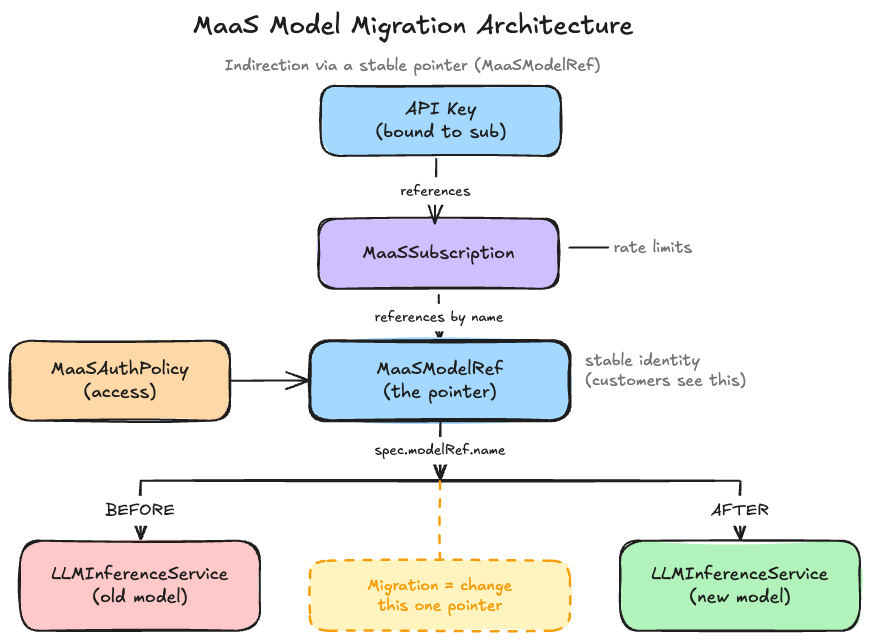
MaaSModelRef Phase Transitions
The MaaSModelRef goes through these phases:
| Phase | Meaning |
|---|---|
| Pending | Backend is initializing or no governance pairing found yet. |
| Ready | Backend is healthy AND at least one MaaSSubscription + MaaSAuthPolicy pair is active. Inference is possible. |
| Unhealthy | Governance is attached but the backend has a runtime or health failure. |
| Failed | Non-recoverable reconciliation error. |
| Invalid | The resource spec is missing or structurally invalid. |
Governance means at least one MaaSSubscription AND one MaaSAuthPolicy both reference the same MaaSModelRef. Both are required for the model to reach Ready phase. These two CRDs are independent - updating one does NOT auto-update the other. For details on keeping them in sync, see Governance Pairing in Phase 5.
What Changes vs What Stays the Same
| Component | Changes? | Why |
|---|---|---|
| LLMInferenceService | Yes | New backend deployed (qwen-38), old one deleted (qwen-36). |
MaaSModelRef spec.modelRef.name | Yes | Pointer swapped from qwen-36 to qwen-38. |
| MaaSModelRef name | No | qwen-coder is the stable identity that customers see. Keeping it the same is what makes the swap seamless. |
| MaaSAuthPolicy | No | References MaaSModelRef qwen-coder by name (unchanged). |
| MaaSSubscription | No | References MaaSModelRef qwen-coder by name (unchanged). |
| API keys | No | Bound to a subscription at creation time. Subscription is unchanged, so keys keep working. |
| Model ID in requests | No | Both qwen-36 and qwen-38 serve the same spec.model.name (Qwen/Qwen3-Coder), so the canonical model ID (publishers/llm/models/Qwen/Qwen3-Coder) stays the same. |
BBR endpoint (/v1/chat/completions) | No | Body-based routing uses the canonical model ID in the request body (publishers/llm/models/Qwen/Qwen3-Coder), derived from the namespace and spec.model.name (both unchanged). Customers using this endpoint need no changes. |
Per-model URL path (/llm/<name>/...) | Yes | The per-model URL path changes from /llm/qwen-36/... to /llm/qwen-38/... because it is derived from the LLMInferenceService name. Customers using per-model URLs must switch to the BBR endpoint. |
The per-model URL path changes after a swap: /llm/qwen-36/v1/chat/completions becomes /llm/qwen-38/v1/chat/completions because it is derived from the LLMInferenceService name, not the MaaSModelRef name. Always use the BBR endpoint (/v1/chat/completions) with the full publisher model ID in the request body (e.g. publishers/llm/models/Qwen/Qwen3-Coder) for swap-safe client integration.
Prerequisites
- Phases 1-5 completed (Red Hat OpenShift AI installed, Models as a Service platform running,
llmnamespace created) - Admin access to the model namespace and
models-as-a-servicenamespace
Swap Procedure
This procedure walks through the full swap lifecycle using the provided Qwen 3.6 -> 3.8 simulator templates. Both templates use the CPU simulator image (llm-d-inference-sim), so no GPU is required.
The scenario: you have a model called qwen-36 registered with MaaS through a MaaSModelRef called qwen-coder. You want to replace it with qwen-38 without affecting customers.
If you already have a model deployed from Phase 5, you can skip the original model deployment and adapt the steps to your existing model names.
Step 1: Deploy the Original Model
Deploy the original model (qwen-36) with its full MaaS stack (MaaSModelRef, AuthPolicy, Subscriptions):
Wait for the model to become Ready:
Expected output:
Step 2: Deploy the Replacement Model
Deploy the replacement (qwen-38) alongside the existing one:
The new LLMInferenceService must use the same spec.model.name as the existing one. Both qwen-36 and qwen-38 use Qwen/Qwen3-Coder. This is the model ID that customers send in their API requests (/v1/chat/completions). If the names differ, customers would need to update their client code.
Step 3: Verify the Replacement is Ready
Wait for both LLMInferenceServices to be running:
Expected output - both old and new show a Ready condition:
For GPU models, this can take 5-15 minutes while the image is pulled and model weights are loaded.
Step 4: Swap the MaaSModelRef Pointer
This is the swap itself. Patch the MaaSModelRef to point to the new LLMInferenceService:
This one-field change is what makes the swap seamless. The MaaSModelRef name (qwen-coder) stays the same, so all auth policies, subscriptions, and API keys continue to work.
Verify the MaaSModelRef now points to qwen-38:
Step 5: Delete the Old LLMInferenceService
While both LLMInferenceServices exist, the gateway routes 100% of BBR traffic to qwen-36 (the first-created backend) and 0% to qwen-38. You must delete qwen-36 so the gateway starts routing to qwen-38.
This means the swap is not zero-downtime. There is a brief window (typically a few seconds) between deleting the old model and the gateway routing to the new one where requests may fail.
This deletes the old inference pods, its HTTPRoute, and frees any GPU resources it was using.
Step 6: Clean Up Stale TokenRateLimitPolicy
After swapping the MaaSModelRef and deleting the old LLMInferenceService, the TokenRateLimitPolicy (TRLP) may retain an owner reference to the old HTTPRoute. This causes the MaaSSubscription to go Failed because the TRLP references a non-existent route.
Delete the stale TRLP so the controller can recreate it with the correct owner reference:
The maas-controller will automatically recreate the TRLP, now correctly owned by the new HTTPRoute.
Step 7: Verify
Confirm that everything is healthy:
Test inference to confirm the swap worked. If you already have an API key from before the swap, use it - the whole point is that existing keys keep working. If you need a new one:
Send an inference request using the BBR endpoint:
A successful response confirms the swap is complete - the request was routed to qwen-38 using the same model ID and API key that worked with qwen-36.
The model ID in the request body must be the full publisher path as returned by /v1/models (e.g. publishers/llm/models/Qwen/Qwen3-Coder). Using the short name (Qwen/Qwen3-Coder) returns a 404.
Operational Notes
BBR Routing Conflict
When two LLMInferenceServices in the same namespace share the same spec.model.name, their HTTPRoutes create identical BBR match rules. The gateway accepts both routes but routes 100% of traffic to the first-created backend - the new model receives zero requests. This was validated on OpenShift 4.21: 10/10 requests hit the old pod, 0/10 hit the new one. Deleting the old LLMInferenceService removes its HTTPRoute and lets the gateway discover the new one. There is no way to “test the new model first” while the old one exists.
TokenRateLimitPolicy Stale Owner Reference
The TokenRateLimitPolicy is auto-created by maas-controller and owned by the HTTPRoute. When the MaaSModelRef pointer changes, the TRLP still references the old HTTPRoute. Deleting the TRLP (Step 6) lets the controller recreate it with the correct owner. If you skip this, the MaaSSubscription may go Failed with an error like: Object <namespace>/maas-trlp-<name> is already owned by another HTTPRoute.
endpointOverride
If you created the MaaSModelRef manually (not through the Kustomize manifests in Phase 5), the controller may not be able to auto-discover the endpoint URL. In that case, set spec.endpointOverride on the MaaSModelRef:
You can check if this is needed by looking at the MaaSModelRef status. If it is stuck in Unhealthy with an empty endpoint, endpointOverride is the fix.
Model ID Format
The model ID used in inference requests (/v1/chat/completions) is the full publisher path, not the short model name. For example:
- Short name:
Qwen/Qwen3-Coder - Full publisher path:
publishers/llm/models/Qwen/Qwen3-Coder
Always use the model ID as returned by the /v1/models endpoint to avoid 404 errors.
Template Manifests
The manifests/99-model-swap/ directory contains two concrete simulator-based templates that walk through the full swap lifecycle (Qwen 3.6 -> 3.8):
Both templates use the CPU simulator image (llm-d-inference-sim), so no GPU is required. Both share spec.model.name: Qwen/Qwen3-Coder - this is the invariant that makes the swap seamless.
The qwen-36/ directory includes the full MaaS stack (MaaSModelRef + AuthPolicy + Subscriptions) because it is the original deployment. The qwen-38/ directory only includes the LLMInferenceService because the MaaS governance resources persist unchanged across the swap - only the MaaSModelRef pointer changes.
For a real swap with GPU models, replace the container image, model URI, and resource requests in both model.yaml files to match your actual models.
References
- Architecture & Request Flow - full Models as a Service component overview and request lifecycle
- Phase 5: Model Deployment - how to deploy a model from scratch
- Upstream MaaS Documentation
12 - Demos
12.1 - Demos
Hands-on walkthroughs that go deeper on the subscription, access control, and authentication topics covered in Phase 5 and Phase 9. Each scenario has setup/run/cleanup scripts and a presenter talk track.
Prerequisites
- Complete the guide through Phase 5 with at least the simulator model deployed
- For the OIDC, JWKS Cache, and Subscription Priority demos, also complete Phase 9 (they use Keycloak identities)
Deploy the simulator if not already done:
Preflight Check
Before presenting, run the preflight script to verify all demos are ready (it creates nothing and applies no YAML):
Expected result: 16 passed, 0 failed. The script also warms up maas-api to absorb its cold-start 500.
Subscriptions & Access (Phase 5)
| Demo | What it shows | Link |
|---|---|---|
| User-Level Rate Limiting | Assign MaaSSubscription tiers to groups and individual users. Shows how priority resolves overlaps when a user belongs to multiple groups. | README |
| Subscription Priority | Proves entitlement is selected, not accumulated. A user in two groups gets the higher-priority tier, not the sum. Per-user subscriptions can cap below group tiers. Requires Phase 9 (Keycloak). | README |
| Service Account Access | In-cluster workload calls a model with its ServiceAccount token via TokenReview. No API key or secret needed. Access per namespace, rate limits per workload. | README |
| Corporate Scenario | Division-level model governance: three divisions (Sales, Engineering, Products), on-prem + cloud models, differentiated access and rate limits. Demonstrates the full CIO-to-deployment policy lifecycle. Recommended starting point for enterprise demos. | Full Guide / Scripts |
OIDC & Token Validation (Phase 9)
| Demo | What it shows | Link |
|---|---|---|
| OIDC Authentication | Authenticate users from an external OIDC provider (Keycloak) who have no OpenShift account. The groups claim in the token selects the subscription. Includes a click-through UI and CLI sample client. | README |
| JWKS Cache | Proves JWT signatures are verified locally from a cached JWKS, not per-request to the IdP. Blocks Authorino from reaching Keycloak and shows validation still succeeds. | README |
Demo Structure
Every demo follows the same pattern:
The READMEs document three edge-case behaviors found during demo development: an identity matching two subscriptions gets 403 on the direct-token path, a token with no groups claim fails with an opaque AUTH_FAILURE, and split-horizon DNS can produce a false pass in the JWKS caching proof if you block the wrong address.
12.2 - Corporate Scenario: Division-Level Model Governance
A realistic enterprise demo showing how a CIO rolls out Models as a Service across an organization. Three divisions get differentiated access to on-prem and cloud models, each with appropriate token budgets - all enforced by the platform through policy, not code.
This is the recommended starting point when you want to show Models as a Service to stakeholders who care about governance, cost control, and multi-team model access.
All file paths and oc apply commands in this guide are relative to the CAI-Field-Manual-MaaS repository root. Make sure you have cloned it and are working from its root directory (see Getting Started).
The scenario
A CIO at a mid-size company assigns three divisions access to AI models. Each division has different needs and different budgets:
| Division | General Purpose (on-prem) | Code Model - DeepSeek R2 (on-prem) | Multimodal - Gemini Flash (cloud) |
|---|---|---|---|
| Sales | Yes (500 tok/min) | No | No |
| Engineering | Yes (500 tok/min) | Yes (1000 tok/min) | Yes (20 tok/min) |
| Products | Yes (500 tok/min) | Yes (500 tok/min) | No |
The cloud model is expensive, so only Engineering gets access - and with a tight cap. Engineering gets higher limits on the code model because they use it more heavily. Sales only needs the general purpose chatbot.
Each division gets ONE subscription covering all their allowed models. One API key per user, full access to everything their division is entitled to.
Prerequisites
- Complete the guide through Phase 5 with at least the simulator model deployed
oclogged into the cluster as cluster-adminhtpasswd,curl,jqavailable on PATH
Deploy the simulator if not already done:
Architecture
Models
All three models are backed by the CPU-only simulator (llm-d-inference-sim) - no GPU required. The namespace appears in the URL path, which is how you visually distinguish on-prem from cloud.
| Model | Namespace | Type | Served name |
|---|---|---|---|
| facebook-opt-125m-simulated | llm | On-prem (existing) | facebook/opt-125m |
| deepseek-r2-llmd | llm | On-prem (new) | deepseek/deepseek-r2 |
| gemini-flash-cloud | cloud-models | Cloud (new) | google/gemini-flash |
URL examples:
- On-prem:
https://maas.<domain>/llm/deepseek-r2-llmd/v1/chat/completions - Cloud:
https://maas.<domain>/cloud-models/gemini-flash-cloud/v1/chat/completions
Users and groups
Six users across three groups, created via htpasswd identity provider (corp-demo):
| Group | Users | Division |
|---|---|---|
corp-sales | sales-1, sales-2 | Sales |
corp-engineering | eng-1, eng-2 | Engineering |
corp-products | prod-1, prod-2 | Products |
MaaS CRDs
The governance is expressed through three CRD types:
MaaSAuthPolicy controls who can see which models:
corp-deepseek-access- grantscorp-engineering+corp-productsaccess todeepseek-r2-llmdcorp-cloud-access- grantscorp-engineeringONLY access togemini-flash-cloud- The existing
simulator-accessalready grantssystem:authenticatedaccess to the general model
MaaSSubscription controls how much each division can consume:
| Subscription | Division | Models and limits |
|---|---|---|
corp-sales | Sales | general: 500 tok/min |
corp-engineering | Engineering | general: 500 tok/min, deepseek: 1000 tok/min, gemini: 20 tok/min |
corp-products | Products | general: 500 tok/min, deepseek: 500 tok/min |
All subscriptions use priority 30 to outrank the shipped simulator-premium (priority 20) which targets system:authenticated.
MaaSModelRef registers each model with the MaaS control plane. Must be in the same namespace as its LLMInferenceService.
Step 1: Setup
The setup script creates everything: users, groups, models, and governance CRDs.
Set DEMO_PASSWORD to skip the interactive prompt:
The script:
- Checks that the general-purpose model (
facebook-opt-125m-simulated) is deployed and Ready - Creates 6 htpasswd users and adds the
corp-demoidentity provider (additive, does not touch existing providers) - Creates 3 OpenShift groups (
corp-sales,corp-engineering,corp-products) - Deploys the
cloud-modelsnamespace with gateway labels - Deploys 2 new LLMInferenceService resources (simulator-backed, CPU-only)
- Waits for simulator pods to start Running
- Applies MaaSModelRef, MaaSAuthPolicy, and MaaSSubscription resources
- Waits for both MaaSModelRefs to reach Ready
- Prints a summary of all resources
The oauth pods restart after adding the identity provider. Wait about a minute before trying to log in as the demo users.
What gets created
After setup completes, verify the state:
Step 2: Run the demo
The script logs in as one user per division (sales-1, eng-1, prod-1), mints an API key, and tests:
- Model visibility - which models each user can see in the catalog
- Inference on allowed models - sends 8 requests per model, shows tokens consumed
- Denied model access - proves 403 for unauthorized models
- Rate limiting - eng-1’s 20 tok/min cloud limit triggers within the burst
Expected output
Key observations:
- sales-1 sees only one model, gets 403 on the other two - Sales has no code model or cloud access
- eng-1 sees all three models, on-prem requests sail through, cloud model hits rate limiting at ~20 tokens - the CIO’s cost control in action
- prod-1 sees two models (no cloud), both on-prem models work fine
Step 3: Verify
The automated verification script runs 15 tests covering access control, rate limiting, key multiplication, and config drift.
What it tests
| Test suite | What it proves |
|---|---|
| Access control (9 tests) | Full 3x3 matrix of users x models: 6 should allow (200), 3 should deny (403) |
| Rate limiting (1 test) | eng-1 hits 429 on the cloud model within 15 requests |
| Key multiplication (1 test) | eng-2 mints two keys, exhausts quota with key-1, verifies key-2 is also rate-limited immediately. Proves rate limits are per subscription, not per credential. |
| Config drift (4 tests) | Subscription token limits match expected values (catches manual edits or drift) |
Expected result:
Step 4: Cleanup
Removes all demo resources (subscriptions, auth policies, MaaSModelRefs, LLMInferenceServices, namespace, groups, users, IDP). The existing general-purpose model is not touched.
Talk track
Use this flow when presenting the scenario to stakeholders.
1. Start with the CIO’s problem
Three divisions, each with different needs. Sales wants a chatbot. Engineering wants code assistance plus cloud model access. Products needs the code model for sprint reviews. How do you give each team exactly what they need - no more, no less?
2. Show the manifests
Open auth-policies.yaml and subscriptions.yaml. Point out how MaaSAuthPolicy controls visibility (who can see which models) and MaaSSubscription controls consumption (how much each group can use). The combination is the full governance picture.
One subscription per division, covering all their models with per-model limits. One key, full access.
3. Show the model catalog per user
Log in to the Red Hat OpenShift AI Dashboard as each division user:
- sales-1 sees one model
- prod-1 sees two models
- eng-1 sees all three models
The platform hides what you cannot access. There is no “request access” button for models outside your policy.
4. Run the burst
Point out that Engineering hits rate limiting on the cloud model (20 tokens/min) but not on the on-prem models. That is the CIO’s intent: cloud is expensive, keep it tight. On-prem is cheaper, give them room.
5. Try denied access
Sales calling the DeepSeek model gets a clean 403. Not a 500, not a timeout - the platform knows the policy and enforces it before the request reaches the model.
6. Key multiplication does not help
Run verify-scenario.sh and point at the key multiplication test. Minting a second API key does not reset the quota. The rate limit is per subscription, not per credential.
7. Change a limit live
Patch a subscription to show that governance is policy, not deployment:
Re-run ./run-demo.sh - Engineering no longer hits rate limiting on the cloud model. No redeployment, no restart, instant policy change.
Restore the original limit:
How the governance works
MaaSAuthPolicy - who can see what
Each MaaSAuthPolicy grants access to one or more models for specific groups or users. If a user is not covered by any auth policy for a model, the model does not appear in their catalog and API calls return 403.
The existing simulator-access policy grants system:authenticated access to the general purpose model. The corporate policies add group-specific access to the two new models without touching the existing setup.
MaaSSubscription - how much they can use
Each division gets ONE subscription covering all their allowed models, with per-model token rate limits. When a user mints an API key, the platform resolves the highest-priority subscription they match and attaches it.
All corporate subscriptions use priority 30 to outrank the shipped simulator-premium (priority 20, targeting system:authenticated). Without this, the shipped tier would win and the corporate limits would not apply.
Priority resolution
- Subscriptions are selected, not accumulated. A user gets ONE subscription - the highest priority match.
- A single subscription can cover multiple models with different limits per model.
- Minting multiple API keys does not multiply the quota. Rate limits are per subscription, not per credential.
- Priority 30 for all corporate-scenario subscriptions means they win over shipped defaults (priority 10 and 20).
MaaSModelRef governance pairing
A MaaSModelRef reaches Ready only when BOTH a MaaSSubscription AND a MaaSAuthPolicy reference it. This is the governance pairing - without both, the model is not accessible through the MaaS control plane.
Files
13 - Cleanup & Teardown
Remove Models as a Service and its dependencies from your OpenShift cluster.
Automated Cleanup
The cleanup script undoes setup-maas.sh in reverse order, checking whether each resource exists before deleting.
The script prompts for confirmation before deleting anything. Pass --yes to skip the prompt.
Options
| Flag | Description |
|---|---|
--dry-run | Preview what would be deleted without actually deleting |
--keep-operators | Skip operator removal (Phase 7) - useful when you only want to tear down models and config |
--from-phase <N> | Start from a specific cleanup phase (1-7) |
--yes | Skip the confirmation prompt |
Cleanup Phases
The script runs these phases in order:
| Phase | Name | What it removes |
|---|---|---|
| 1 | External Models | ExternalModel CRs, provider API key secrets, external-models namespace |
| 2 | Observability | Telemetry policies, COO / OpenTelemetry / Tempo operators and namespaces |
| 3 | Models | MaaSSubscription, MaaSAuthPolicy, MaaSModelRef, LLMInferenceService, llm namespace |
| 4 | Red Hat OpenShift AI Configuration | OdhDashboardConfig, DataScienceCluster, DSCInitialization |
| 5 | MaaS Platform | PostgreSQL deployment / PVC / service, postgres-creds and maas-db-config secrets |
| 6 | Platform Configuration | Gateway, GatewayClass, Route, Kuadrant CR, user workload monitoring config, MetalLB (if installed) |
| 7 | Operators | RHCL, cert-manager, LWS, Red Hat OpenShift AI subscriptions / CSVs, operator namespaces, Red Hat OpenShift AI-managed namespaces |
Examples
Preview what would be deleted:
Remove models and config but keep operators installed:
Remove only the operators (everything else already cleaned up):
Manual Cleanup
If you prefer to remove resources selectively, follow these steps in order.
Remove Models
Remove RHOAI Configuration
Remove MaaS Platform (PostgreSQL)
Remove Gateway and Kuadrant
Remove Operators
Delete subscriptions first, then CSVs, then namespaces:
Wait 60 seconds for the RHOAI operator to clean up managed resources, then remove its namespaces:
What Is Not Removed
The cleanup script does not remove:
- Pre-existing namespaces (
openshift-operators,openshift-monitoring,openshift-ingress) - GPU operators (NFD, NVIDIA GPU Operator) - these are installed separately
- CRDs left behind by operators (OLM does not remove CRDs on operator deletion)
- Persistent data in external storage (e.g., if you used an external PostgreSQL)
Next step
To reinstall, run ./scripts/setup-maas.sh - see Automated Setup.
14 - Guide Changelog
Changes to the Red Hat OpenShift AI Models as a Service companion guide since the project started in June 2026. Covers new guide phases, automation improvements, bug fixes, and community contributions.
Each entry links to its pull request for full details.
November 2026
New Pages
Running MaaS with RHCL 1.5 - Validation of Red Hat OpenShift AI 3.5.2 MaaS on RHCL 1.5.0, side by side with the GA MCP Gateway that ships inside RHCL 1.5. Verified 15/15 end to end, plus an MCP
tools/calland anAuthPolicyon the MCP gateway enforced by the shared Authorino. Covers the consolidated RHCL 1.5 operator (one CSV, components deployed throughKuadrantControlPlane), the Authorino Service losing its serving-cert annotation (Kuadrant stuck onAuthorinoNotReady, API keys return 500), the Kuadrant operator near its 500Mi limit and how to raise it through the Subscription,Kuadrantbeing a silent singleton, pointing the MCP auth EnvoyFilter atkuadrant-system, and the single MetalLB address the MCP gateway can take first. (#205) Each issue now links its Jira: RHOAIENG-103136, CONNLINK-1976, RHOAIENG-103137, plus the existing CONNLINK-1878, CONNLINK-1713 and CONNLINK-1973.Running MaaS on OpenShift 5 - First walkthrough of MaaS on OpenShift 5.0, covering what carries over unchanged (OLM v0, Gateway API v1, the Istio-backed
openshift-defaultGatewayClass, Kuadrant policy attachment) and seven issues with workarounds: RHOAI missing from the OpenShift 5 operator index, the RHCLstablechannel renamed tostable-1.5, the installer assuming 3.5 while the catalog serves 3.4.2, a second Kuadrant instance on a cluster that already runs RHCL, the MetalLB pool landing on a node address,verify.shusing a 3.5-only inference URL, and the gateway HPA pinned at maximum replicas. Verified 15/15 end to end on RHOAI 3.4.2. (#203)
Fixes
Authorino Serving-Cert Annotation on RHCL 1.5 -
setup-maas.shPhase 3 now checks that theauthorino-authorino-authorizationService still has its serving-cert annotation, re-applies it if the RHCL 1.5 Authorino operator dropped it, waits for theauthorino-server-certSecret and restarts Authorino. Phase 1 also no longer re-applies the checked-in Subscription over an operator that is already installed, so an RHCL onstable-1.5is not moved back tostable. (#205)Operator Catalog and Channel Resolution -
setup-maas.shnow looks up which CatalogSource actually publishes each operator and which channels it offers, instead of assumingredhat-operatorsand a fixed channel. It prefers a catalog that carries the channel the manifest asks for, so a snapshot catalog cannot silently move you to an untested release, andredhat-operatorswins ties. Adds--catalog-sourceto prefer a specific catalog, warning and falling back when that catalog does not carry the package, and--to-phaseto stop after a given phase. Also skips creating a duplicate Subscription when an operator is already installed from another namespace, leaves an already-resolved Subscription untouched, and waits for the CSV where the operator really lives. (#203)RHOAI Version Re-detection - The installer read the RHOAI version once during preflight, before the operator existed, so a run that asked for 3.5 against a catalog serving 3.4.2 applied the 3.5 DSC layout. The API server prunes the unknown
aigatewayfield without an error, leaving MaaS silently disabled. The version is now re-read from the CSV after the operator installs and again at Phase 4. (#203)Gateway CPU Request Raised to 500m - The Sail Operator gives the MaaS gateway Deployment an HPA that targets 80% CPU of the container request, and a gateway running the RHCL Wasm filters idles at 145-271m. With the old
100mrequest the HPA sat permanently atmaxReplicas: 10, each pod holding a 2Gi limit.gateway-resources.yamlnow requests500m, which brought a live cluster back tominReplicas: 2in ten seconds with no loss of health. The 2Gi memory limit is unchanged, since that is still the RHOAIENG-68589 workaround. (#203)MetalLB Pool Collision - The pool address was derived as “first node IP plus one”, which lands on a second node whenever node addresses are consecutive. The resulting collision on port 443 takes down the console and OAuth. Node addresses are now excluded when choosing the pool. (#203)
verify.sh Inference URL on RHOAI 3.4 - The inference, auth-enforcement and rate-limit checks posted to
/v1/chat/completionsat the gateway root, which only exists on 3.5 with body-based routing. On 3.4 every request returned 404 and looked like an auth failure. The checks now use the per-model URL from the models listing. (#203)
October 2026
New Pages
- MaaS:PAL Automated Verification - A new section to explain the MaaS:PAL community plugin to help with MaaS configuration verification (#192)
Features
- HTTP Proxy for External Models - New section in the external models page for clusters that can only reach provider APIs through a corporate HTTP proxy, with Azure OpenAI as the worked example. Explains why there is no proxy setting to turn on (Envoy ignores
HTTP_PROXY, Istiotunneldoes not apply to HTTP routes,http_11_proxyEnvoyFilters cannot attach to the reconciler-generated cluster on Envoy 1.35, and thetls/portannotations are 3.4 only), then documents the egress tunnel pattern that keeps TLS end-to-end to the provider. Includes Kustomize manifests with a lab proxy for testing. (#194)
Fixes
Version Notes in Phase 1 - Added an orientation-only table of the OCP / RHOAI / RHCL versions the guide is exercised against, pointing at the supported configurations matrix as the authoritative source, plus a note on how the Red Hat AI subscription guide describes RHCL entitlement for MaaS. Dropped the stale “pin to 1.3.4” suggestion from the troubleshooting checklist. (#189)
WASM Auth Timeout in External Models Guide - Added Known Issue entry for the WASM auth timeout (RHOAIENG-71638) to the external models page so users hitting HTTP 500 under load can find the fix directly. Also bumped the recommended AUTH_SERVICE_TIMEOUT from 2s to 10s based on field feedback. (#186)
CORS Undo Status Code - Fixed expected status code in the CORS guide undo section: stock gateway returns 404 on OPTIONS (no HTTPRoute match), not 401 as originally documented. (#185)
September 2026
New Pages
Multi-Tenancy Reference - What RHOAI 3.5 MaaS multi-tenancy covers: tenants vs instances, dedicated vs shared resources, isolation boundaries, AITenant provisioning walkthrough, and quick answers for the common questions. (#170)
API Key Security Reference - Deep dive into MaaS API key internals: key anatomy, hash derivation, ValidateAPIKey flow, IDOR protection, lifecycle management, and 8-threat model. (#129)
Model Swap Reference - How to swap a model backend without customer-facing changes. Covers MaaSModelRef hierarchy, 6-step migration procedure, BBR endpoint routing, and concrete Qwen 3.6→3.8 swap templates. (#113, #134)
Platform Upgrade Guide (3.4 → 3.5) - End-to-end 10-step MaaS migration guide covering DSC fields, namespace migration, ExternalModel API changes, and dashboard config. (#119)
Demos Page - 5 presenter-ready demos for subscription tiering, priority resolution, OIDC authentication, service account access, and JWKS cache validation. Contributed by deewhyweb. Grouped by parent phase with inline TIP pointers from Phase 5 and Phase 9. (#152, #153)
Features
Admin Key Management FAQ - New section in the API Key Security page: why keys cannot be created on behalf of another user (and what works instead: self-service, IdP tokens with external OIDC, ServiceAccount tokens), and why there is no per-user key cap (quota is per subscription, not per key). (#172)
Site Search - Search box in the top navbar, powered by the official Antora Lunr extension. Client-side index built at build time, results grouped by page with section deep links and snippets. (#171)
Verify Guide Skill Documentation - Added
/verify-guideskill to the Claude Code guide page with usage, arguments, phases table, and description of all 6 verification phases. (#166)Azure OpenAI External Model Provider - Added Azure OpenAI as fifth external model provider with Kustomize manifests, setup/cleanup script support, and gpt-4.1-mini as default model. Uses the
azure-openaiBBR provider type. (#168)Anthropic External Model Provider - Added Anthropic (Claude Haiku 4.5) as fourth external model provider with Kustomize manifests, setup/cleanup script support, and RHOAIENG-93984 known issue documentation for /v1/messages token counting gap. (#164)
Phase 9: External OIDC Authentication - Full Keycloak integration with PostgreSQL backend, realm import, automation script, and 6-check test suite. Supports corporate SSO with JWT claim-based authorization. (#98)
Loki-based Usage Dashboards - Added Loki Operator, MinIO, and LokiStack manifests to Phase 7. When usage logging is enabled, operator auto-creates EnvoyFilter, OTEL Collector, Tenancy Proxy, and Perses dashboards. RHOAI 3.5+ only. (#96)
Qwen3-0.6B CPU-only Model - First model in the guide that does not need a GPU. Runs on vLLM CPU runtime with 4-8 CPU and 16Gi memory. (#133)
Limitador Persistence with Redis - Added dev Redis deployment and Limitador CR patch so rate-limit counters survive pod restarts. New
--with-redisflag for setup-maas.sh. (#142)External Models Dual 3.4/3.5 Support - Added ExternalProvider + ExternalModel manifests for RHOAI 3.5 new
inference.opendatahub.io/v1alpha1API. Tabs blocks in docs and version branching in setup script. (#88)Gateway Proxy Workaround - On OCP < 4.22 behind corporate proxy, gateway pod does not get cluster-wide proxy settings. Added Step 5f with ConfigMap template for HTTP_PROXY/HTTPS_PROXY/NO_PROXY env vars. (#137)
Gateway Telemetry Auto-Creation - Replaced manual
oc apply -ktelemetry step with MaasTenantConfig/Tenant CR patch. The RHOAI operator (maas-controller) auto-creates TelemetryPolicy and Istio Telemetry whenspec.telemetry.enabled: trueis set. Added 3.4/3.5 tabs and optional per-user metrics toggle. (#146)Governance Pairing Documentation - Both MaaSAuthPolicy AND MaaSSubscription must reference the same model for Ready state. Day 2 patch commands included. (#117)
ServiceAccount-Scoped Subscriptions - New section in Phase 5 showing how to scope a MaaSSubscription to a specific ServiceAccount via
spec.owner.users. Useful for CI/CD pipelines and batch jobs that need their own rate limits. (#150)External Models Dashboard Documentation - Added Technology Preview callout for the External models tab in the RHOAI Dashboard (AI hub > Models > Deployments). New section in Phase 8 with screenshot showing the model listing and provider details. (#156)
Fixes
Broken Official Docs Links - The RHOAI 3.5 docs renamed the MaaS chapter chunk and retired two anchors, breaking five deep links in Phases 2, 7, and 8. All links now point at the correct per-version chunk and anchors, verified against the live docs. (#170)
Live Install Review Fixes - Docs, script, and demo fixes from a full manual install review: Phase 3 namespace pre-create for 3.5+, Phase 9 Keycloak hostname patch, verify.sh now keeps pre-existing models at cleanup, demo subscription priorities raised above the generic model tiers, and gpt-oss-20b VRAM corrected to ~16 GiB (runs quantized on a 24 GB L4). (#169)
UWM No Longer Required in RHOAI 3.5 - Marked User Workload Monitoring as optional in Phase 2. RHOAI 3.5 uses COO’s MonitoringStack for metrics collection. UWM is still useful for forwarding metrics to external tools. (#167)
Phase 4 CRD Race Condition - DSC triggers async CRD registration. Script was applying HardwareProfile before CRD existed. Added wait_for_crd() helper. (#108)
OGX Rename for RHOAI 3.5 - RHOAI 3.5 renamed llamastackoperator to ogx. Old key was silently ignored, blocking Playground from appearing. (#110)
IPP-managed Label for External Models - RHOAI 3.5 changed secret label from
bbr-managedtoipp-managed. Without correct label, apikey-injection watcher never picks up the secret and inference returns 500. (#90)Stale DNSRecord After Gateway Service Type Change - When gateway switches from LoadBalancer to ClusterIP, stale dnsrecord pointing to defunct AWS ELB is not cleaned up. Added troubleshooting entry with diagnosis and workaround. Filed RHOAIENG-93962. (#140)
HTTPRoute Rule Name Collision - RHOAI 3.5 hardcoded HTTPRoute rule names. Multiple models on the same gateway cause Istio to merge duplicate rules, sending all traffic to one EPP. Documented as known issue. (#139)
Body-Based Routing Curl Examples - All inference curl examples across 5 guide pages, verify.sh, and setup-maas.sh now use body-based routing at
/v1/chat/completionswith the correct model ID from/v1/models. Local models require the canonicalpublishers/{namespace}/models/{model-name}format - short names return 404. Also addedqwen3-06bto VALID_MODELS. (#147)13 Documentation Fixes from Full Guide Review - Broken xref anchor, wrong Roo Code URL, missing namespace in oc patch, stale llamastackoperator ref, missing externalModels flag, wrong OCP version, and more across 10 files. (#124)
Gateway-access Namespace Labeling for RHOAI 3.5 - Phase 2 tried to label
redhat-ai-gateway-infrabefore it exists. Moved labeling to Phase 4 with safety-net re-label. (#101)OperatorGroup Skip for Pre-installed Operators - OLM only allows one OperatorGroup per namespace. Script now checks for existing groups and skips if present. (#104)
Authorino Patch Race on Fresh Install - Script tried to patch Authorino CR before it exists. Added existence check with Phase 3 retry logic. (#114)
3.4 to 3.5 Upgrade Path Bugs - Channel not restored on cluster after
--rhoai-version 3.4, and DSC not updated during upgrade with--from-phase 4. (#84)OTEL Collector Proxy Interception - On proxied clusters, OTEL collector routes TargetAllocator request through corporate proxy. Root cause: short hostname without .svc suffix. Workaround patches OTel CR spec.env. Filed RHOAIENG-91640. (#105)
August 2026
New Pages
Post-Upgrade Troubleshooting - 10 most common 3.4→3.5 upgrade issues with symptoms, diagnosis commands, and workarounds. Covers MCP OOM, ExternalModel migration, gateway label mismatch, hostname discovery, and more. All issues linked to Jira. (#79)
Cleanup and Teardown Guide - New Phase 9 cleanup page with
cleanup-maas.shscript. Reverses setup in 7 phases, supports--dry-run,--keep-operators,--from-phase,--yes. (#56)
Features
RHOAI 3.4/3.5 Dual-Version Support - Auto-detects RHOAI version from CSV. AI Gateway modularization (
kserve.modelsAsService->aigateway.modelsAsAService), dual DSC manifests, version tabs in docs. Validated across 10 walkthroughs. (#76)Disconnected/Air-gapped Full Support - Phase 0 docs, ImageSetConfiguration, ITMS manifests, GPU MachineSet template. Added Gemma 2 9B IT FP8 model for single A10G GPU. Fixed internal LB annotation for AWS disconnected. (#57, #58, #59)
WASM Shim for Disconnected Clusters - Kuadrant WASM shim is fetched via OCI at runtime, bypassing CRI-O/IDMS. Added RELATED_IMAGE_WASMSHIM patch and WASM shim to ImageSetConfiguration/ITMS. (#59)
GPU HardwareProfile and Model Cleanup - Added HardwareProfile CR to Phase 4 for proper GPU scheduling. Removed T4 (compute capability 75 too low for FP8) and A10G (tensor tile size error with current vLLM) from supported GPUs. (#72)
Fixes
Custom Hostname Support - Added
--maas-hostnameflag andMAAS_HOSTNAMEenv var. Fixed CSV wait on fresh clusters. Commented out TelemetryPolicy fields that crash Wasm shim before RHOAI 3.4.4. (#71)Istiod/Proxyv2 Images for Disconnected OCP >= 4.20.32 - Ingress operator embeds Istio (sail library) instead of standalone OSSM. Images are not in any catalog, causing ImagePullBackOff. Added discovery commands. (#75)
RHCL Pin Removed - Removed v1.3.4 pin since RHCL v1.4.2 fixes the WASM bugs. (#56)
Skip ModelControllerReady on RHOAI 3.5+ - DSC condition was removed in 3.5, causing setup script to wait 300s for nothing on every fresh install. (#78)
GPU Driver DTK Kernel Check - Made the kernel check the gate for GPU driver builds on disconnected clusters. Driver builds only needed when DTK image kernel does not match the node. Contributed by deewhyweb. (#69)
July 2026
Changes
OSSM3 Removal - On OCP 4.20+, openshift-ingress manages OSSM internally. Pre-installing servicemeshoperator3 blocked the gateway controller. Removed OSSM subscription and all manual OSSM references. (#45, #46)
Verify-guide Claude Code Skill - New automation skill that runs a full naive-user walkthrough on a live cluster. Covers 6 phases: cluster login, setup-maas.sh, verify.sh E2E (15 checks), 8 blind-spot regression checks, guide content verification, and report. (#49)
Pipefail and RHCL Install Plan Fixes - Fixed Phase 5 crash when all model pods are healthy (grep exit 1 under pipefail). Fixed RHCL install plan approval to use subscription status lookup. (#50)
June 2026
Initial Release
Guide Launch - Antora documentation site deployed on GitHub Pages. Phases 1-7 covering prerequisites, platform config, MaaS platform, RHOAI config, model deployment, verification, and observability. Includes
setup-maas.shautomation script and Kustomize manifests for each phase.Alpha Testing - Initial alpha-test feedback from bryonbaker and nueda-rh covering content accuracy, missing steps, typo fixes, and redundant verification removal. (#2, #3, #4, #8)
Features
Architecture and Request Flow Reference - New reference page with 4-layer component overview, 8-step request flow walkthrough, Mermaid diagrams, and FlowStory interactive visualizer link. (#12)
Phase 8: External Models - Added ExternalModel support for OpenAI (gpt-4o-mini), Google Gemini (gemini-2.5-flash), and AWS Bedrock. Kustomize manifests,
--external-model-providerflag, and full documentation. (#20, #21)Gateway OOMKill Persistent Fix - Replaced temporary
oc patch deploymentworkaround with persistent ConfigMap +spec.infrastructure.parametersRefapproach. Survives Istio reconciliation. (#26)Gateway Namespace Binding Restriction - Switched gateway from
allowedRoutes.namespaces.from: Alltofrom: Selectorwithmaas.opendatahub.io/gateway-access=truelabel. Only labeled namespaces can attach HTTPRoutes. (#36)DSCI Monitoring Configuration - Phase 7 installed observability operators but never configured the DSCI to use them. Added DSCI patch with metrics and traces configuration. (#37)
Fixes
End-to-End Testing Fixes - Fixed 5 script bugs (CSV timeout, Kuadrant pod restart label, ODH namespace label, RHOAI version parsing, OdhDashboardConfig race) and 2 doc inaccuracies from first live cluster testing. (#14)
Expected Outputs Update for RHOAI 3.4.0 - Updated CSV versions, route/TLS output, CSV column names, API key creation command, verification pass count, and replaced static placeholders with shell variables. (#16)
RHCL Pinned to v1.3.4 - RHCL 1.4.0 had WASM plugin loading issues causing gateway errors and breaking the RHOAI model UI. Added startingCSV + Manual install plan approval. (#32)
GPU Operand Instances - Added ClusterPolicy and NodeFeatureDiscovery CRs to Phase 1 manifests. Without these, GPU operator does not install drivers. (#33)
MetalLB IP Collision on SNO - Using node’s own InternalIP for MetalLB caused kube-proxy iptables to hijack port 443 traffic, breaking OAuth callbacks, console access, and in-cluster
*.appsroutes. Now derives MetalLB IP as node IP + 1. (#40)
Contributors
| Contributor | Contributions |
|---|---|
| rcarrata | Primary author - guide content, automation scripts, Kustomize manifests |
| bryonbaker | Alpha testing review and documentation feedback |
| deewhyweb | MaaS entitlement and authentication demos, GPU driver DTK kernel check |
| nueda-rh | Platform configuration fixes |
| rafpcloud | Dashboard namespace labeling |
| skoussou | README link fixes |
| Surote | Custom hostname support and dashboard feature flags |
| stefan-bergstein | OperatorGroup pre-install bug report |
Issue reporters: hupiper, guimou, svalluru, erwangranger.
15 - AI-Assisted Installation and Verification
This repository includes skill definitions that provide AI-assisted MaaS installation and end-to-end verification. The /install-maas skill wraps the same setup-maas.sh script used in the Automated Setup, while the /verify-guide skill runs a full verification pass against a live cluster - covering installation, the 15-point E2E test suite, blind-spot regression checks, and guide content validation.
The skills work with any AI coding tool that supports skill definitions:
- Claude Code / Open Code
- Cursor
- Roo Code
- Other AI coding agents with skill support
All file paths and oc apply commands in this guide are relative to the CAI-Field-Manual-MaaS repository root. Make sure you have cloned it and are working from its root directory (see Getting Started).
Prerequisites
- An AI coding tool installed (see list above)
ocCLI authenticated as cluster-admin- This repository cloned locally
/install-maas
The /install-maas skill wraps ./scripts/setup-maas.sh, letting your AI coding agent handle cluster detection, error diagnosis, and interactive troubleshooting.
Usage
Open the repository in your AI coding tool and invoke the skill:
Arguments
All arguments from setup-maas.sh are supported:
| Option | Description |
|---|---|
--model <name> | Model to deploy: simulator (CPU), granite-tiny-gpu, gemma, gpt-oss-20b, qwen3-06b, auto |
--from-phase <N> | Start from phase N (0-7) |
--skip-models | Skip Phase 5 (model deployment) |
--skip-verify | Skip Phase 6 (verification) |
--with-observability | Also run Phase 7 (COO + telemetry) |
What the Skill Does
The skill runs ./scripts/setup-maas.sh from the repository root with the provided arguments. Your AI coding agent monitors the output, detects failures, and can help diagnose issues interactively.
The skill has access to oc, envsubst, curl, jq, and other CLI tools needed for MaaS deployment.
Skill Definition
The skill is defined in .claude/skills/install-maas/SKILL.md within this repository. It is automatically discovered when you open the repo in a compatible AI coding tool.
/verify-guide
The /verify-guide skill runs end-to-end verification of the guide content against a live OpenShift cluster. It installs MaaS, executes the 15-point E2E test suite, runs 8 blind-spot regression checks learned from previous walkthroughs, and validates that commands documented in the AsciiDoc pages produce the expected output. At the end it generates a structured report with all results.
Usage
Example:
Arguments
| Option | Description |
|---|---|
<API_URL> | (Required) OpenShift API server URL, including port |
<USERNAME> | (Required) Cluster admin username (e.g. admin or kubeadmin) |
<PASSWORD> | (Required) Cluster admin password |
--skip-install | Skip Phase 1 (setup-maas.sh). Use when MaaS is already installed |
--skip-verify-sh | Skip Phase 2 (verify.sh E2E) |
--skip-blindspot | Skip Phase 3 (8 blind-spot regression checks) |
--skip-guide-content | Skip Phase 4 (AsciiDoc content verification) |
--with-observability | Pass --with-observability to setup-maas.sh in Phase 1 |
--walkthrough-number N | Label this run as walkthrough N (default: auto-increment) |
Phases
The skill runs 6 phases in sequence. Individual phases can be skipped with the flags above.
| Phase | What it checks | Time |
|---|---|---|
| 0 | Cluster login, preflight detection (platform, OCP version, GPU, nodes) | instant |
| 1 | Full MaaS installation via ./scripts/setup-maas.sh | 15-30 min |
| 2 | 15-point E2E via ./manifests/06-verification/verify.sh | 3-5 min |
| 3 | 8 blind-spot regression checks (gateway OOM, MetalLB IP, RHCL version, etc.) | 1-2 min |
| 4 | AsciiDoc guide commands produce documented output | 1-2 min |
| 5 | Report generation and findings summary | instant |
What the Skill Does
The skill logs into the cluster, detects its characteristics (platform, GPU, node count), and then runs through each phase collecting PASS/FAIL/WARN results. It never stops on a single failure - all checks run regardless, so you get the full picture in one pass.
Phase 3 blind-spot checks cover regressions that the standard verify.sh does not test: gateway memory limits, MetalLB IP collisions, OAuth/console accessibility, RHOAI dashboard reachability, namespace labels, RHCL operator version, HuggingFace Xet storage behavior, and an independent inference request.
Phase 4 validates that specific commands from the guide pages (model-deployment/maas-models, installation-guide/rhoai-config, model-deployment/verification, installation-guide/prerequisites) return the documented output.
At the end, the skill prints a structured report with all results, operator versions, and any issues found.
Skill Definition
The skill is defined in .claude/skills/verify-guide/SKILL.md within this repository. It is automatically discovered when you open the repo in a compatible AI coding tool.
16 - MaaS:PAL — Verification for your MaaS
MaaS:PAL (MaaS: Policies, Access, Limits) is a Red Hat AI Community Plugin for the OpenShift AI dashboard that tests a Models as a Service setup on a live cluster. It answers questions like “is my subscription’s rate limit actually enforced?” or “does my subscription reach every model it covers?”. It acts through MaaS’s own user-facing APIs, the way a real user would.
Getting started
Follow the MaaS:PAL README for installation, dashboard registration, and access configuration.
Using MaaS:PAL
In the dashboard, open Community plugins → MaaS:PAL. Pick a scenario from the Scenarios catalog — search, or filter by category — adjust its settings and launch it.
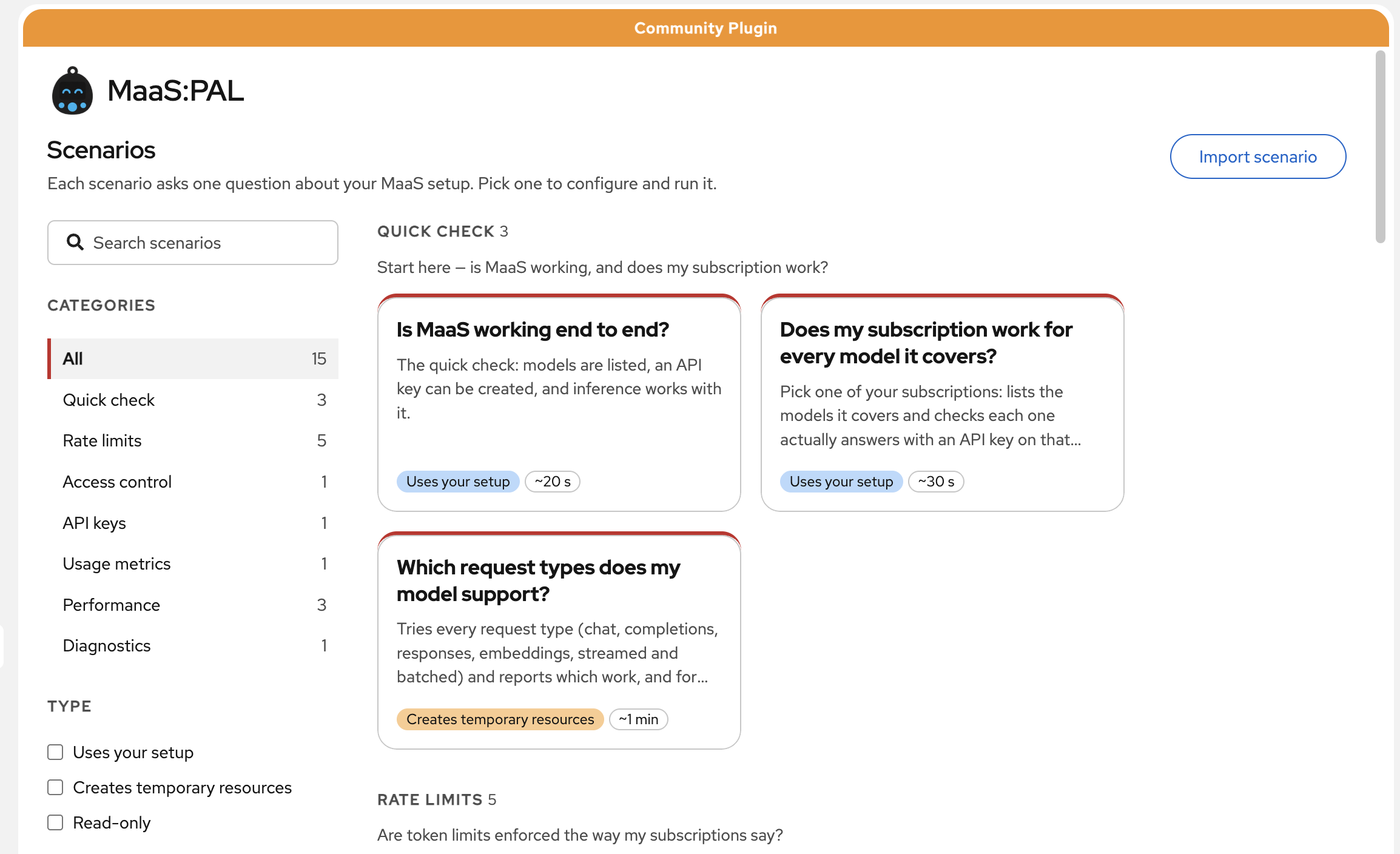
Runs lists every scenario run, with its status and duration. Open a run to see what happened.
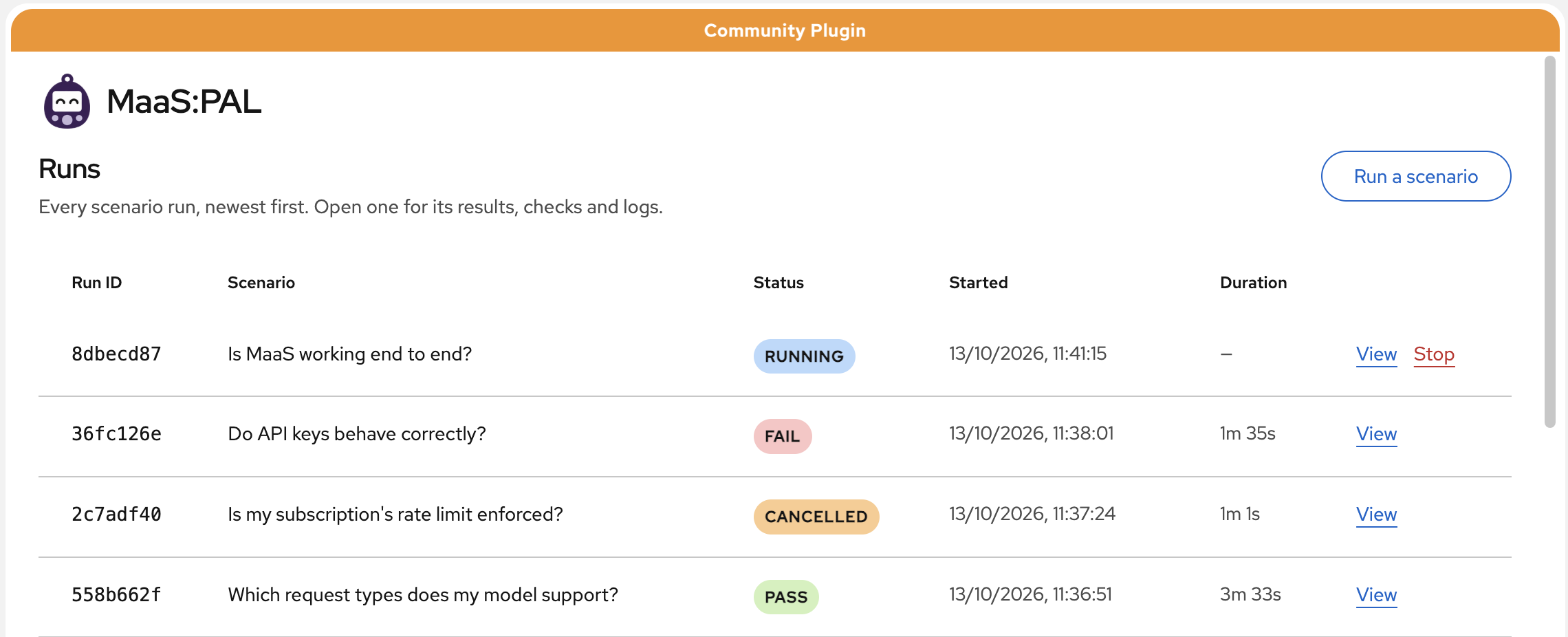
The run page shows what happened step by step: live progress, the checks, a plain-language verdict, and what the run created and cleaned up.
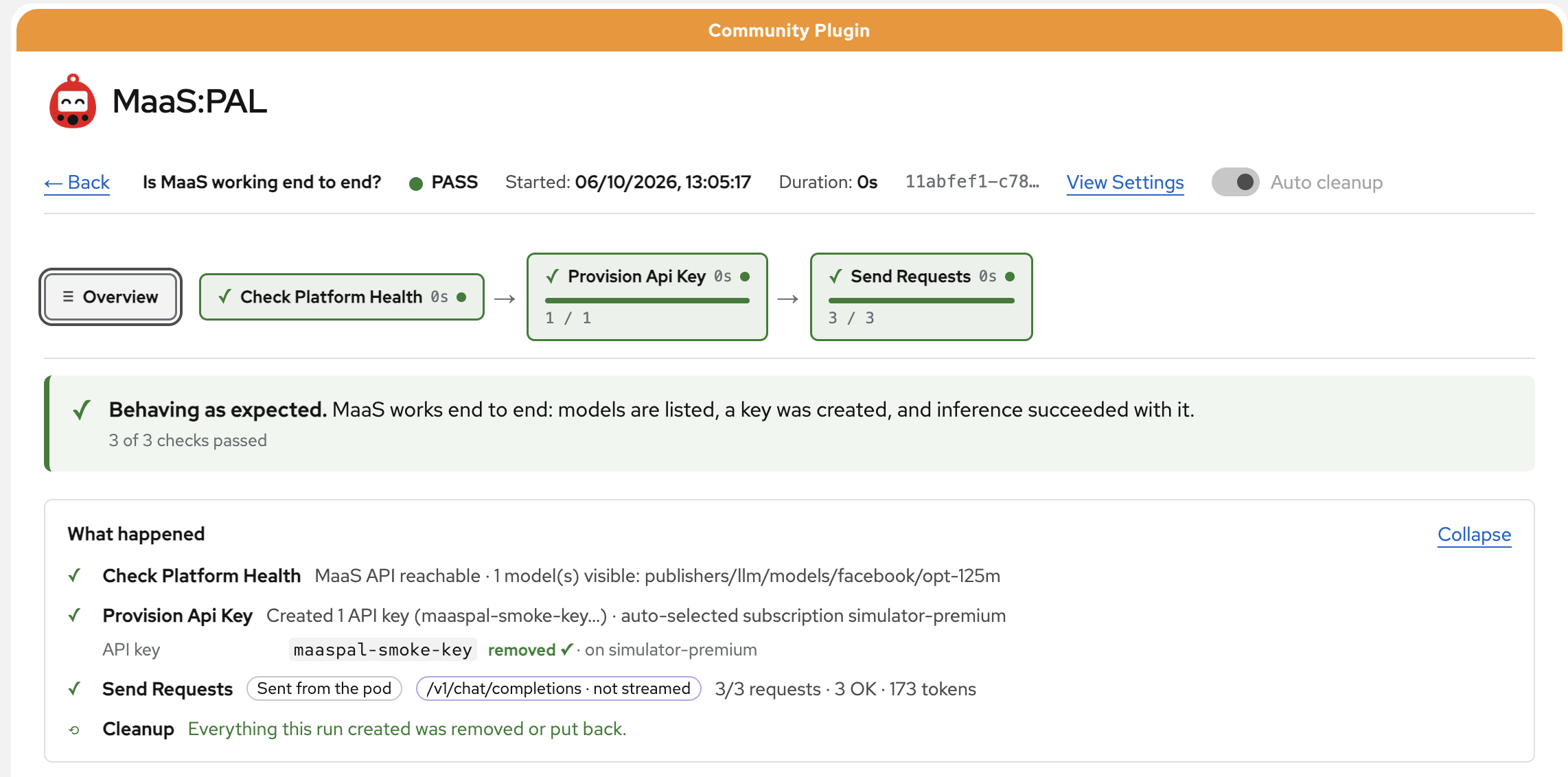
When a run fails, the verdict names the finding directly — for example, a CORS block when sending requests from the browser.
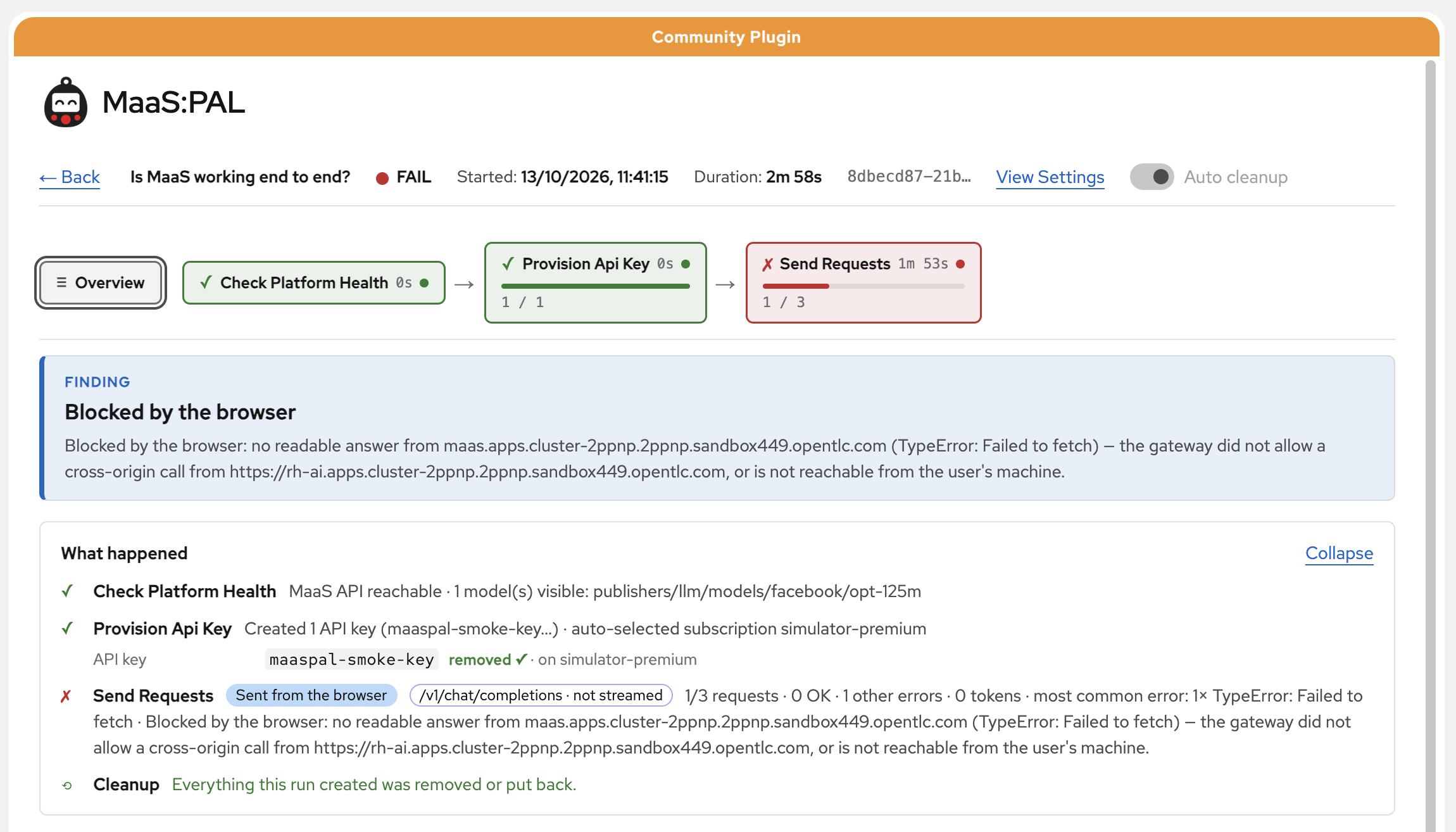
MaaS overview shows the cluster’s MaaS configuration — subscriptions, models, auth policies, rate limiting, and networking — as a read-only view. Nothing here changes the cluster.
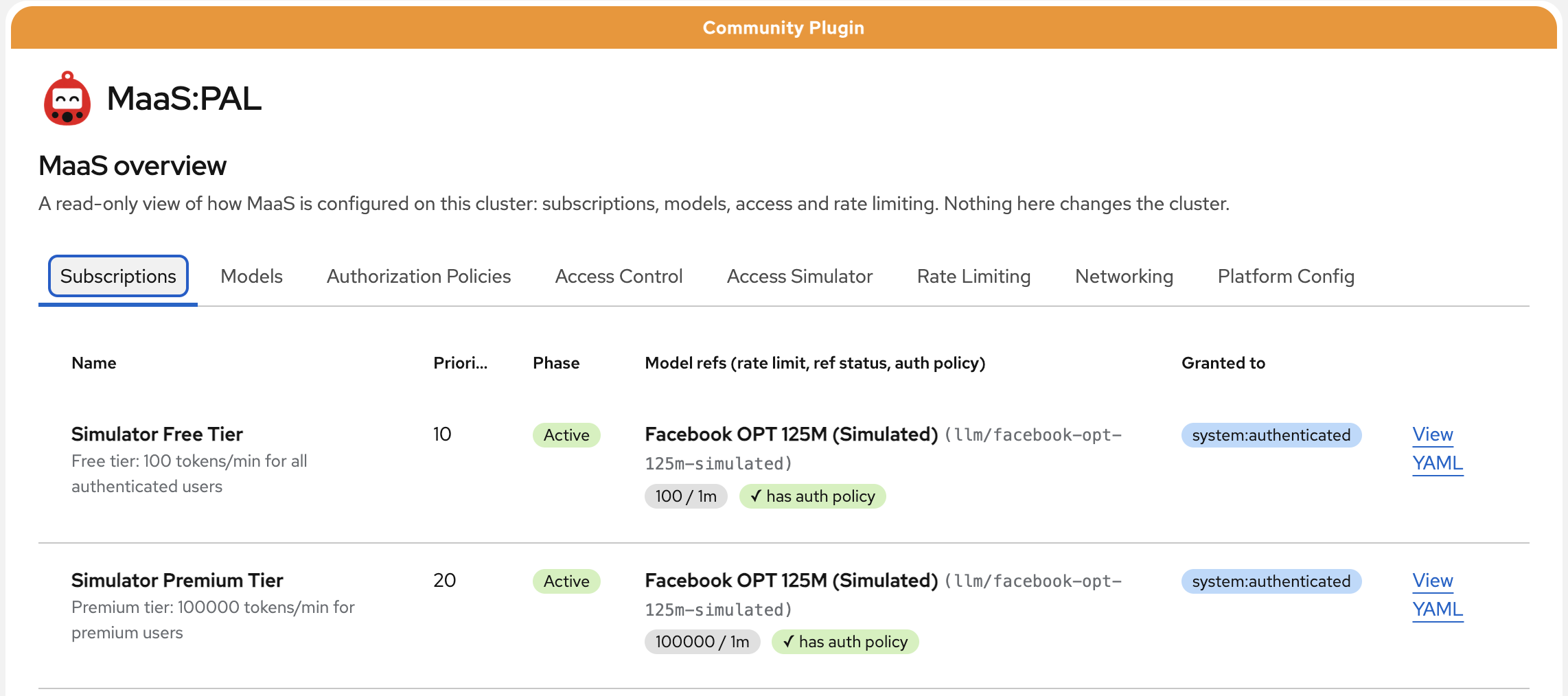
Scenarios
| Category | Scenario | Question it answers |
|---|---|---|
| Quick check | smoke_test | Is MaaS working end to end? |
| Quick check | verify_subscription | Does my subscription work for every model it covers? |
| Quick check | request_types | Which request types does my model support? |
| Rate limits | verify_subscription_rate_limit | Is my subscription’s rate limit enforced? |
| Rate limits | keys_share_user_budget | Do all my keys share one budget? |
| Rate limits | rate_limit_window_recovery | Does access come back after the rate-limit window? |
| Rate limits | subscription_auto_selection | Which subscription do my keys get? |
| Rate limits | rate_limit_per_user_or_shared | Are limits per user or shared? |
| Access control | denied_without_auth_policy | Is access denied without an auth policy? |
| API keys | api_key_lifecycle | Do API keys behave correctly? |
| Usage metrics | usage_metrics_accuracy | Do MaaS usage metrics match real traffic? |
| Performance | load_test | How does MaaS hold up under load? |
| Performance | gateway_overhead | How much latency does the MaaS gateway add? |
| Performance | multi_model_load | Does MaaS hold up with many models and subscriptions? |
| Diagnostics | model_config_health | Are my models wired up correctly? |
You can also import your own scenarios from the Scenarios page. See the MaaS:PAL README for the scenario YAML format.